seaSurface
R2026bDescription
SeaSurface defines a sea surface object belonging to a radarScenario.
Manage surfaces in a radar scenario using SurfaceManager.
Surface reflectivity, or normalized radar cross section, is defined as a surfaceReflectivitySea or surfaceReflectivityCustom
System object™.
You can use seaSurface function to specify surface extent,
reflectivity, wind motion, reference height, and digital elevation terrain data. Use the
occlusion object
function to test for occlusion along the line-of-sight between two points in the scenario and
use height to provide
surface height at a point.
Creation
Description
srf = seaSurface(scenario)SeaSurface object, srf, to the radarScenario
object scenario.
srf = seaSurface(scenario,PropertyName=Value)SeaSurface object, srf, with each specified
PropertyName set to the corresponding Value.
You can specify additional pairs of arguments in any order as
PropertyName1=Value1,...,PropertyNameN=ValueN
Properties
Object Functions
height | Height of point on surface |
occlusion | Test for occlusion of point by a surface |
plotReflectivityMap | Plots reflectivity map |
Examples
Create a square sea surface area using the seaSurface object. Assume a moderate sea state with a wind speed of about 10 m/s, a fetch of 250 km and a length of 1.0 km. Add an Elfouhaily spectrum to the sea surface. Use the height function to determine the heights of 2 points on the map.
Create a radar scenario.
scene = radarScenario(IsEarthCentered = false);
rng('default')
Add a sea surface to the scene with an Elfouhaily spectrum.
spec = seaSpectrum(Resolution = 20);
srf = seaSurface(scene,Boundary = [-500 500; -500 500], ...
    WindSpeed = 10,Fetch = 250000,SpectralModel = spec);
Find the height at two points.
P1 = [0;0];
P2 = [30;-70];
H = height(srf,[P1 P2])
H = 1×2

   -0.9394   -0.2682
Display the sea surface properties in the surface manager.
mgr = scene.SurfaceManager
mgr =
  SurfaceManager with properties:

    EnableMultipath: 0
       UseOcclusion: 1
           Surfaces: [1×1 radar.scenario.SeaSurface]
mgr.Surfaces
ans =
  SeaSurface with properties:

                WindSpeed: 10
            WindDirection: 0
                    Fetch: 250000
            SpectralModel: [1×1 seaSpectrum]
        RadarReflectivity: [1×1 surfaceReflectivitySea]
    ReflectionCoefficient: [1×1 radar.scenario.SurfaceReflectionCoefficient]
          ReflectivityMap: 1
          ReferenceHeight: 0
                 Boundary: [2×2 double]
Create a square sea surface assuming a moderate sea state with a wind speed of about 12 knots (6.17 m/s), a fetch of 120 nmi (222.24 km), and a length of 1.024 km. Add an Elfouhaily spectrum to the sea surface. Use the occlusion object function to determine if the path from point 1 to point 2 is occluded.
Start by creating a radar scenario;
scene = radarScenario;
Add a sea surface with an Elfouhaily spectrum.
rng('default');
spec = seaSpectrum('Resolution',16);
Create the sea surface.
bnds = [0 1024; 0 1024];
srf = seaSurface(scene,'Boundary',bnds, ...
    'WindSpeed',6.17,'Fetch',222.24e3, ...
    'SpectralModel',spec);
Set two points for testing occlusion.
p1 = [1016; 368; -0.082];
p2 = [10; 100; 0.13];
Determine if the path from p1 to p2 is occluded
tf1 = occlusion(srf,p1,p2)
tf1 = logical
   1
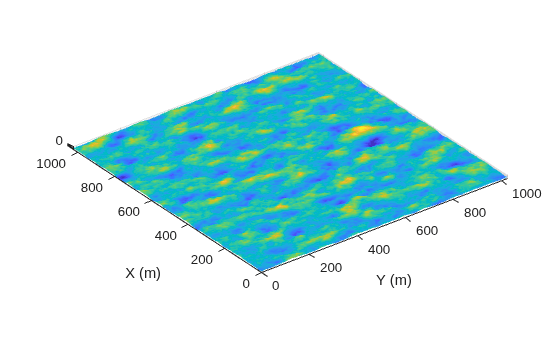
Create a 1024-by-1024 m square sea surface. Assume an NRL reflectivity model for a high sea state 6 with a wind speed of about 20 m/s and a fetch of 250 km. Set UseOcclusion in the SurfaceManager to false.
Create a radar scenario.
scene = radarScenario;
Model the reflectivity using the NRL model.
refl = surfaceReflectivitySea(Model = 'NRL',SeaState = 6, ...
    Polarization = 'V')
refl =
  surfaceReflectivitySea with properties:

    EnablePolarization: 0
                 Model: 'NRL'
              SeaState: 6
          Polarization: 'V'
               Speckle: 'None'
rng(2033)
spec = seaSpectrum(Resolution = 2);
bnds = [0 1024; 0 1024];
srf = seaSurface(scene,Boundary = bnds, ...
    WindSpeed = 20,Fetch = 250e3, ...
    SpectralModel = spec);
mgr = scene.SurfaceManager;
mgr.UseOcclusion = false
mgr =
  SurfaceManager with properties:

    EnableMultipath: 0
       UseOcclusion: 0
           Surfaces: [1×1 radar.scenario.SeaSurface]
x = linspace(srf.Boundary(1,1),srf.Boundary(1,2),1000);
y = linspace(srf.Boundary(2,1),srf.Boundary(2,2),1000);
[X,Y] = meshgrid(x,y);
X1 = X(:)';
Y1 = Y(:)';
hts = height(srf,[Y1;X1]);
hts = reshape(hts,length(x),length(y));
surf(x,y,hts)
axis equal
shading interp
ylabel('X (m)')
xlabel('Y (m)')
zlabel('Height (m)')
Version History
Introduced in R2022a

