Latest Contributions

- Specify Output Size: Use the new Width, Height, and Units name-value pairs
- Control Padding: Easily adjust the space around your axes using the Padding argument, or set it to to match the onscreen appearance.
- Preserve Aspect Ratio: Use PreserveAspectRatio='on' to maintain the original plot proportions when specifying a fixed size.
- SVG Export: The exportgraphics function now supports exporting to the SVG file format.




Hi Everyone,
Require some guidance and pointers on model ee_pmlsm_drive please.

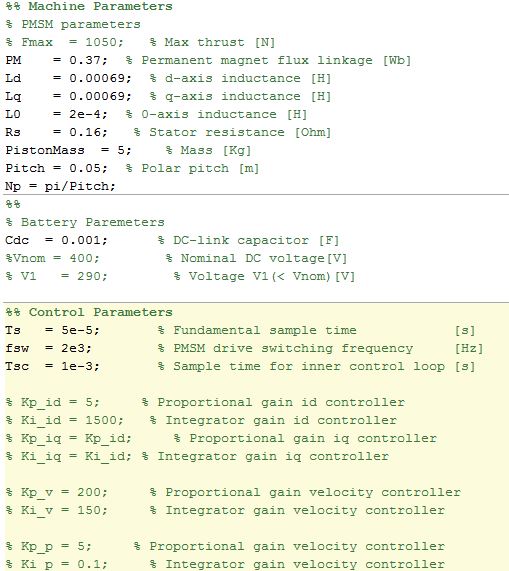
Its regarding a PMSM linear machine model, with a cascade (position and speed) outer loop and a current controller inner loop (Id and Iq currents).
The current Simulink model uses a low voltage DC supply (48v) and uses a step input to the system. My system uses a HV source (400v) and the input is sinusoidal position, with an operating frequency range of 0 to 20hz.
I have used the original model, re-created my own (to learn Simulink/Simscape) with a HV battery source (400v) and used machine parameters that match the application (peer reviewed publication).
As my power electronics background is limited, my background is mechanical, i am unable to tune the inner and outer loops, and am unsure in what order to tune. My project is to use the linear PMSM to drive (motoring) a linear piston for combustion and also use the linear piston to drive the PMSM (generating).
Using the built in PID tuner for the outer speed and position loops i am encountering an error (plant cannot be linearised). I am using a simple 1 hz sine wave to simulate the reference position set-point. With all PID values set to default i have no dq currents, however i have idq ref from the outer velocity controller loop.
Any help with resources and guidance as to how to tune the loops for my updated parameters on this model would be great.

- What skills should I strengthen first?
- Which MATLAB/Simulink toolboxes are most important for beginners aiming toward simulation/control roles?
- What small projects or portfolio examples should I build to improve my profile?
- What is the best roadmap to eventually become a good candidate for internships in this area?




- Communication systems
- Signal processing
- Mathematical modeling
- Engineering applications
- Scientific computing
- Foundation Module: MATLAB basics and fundamentals
- Image Processing: Practical applications and techniques
- Signal Processing: Analysis and implementation
- Machine Learning: ML algorithms using MATLAB
- Hands-on Learning: Projects, assignments.
- Enthusiastic educators willing to share knowledge
- Experience in any MATLAB application area
- Commitment to collaborative teaching

- Fast ramp-up in unfamiliar domains: When I explore an unfamiliar application area or a new topic, MATLAB helps me quickly locate the canonical methods and example workflows. Its comprehensive, professional documentation — along with the related-topic links typically provided at the end of each page — makes it easy to get started intuitively and saves a lot of time that would otherwise be spent hunting for foundational knowledge across the web.
- A relatively cutting-edge yet reliable technical path: MATLAB’s many toolboxes evolve with the field. While updates aren’t always absolutely bleeding-edge, they generally offer approaches that balance modernity and proven reliability. This reduces the risk of wasting time on obscure or unstable algorithms and helps me follow a pragmatic, well-tested technical direction.
- Strong community and technical support: When I encounter a problem I first post on forums like MATLAB Answers and thoroughly investigate the issue myself. If I find a solution, I publish it to contribute back — which deepens my own understanding and helps others. If I can’t solve it alone, experienced community members often respond within hours. As a last resort, MathWorks’ official support is available and typically conducts an in-depth investigation into specific cases to help resolve the issue.
- ......


- The new solution framework for Ordinary Differential Equations (ODEs) in MATLAB R2023b
- Faster Ordinary Differential Equations (ODEs) solvers and Sensitivity Analysis of Parameters: Introducing SUNDIALS support in MATLAB
- Solving Higher-Order ODEs in MATLAB
- Function handles are faster in MATLAB R2023a (Faster function handles led to faster ode45 and friends)
- Understanding Tolerances in Ordinary Differential Equation Solvers


- Work with Image Data Types
- Image Registration
- Edge, Circle, and Line Detection
- Manage and Process Multiple Images
About General
This is the channel to post to if your topic doesn't fit any other channel contexts.
 All technical questions
Community Guidelines MATLAB FAQs