Argument validation
I often see the need of argument validation for which the arguments depend on each other.
function result = myFcn(points, attributes, queryIdx)
% INPUT
% points: [Nx3]
% attributes: [Nx1]
% queryIdx: [Mx1]
%
% OUTPUT
% result: [Mx1]
end
points and attributes depend in size, queryIdx and result as well. The current arguments/end block does not allow to formulate such constraints. The best you can do currently is
function result = myFcn(points, attributes, queryIdx)
arguments(Input)
points (:,3)
attributes (:,1)
queryIdx (:,1)
end
arguments(Output)
result (:,1)
end
assert(height(points) == height(attributes), "Argument validation failed")
...
assert(height(queryIdx) == height(result), "Argument validation failed")
end
Reading just the header without additional comments is unclear for a developer and prone to misunderstanding.
What do you think of the following language extension proposal?
function result = myFcn(points, attributes, queryIdx)
arguments(Input)
points (N,3)
attributes (N,1)
queryIdx (M,1)
end
arguments(Output)
result (M,1)
end
end
The intention is clear for the reader at first sight and gives you guarantees about input/output parameters (in contrast to simple comments). Validating the parameter "points" sets the (temporary) variable N, which can be reused in further argument validations. To be discussed if N and M are valid just within the arguments block or also in the whole function.
What is your opinion on such a language improvement?
11 Comments
Time Descending
You cannot do this with just size validation. But using validation functions you can enforce conditions that relate to multiple input arguments. A validation function can include as input arguments the argument being validated, literals, or previous defined positional input arguments. In the example in that section of the linked documentation page, the local function mustBeEqualSize enforces that the input argument v that it's being used to validate is the same size as the previously defined input argument x.
To me, seeing a validation function named mustBeEqualSize(v, x) in the arguments block is a pretty clear statement of the constraint on the sizes of those two input arguments, so long as the author isn't trying to be misleading (having mustBeEqualSize enforcing that the input arguments are the same data type, for example, which ought to be flagged as "Change the name of your validation function to reflect what it's actually doing" in a code review.)
And if mustBeEqualSize were a validation that you wanted to do in multiple functions that you're writing, there's nothing preventing you from adding it to your own personal collection of functions. It doesn't have to be a local function.
This approach is more flexible than your proposal (for example, it can enforce that two inputs are compatibly sized not just equally sized), albeit also being more verbose.

Mathworks decided to deal with size validation in the language itself
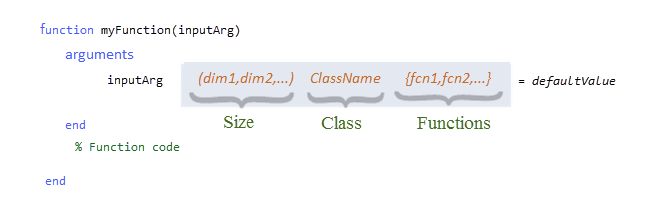
rather than with a validation function such as mustBeSize(inputArg, dim1, dim2). From this point of view, my proposal is not completely off this direction. Furthermore, I'd consider this version
arguments(Input)
points (N,3)
attributes (N,1)
end
more readable than your (adapted) proposed version
arguments(Input)
points (:,3)
attributes (:,1) {mustBeEqualHeight(attributes, points)}
end
Neither mustBeEqualHeight() nor your proposal mustBeEqualSize() is part of standard Matlab.
Performance overhead compared to mustBeSize() is probably similar.
If you want even more flexibility or cover corner cases, of course you can write your own validator, but the simple use case I've laid down is something I see very often. No need for more flexibility most of the time.

There are still areas of improvement for argument validation. For example, the following does work:
function [out] = test_arguments(a, b)
arguments(Input)
a (1, 1)
b (1, 1) {mustBeBetween(b, 1, a)}
end
out.a = a;
out.b = b;
end
But, it does NOT work for optional input arguments (at least, in R2025b). The following code produces an error for the usage of in.a in the validation function, even though it has been assigned a default value:
function [out] = test_arguments(in)
arguments(Input)
in.a (1, 1) = 7
in.b (1, 1) {mustBeBetween(in.b, 1, in.a)}
end
out.a = in.a;
out.b = in.b;
end
I have run into this limitation many times.
completely agree, optional input arguments should be covered the same way as positional arguments
How would you expect your test_arguments function to behave if I called it like this?
test_arguments('b', 5, 'a', 2)
It could validate b against the default value of a (7) because at the time it sees the definition of b, a hasn't been defined yet. But then when it assigned a value to a, would it have to go back and re-validate b against the new value of a? Should it assign values to all the name-value arguments and only then perform the argument validation?
For name-value arguments, you can specify them in any order. Many times the order doesn't matter, but there are a few times where it does. One example is in Handle Graphics, where specifying (for example) Units and Position when constructing a graphics object can change how Position is interpreted if Units is specified before or after Position.
Another is when specifying the same name-value argument multiple times, as in that case the last value wins. This proves problematic for your test_arguments function too (though it's a bit of a generalization of the first problem I asked above). Suppose I specified a multiple times with a specification of b in-between, where b satisified mustBeBetween for the first value I specified for a but not for the second value. Is this call valid or not? In the line of code below 5 is between 1 and 10, but 5 is not between 1 and 3.
test_arguments('a', 10, 'b', 5, 'a', 3)
This problem doesn't occur with positional input arguments, because if you defined:
function out = test_arguments(a, b)
arguments
a
b {mustBeBetween(b, 1, a)}
end
% ...
you can't redefine a in the arguments block after b has been validated. But in this case you couldn't define a default value for a without also defining a default value for b.
These are valid points, albeit not what most usages would run into. Perhaps what I am really asking for is for optional inputs to be parsed/interpreted IN ORDER based on the order they exist in the function or class. That way, users could specify whichever optional inputs they want for each function/class call, but the inputs would always be interpreted the same way based on the source code.
If that is not possible with existing code infrastructure, then I would suggest adding this feature as another supported input type—it would be essentially the same as the existing capability but with enforced order.
I have found the single-input, single-output syntax I included above [function [out] = test_arguments(in)] that uses optional inputs to be key to coding flexible systems. It would be great if it were as fully supported as regular inputs.

If were to do some such, this example should also have some syntax to ensure M<=N
My only concern would be one of how much more runtime overhead is introduced continuing to extend to more and more testing in the runtime code instead of verification in ensuring inputs meet the contract.
That is a valid point, as people that compare MATLAB to other languages often point out how slow it is to others, in particular, compiled languages.
One of the benefits of MATLAB over other languages is that the user doesn't have to worry about all the packages/imports to include for each file. I wonder if there is a better solution here. Perhaps MATLAB could allow users to toggle off specific packages via a preferences panel to make their code run faster.
If, at a later point after the user had disabled some pacakges, an add-on needed one of those disabled packages, the app could alert the user to that, even adding a link to the message for the user to quickly toggle the needed package(s) back on.
I am not sure how much of the MATLAB performance degradation over time is owing to the sheer bulk of the installed toolboxes as compared to the rewriting of functional code into the object-oriented classdef paradigm. I suspect it's more internal design/implementation than simply resolving where the function is although the extensive overloading of all the various data types and objects has to be a significant part.
There apparently being no way to edit a prior comment, I'll add that a recent post here by MathWorks staffer indicated that they've been reworking the objects model structure and that potentially significant speedups are coming in future (unspecified) release; just how much dependent upon how much use is made of them, but that it should also impact builtin functions as well. Back to R14 speed is highly unlikely, but improvements are always good; particularly if one is trying to do large data processing and not just scoping out studies with small datasets to test theory.
I would like to see improvements along these lines.
Also, this post is related:
Sign in to participate
Tags

