Pull up a chair!
Discussions is your place to get to know your peers, tackle the bigger challenges together, and have fun along the way.
- Want to see the latest updates? Follow the Highlights!
- Looking for techniques improve your MATLAB or Simulink skills? Tips & Tricks has you covered!
- Sharing the perfect math joke, pun, or meme? Look no further than Fun!
- Think there's a channel we need? Tell us more in Ideas
Updated Discussions
The Graphics and App Building Blog just launched its first article on R2025a features, authored by Chris Portal, the director of engineering for the MATLAB graphics and app building teams.
Over the next few months, we'll publish a series of articles that showcase our updated graphics system, introduce new tools and features, and provide valuable references enriched by the perspectives of those involved in their development.
To stay updated, you can subscribe to the blog (look for the option in the upper left corner of the blog page). We also encourage you to join the conversation—your comments and questions under each article help shape the discussion and guide future content.

I’m quite curious as to why this particular email was sent directly to my personal inbox. I have never actively subscribed to any online or offline training services nor clicked on any related marketing links. Could it be that because I frequently visit the official MATLAB forums, someone has identified me as a potential customer for their targeted promotions?
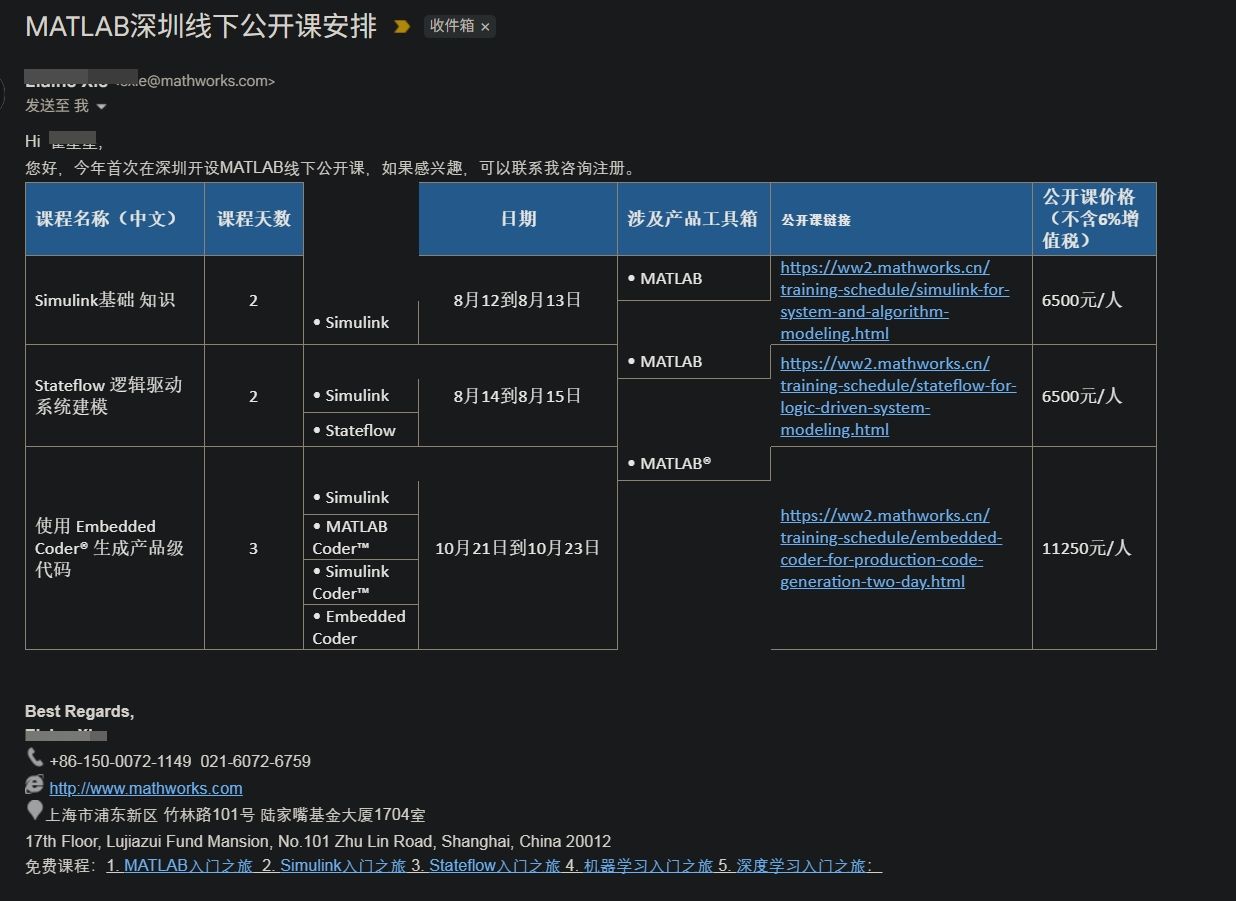
I’d love to hear your thoughts and start a discussion on this!

One of MATLAB's strengths is how easy it is to document a custom function/class. The first continuous comment block is automatially displayed by the help and doc functions, with some neat automatic formatting. For example:
% myFunc My example function
%
% This function does not do anything yet, but one day will be great. For
% example, you will be able to type:
% out=myFunc(in1,in2);
% and something cool will happen.
%
% See also otherFunc
function varargout=myFunc(varargin)
% actual code
end
will have a link to the documentation for "otherFunc", assuming that file exists. Class documentation is nicely broken up into a header (with "See also" support) followed by a property and method summary.
All the above works great with one big exception: apart from highlighting uses of the file's name, there is no way to display anything but pure text. No Markdown, no LateX, and so forth. It is possible to sneak an HTML link into the comment block, calling a MATLAB command that can display a live script with fancy formatting. I have done this in the past, although it can be a little tricky for files inside a package/namespace (folders beginning with '+').
I can envision a system where fancy documentation would be buried inside an "example" subfolder where "myFunc.m" is located. Invoking "showExample myFunc", where "showExample" is a to-be-written utility, would look for a live script inside the appropriate subfolder, make a local copy for the user to tinker with, and then display that local copy in the MATLAB editor. Since the actual function function and its example woulld obviously inside a Git repository, text-based live scripts would be used instead of an *.mlx file.
Again, this all works fine on its fine on its own, but it would be very difficult to replicate the "See also" capability or the other features of the standard doc function. So what are we to do? Is there a clever way to add another block to a standard comment block "See examples" that would automatically detect scripts in a subfolder of function/class being queried?
I know there is a way to incorporate custom documentation into MATLAB help system. This is much too cumbersome for my purposes, where many functions/classes are being added/edited all the time. The existing doc system covers maybe 80% of my needs, but sometimes a little math (LaTeX) would go a long way on explaining how things work.

T < 2 years
38%
2 years < T < 5 years
26%
5 years < T < 10 years
18%
10 years < T < 20 years
11%
T > 20 years
8%
10172 votes

Is it possible to create a Simulink model that is independent of specific microcontrollers?
For example, in the model, the STM32 block is used for CAN transmission. But if I want to deploy the same model to an Arduino, I have to replace the STM32 block with an Arduino-compatible one.
So, is it possible to create a custom block or abstraction that works across multiple microcontrollers like STM32, PIC32, and Arduino without changing the hardware-specific block each time?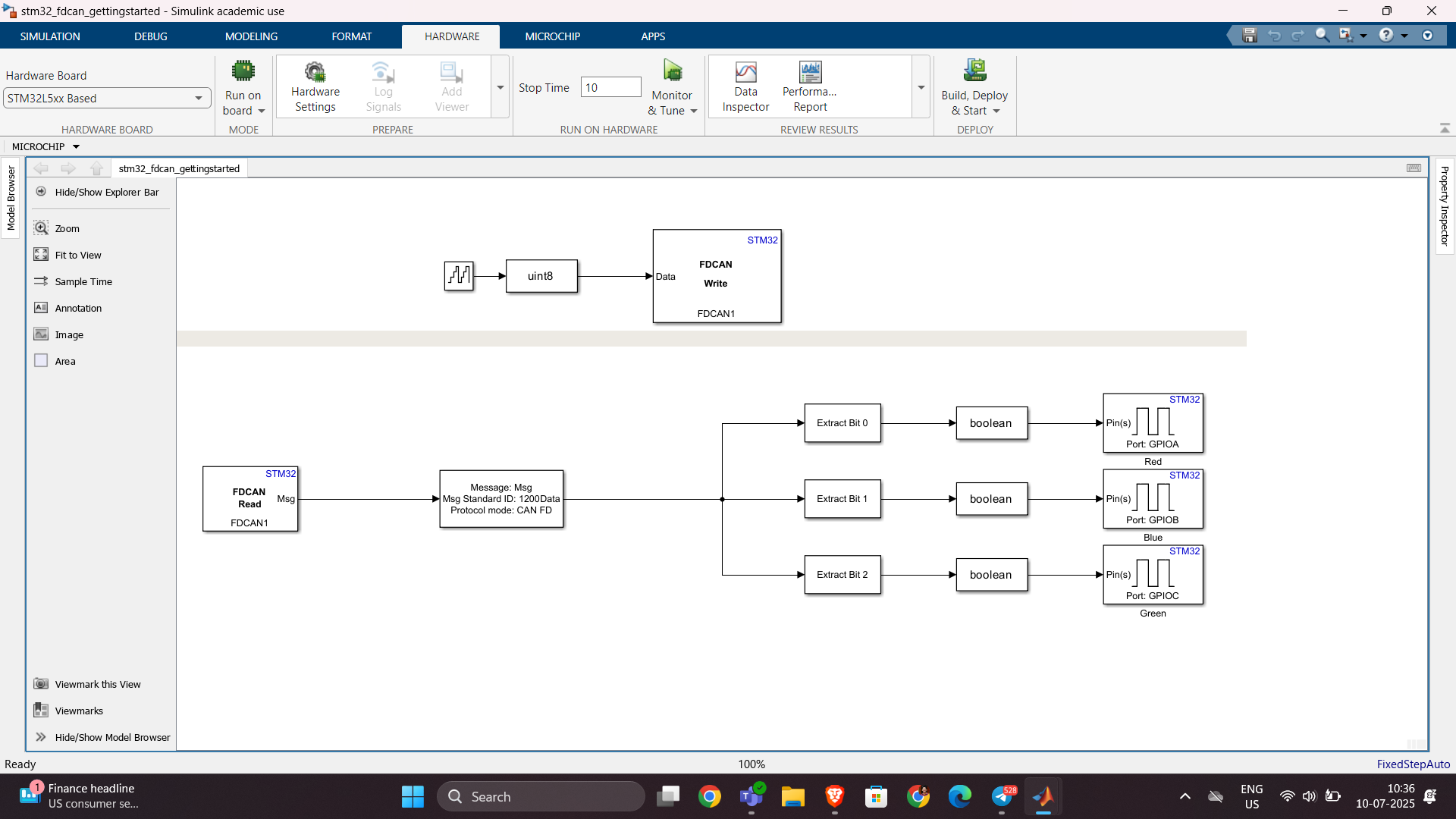

The attached code is an animated solution of the three body problem. On 2024b it runs perfectly fine. When we tried it on 2025a, the animation constantly hitches, the CPU usage is almost double and the runtime is much slower. The curves also look less detailed and jagged in some places. When we run it without drawing anything, the performance seems comparable between versions, but still slightly slower. All of this behavior persists across different hardware. Anybody else having this kind of problem with the new release? I'm suspecting the graphics backend changes may be the culprit here...
clc
clear
close
syms t x1(t) y1(t) x2(t) y2(t) x3(t) y3(t)
G = 6.6743 * 10^-11;
%epsilon = 1e-4
m1 = 10^12;
m2 = 1*10^12;
m3 = 1*10^12;
r1 = [x1(t),y1(t)];
K1 = 1/2 * m1 * (diff(x1(t),t)^2 + diff(y1(t),t)^2);
r2 = [x2(t),y2(t)];
K2 = 1/2 * m2 * (diff(x2(t),t)^2 + diff(y2(t),t)^2);
r3 = [x3(t),y3(t)];
K3 = 1/2 * m3 * (diff(x3(t),t)^2 + diff(y3(t),t)^2);
L1x = diff(diff(K1,diff(x1(t),t)) , t);
L1y = diff(diff(K1,diff(y1(t),t)) , t);
L2x = diff(diff(K2,diff(x2(t),t)) , t);
L2y = diff(diff(K2,diff(y2(t),t)) , t);
L3x = diff(diff(K3,diff(x3(t),t)) , t);
L3y = diff(diff(K3,diff(y3(t),t)) , t);
r12 = r2 - r1;
r13 = r3 - r1;
r23 = r3 - r2;
dlugosc_r12 = sqrt(r12(1)^2 + r12(2)^2);
dlugosc_r13 = sqrt(r13(1)^2 + r13(2)^2);
dlugosc_r23 = sqrt(r23(1)^2 + r23(2)^2);
Q12 = G * m1 * m2 / dlugosc_r12^2 * (r2-r1)/dlugosc_r12;
Q13 = G * m1 * m3 / dlugosc_r13^2 * (r3-r1)/dlugosc_r13;
Q23 = G * m2 * m3 / dlugosc_r23^2 * (r3-r2)/dlugosc_r23;
Q21 = -Q12;
Q32 = -Q23;
Q31 = -Q13;
Q1 = Q12 + Q13;
Q2 = Q21 + Q23;
Q3 = Q31 + Q32;
eqn_1_x = L1x == Q1(1);
eqn_1_y = L1y == Q1(2);
eqn_2_x = L2x == Q2(1);
eqn_2_y = L2y == Q2(2);
eqn_3_x = L3x == Q3(1);
eqn_3_y = L3y == Q3(2);
syms X1 Y1 X2 Y2 X3 Y3
Q1_num = subs(Q1,[x1(t), y1(t), x2(t), y2(t), x3(t), y3(t)],[X1, Y1, X2, Y2, X3, Y3]);
Q2_num = subs(Q2,[x1(t), y1(t), x2(t), y2(t), x3(t), y3(t)],[X1, Y1, X2, Y2, X3, Y3]);
Q3_num = subs(Q3,[x1(t), y1(t), x2(t), y2(t), x3(t), y3(t)],[X1, Y1, X2, Y2, X3, Y3]);
syms vx1 vy1 vx2 vy2 vx3 vy3
state_dot = [
vx1;
vy1;
vx2;
vy2;
vx3;
vy3;
Q1_num(1)/m1;
Q1_num(2)/m1;
Q2_num(1)/m2;
Q2_num(2)/m2;
Q3_num(1)/m3;
Q3_num(2)/m3
];
f = matlabFunction(state_dot, 'Vars', {sym('t'), [X1; Y1; X2; Y2; X3; Y3; vx1; vy1; vx2; vy2; vx3; vy3]});
u0 = [-1e5; %x1
0; %y1
1e5; %x2
0; %y2
0; %x3
sqrt(3)*1e5; %y3
-11/2 * 1e-3; %vx1
11/2*sqrt(3)*1e-3; %vy1
-11/2 * 1e-3; %vx2
-11/2*sqrt(3)*1e-3; %vy2
11e-3; %vx3
0]; %vy3
tspan = [0, 1e9];
%options = odeset('RelTol', 1e-15, 'AbsTol', 1e-20);
[t_sol, u_sol] = ode45(f, tspan, u0);
t_anim = linspace(t_sol(1), t_sol(end), 5000);
u_anim = interp1(t_sol, u_sol, t_anim);
%%
% figure;
tor_1 = plot(u_anim(:,1), u_anim(:,2), 'r', 'LineWidth',1.5); hold on;
tor_2 = plot(u_anim(:,3), u_anim(:,4), 'g', 'LineWidth',1.5);
tor_3 = plot(u_anim(:,5), u_anim(:,6), 'b', 'LineWidth',1.5);
% xlabel('x [m]');
% ylabel('y [m]');
% legend('Ciało 1', 'Ciało 2', 'Ciało 3');
% title('Trajektorie ciał w układzie trzech ciał');
% axis equal
% grid on;
pozycja_1 = plot(u_anim(1,1),u_anim(1,2),'ro','markersize',10,'markerface','r'); hold on
pozycja_2 = plot(u_anim(1,3),u_anim(1,4),'go','markersize',10,'markerface','g');
pozycja_3 = plot(u_anim(1,5),u_anim(1,6),'bo','markersize',10,'markerface','b');
% xlim([-2e5,2e5])
% ylim([-2e5,2e5])
axis equal
for i = 1 : 1 : length(t_sol)
set(pozycja_1,'XData', u_anim(i,1),'YData', u_anim(i,2));
set(pozycja_2,'XData', u_anim(i,3),'YData', u_anim(i,4));
set(pozycja_3,'XData', u_anim(i,5),'YData', u_anim(i,6));
set(tor_1,'XData', u_anim(1:i,1),'YData', u_anim(1:i,2));
set(tor_2,'XData', u_anim(1:i,3),'YData', u_anim(1:i,4));
set(tor_3,'XData', u_anim(1:i,5),'YData', u_anim(1:i,6));
drawnow;
% pause(0.001);
end

Sto tentando inutilmente di salvare il valore dell'enegia che consumo ogni giorno nel field5 di questo canale: https://thingspeak.mathworks.com/channels/2851490 , ma inutilemte in quanto vengono visualizzati sempre e solo 2 dati anche se ho impostato days=30. Ho provato ad aumentare a 365 ma senza variazioni. Come mai?

群馬産業技術センター様をお招きし、製造現場での異常検知の取り組みについてご紹介いただくオンラインセミナーを開催します。
実際の開発事例を通して、MATLABを使った「教師なし」異常検知の進め方や、予知保全に役立つ最新機能もご紹介します。
✅ 異常検知・予知保全に興味がある方
✅ データ活用を何から始めればいいか迷っている方
✅ 実際の現場事例を知りたい方
ぜひお気軽にご参加ください!
Are you a dark mode enthusiast or are you curious about how it’s shaping MATLAB graphics? Check out the latest article in the MATLAB Graphics and App Building blog.
🔹 User Insights: find out how user surveys influenced the development of graphics themes
🔹 Learn three ways to switch between light and dark themes for figures
🔹 Understand how custom and default colors behave across themes
🔹 Download a handy cheat sheet for working with themes in your graphics and apps.
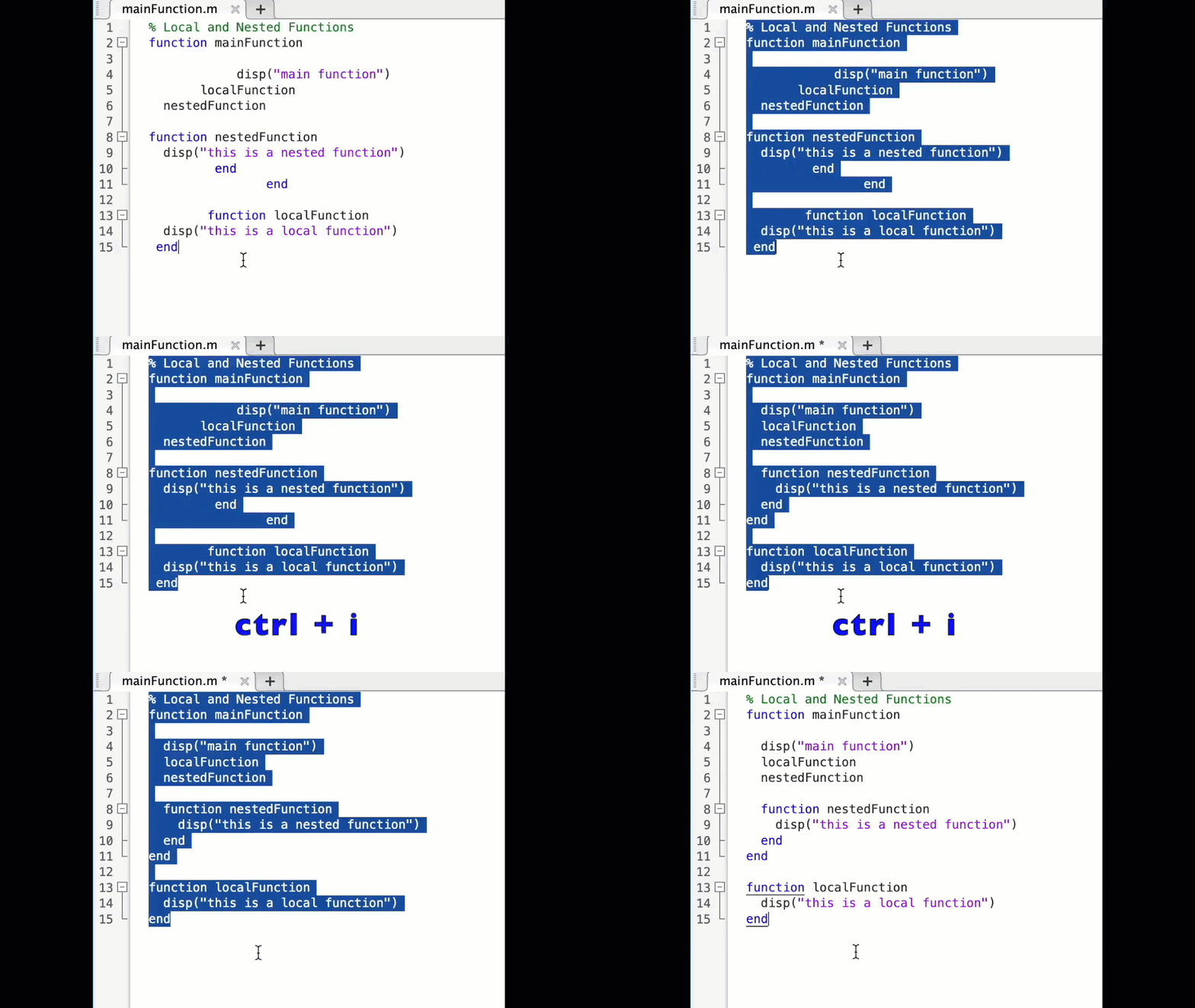

automatisation du calcul du SSDE(Size Specific Dose Estimate )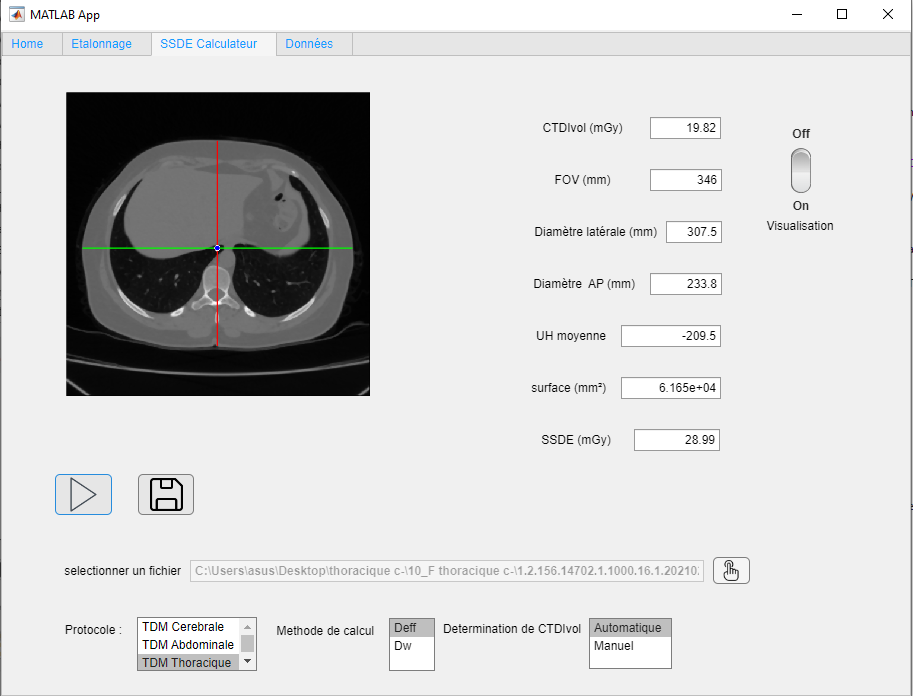

Hey MATLAB enthusiasts!
I just stumbled upon this hilariously effective GitHub repo for image deformation using Moving Least Squares (MLS)—and it’s pure gold for anyone who loves playing with pixels! 🎨✨
- Real-Time Magic ✨
- Precomputes weights and deformation data upfront, making it blazing fast for interactive edits. Drag control points and watch the image warp like rubber! (2)
- Supports affine, similarity, and rigid deformations—because why settle for one flavor of chaos?
- Single-File Simplicity 🧩
- All packed into one clean MATLAB class (mlsImageWarp.m).
- Endless Fun Use Cases 🤹
- Turn your pet’s photo into a Picasso painting.
- "Fix" your friend’s smile... aggressively.
- Animate static images with silly deformations (1).
Try the Demo!

Hello,
I've successfully tested the Processor-in-the-Loop (PIL) workflow in Simulink using a TI F28069M LaunchPad, following the standard examples provided by MathWorks. The PIL block, code generation, and communication all worked without issues.
Now, I’d like to run a similar PIL setup using the Infineon TLE9879 EVALKIT (based on an ARM Cortex-M0), which is not officially supported by Simulink as a target.
I’m wondering if it’s possible to configure PIL manually or via custom workflows. For example:
- Can I create a custom PIL target using Embedded Coder?
- Would I need to port rtiostream manually for communication over UART?
- Could I somehow integrate with Keil µVision (which I use for TLE9879) to build and run the generated code?
- Is there a workaround to simulate PIL behavior using a non-supported board?
My setup:
- Simulink R2024b
- Infineon TLE9879 EVALKIT
- Keil µVision 5 + Infineon Config Wizard
- UART and JTAG interfaces available
The main purpose is to validate control algorithms and measure execution time, not to implement a full HIL system.
Has anyone attempted PIL with a custom or unsupported microcontroller before? Any tips or resources would be greatly appreciated. Thanks in advance!

Hi everyone,
Please check out our new book "Generative AI for Trading and Asset Management".
GenAI is usually associated with large language models (LLMs) like ChatGPT, or with image generation tools like MidJourney, essentially, machines that can learn from text or images and generate text or images. But in reality, these models can learn from many different types of data. In particular, they can learn from time series of asset returns, which is perhaps the most relevant for asset managers.
In our book (amazon.com link), we explore both the practical applications and the fundamental principles of GenAI, with a special focus on how these technologies apply to trading and asset management.
The book is divided into two broad parts:
Part 1 is written by Ernie Chan, noted author of Quantitative Trading, Algorithmic Trading, and Machine Trading. It starts with no-code applications of GenAI for traders and asset managers with little or no coding experience. After that, it takes readers on a whirlwind tour of machine learning techniques commonly used in finance.
Part 2, written by Hamlet, covers the fundamentals and technical details of GenAI, from modeling to efficient inference. This part is for those who want to understand the inner workings of these models and how to adapt them to their own custom data and applications. It’s for anyone who wants to go beyond the high-level use cases, get their hands dirty, and apply, and eventually improve these models in real-world practical applications.
Readers can start with whichever part they want to explore and learn from.


Check out the LLMs with MATLAB project on File Exchange to access Large Language Models from MATLAB.
Along with the latest support for GPT-4o mini, you can use LLMs with MATLAB to generate images, categorize data, and provide semantic analyis.

I'm beginning this MATLAB-based numerical methods class, and as I was thinking back to my previous MATLAB/Simulink classes, I definitely remember some projects more fondly than others. One of my most memorable was where I had to use MATLAB to analyze electrocardiogram (ECG) peaks. What about you guys? What are some of the best (or worst 🤭) MATLAB projects or assignments you've been given in the past?
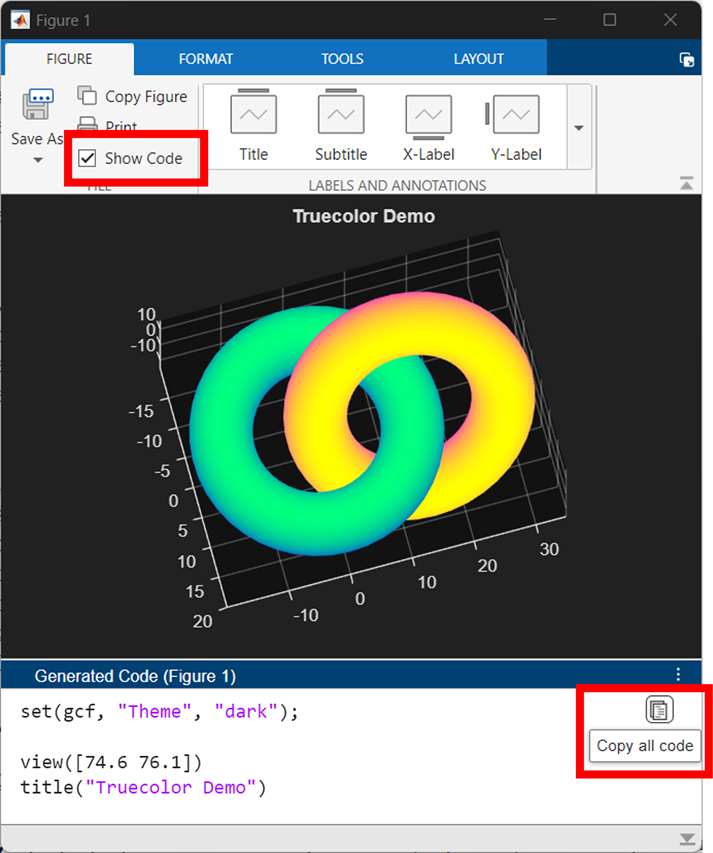
The new figure toolstrip in R2025a was designed from multiple feedback cycles with MATLAB users. See the latest article in the Graphics and App Building blog to see the evolution of the figure toolbar from 1996-2025, learn how user feedback shaped the new toolstrip, and check out the new code-generation feature that makes interactive data exporation reproducible.

For the last day or two, I've been getting "upstream" and other various errors on Answers. Seems to come and go. Anyone else having similar issues?
I rarely use MATLAB.
10%
use MATLAB almost every day.
55%
use MATLAB once every 2-3 days.
10%
only use when specific task require
25%
20 votes
About Discussions
Discussions is a user-focused forum for the conversations that happen outside of any particular product or project.
Get to know your peers while sharing all the tricks you've learned, ideas you've had, or even your latest vacation photos. Discussions is where MATLAB users connect!
Get to know your peers while sharing all the tricks you've learned, ideas you've had, or even your latest vacation photos. Discussions is where MATLAB users connect!
More Community Areas

MATLAB Answers
Ask & Answer questions about MATLAB & Simulink!

File Exchange
Download or contribute user-submitted code!

Cody
Solve problem groups, learn MATLAB & earn badges!

Blogs
Get the inside view on MATLAB and Simulink!

AI Chat Playground
Use AI to generate initial draft MATLAB code, and answer questions!