Check bug reports for issues and fixes
Software is inherently complex and is not free of errors. The output of a code generator might contain bugs, some of which are not detected by a compiler. MathWorks reports critical known bugs brought to its attention on its Bug Report system at www.mathworks.com/support/bugreports/. In the search bar, type the phrase "Incorrect Code Generation" to obtain a report of known bugs that produce code that might compile and execute, but still produce wrong answers. To save a search, click Save Search.
The bug reports are an integral part of the documentation for each release. Examine periodically all bug reports for a release, as such reports may identify inconsistencies between the actual behavior of a release you are using and the behavior described in this documentation.
In addition to reviewing bug reports, you should implement a verification and validation strategy to identify potential bugs in your design, code, and tools.
Search R2026b Bug Reports
Known Bugs for Incorrect Code Generation
All Known Bugs for This Product
MATLAB Programming for Code Generation
Generate and validate code for entry-point MATLAB classes (Tech Preview)
Note
Using a MATLAB® class as an entry point for code generation is a tech preview. This
feature is in active development and might change between the tech preview and the
general release. To enable the feature, enter
enableCodegenForEntryPointClasses at the command line before
launching the MATLAB
Coder™ app, calling the codegen function, or creating a coder.Type object. To provide feedback, email the
development team or participate
in a survey.
You can specify a MATLAB value class, handle class, or System object™ as an entry-point class. An entry-point class is a class that you want to access directly from your custom C or C++ code. Because the code generator preserves the signatures of the entry-point class and the methods that you specify, you can use these signatures as stable interfaces to the generated code.
Starting in R2026b, you can:
Generate standalone and MEX code for entry-point classes by using the MATLAB Coder app. See Generate Standalone C++ Code for Entry-Point Class Using MATLAB Coder App.
Generate standalone and MEX code for entry-point classes at the command line by using the
codegencommand. See Generate Standalone C++ Code for Entry-Point Class at the Command Line.With Embedded Coder®, verify the generated class at the command line by using software-in-the-loop (SIL) and processor-in-the-loop (PIL) execution. See Unit Test Generated Standalone Class.
Prior to R2026a, you produced a C or C++ interface for a MATLAB class by writing a wrapper function for the class, using the wrapper function as an entry point, and disabling inlining. However, because these classes were not entry points, the interface produced by the code generator was unstable and was subject to change due to optimizations and other code generation heuristics. In the R2026a Tech Preview, you generated standalone code for entry-point classes at the command line only.
The MATLAB Coder app does not support code verification for entry-point classes. Instead, use one or both of these approaches:
Check for issues in the MEX class by generating and running a MEX function at the command line. See Generate Standalone C++ Code for Entry-Point Class at the Command Line.
Validate the generated standalone class by using SIL or PIL at the command line. See Unit Test Generated Standalone Class.
Supported Functions
Code generation for more MATLAB functions
Code generation for more toolbox functions
In R2026b, you can generate code for additional toolbox functions and objects. For a list of all functions and objects that are supported for code generation, see:
These are links to the release notes of some toolboxes that added code generation support in R2026b:
Image Processing Toolbox
See C Code Generation: Generate code from additional functions using MATLAB Coder (Image Processing Toolbox).
Statistics and Machine Learning Toolbox
See Generate C/C++ code for prediction using a custom neural network architecture (requires MATLAB Coder and Deep Learning Toolbox) (Statistics and Machine Learning Toolbox).
Wavelet Toolbox
See Deep Learning: Code generation for discrete wavelet transform (Wavelet Toolbox).
mtimes function: Improved performance of the generated C/C++
code
In R2026b, MATLAB
Coder improves the run-time performance of C/C++ MEX and standalone code generated for
the mtimes function. The generated code runs faster when you multiply the transpose
of a sparse matrix with a dense vector or matrix (A'*x).
For example, the generated C MEX function for transposeMtimes is about
13x faster than in the previous
release:
function y = transposeMtimes(A,x)
	y = A'*x;
end
rng(0,"twister");
A = sprandn(4000,4000,0.1);
x = randn(4000,1);
coder.timeit("transposeMtimes",1,{A,x})
The approximate execution times are:
R2026a: 13.8 ms
R2026b: 1.0 ms
The code was timed on a Debian 13, Intel®
Xeon® W-2133 CPU @ 3.60GHz 6-Core Processor using the coder.timeit
function.
Functionality being removed or changed
groupcounts function: Generated code returns a fixed output shape
for empty groups
Behavior change
When the input data is an array and the number of grouping variables is not constant at
code generation time, the generated code for the groupcounts
function now returns the empty array inside the BG cell array as a
0‑by‑1 column vector. In previous releases, this empty array was 0‑by‑0 or 1‑by‑0,
depending on the number of input rows.
This change produces consistent output shapes, which can avoid unnecessary variable‑size
support in the generated code. If your code requires BG to be 0-by-0 or
1-by-0, update your code to expect a 0‑by‑1 value.
Code Generation Workflow
Improved error reporting for codegen function
Errors produced by the codegen function now include detailed error
information in the MException object. With this change, you can
click the Explain Error button to see an explanation for code
generation errors.
Create multiple entry-point signatures when automatically defining input types in MATLAB Coder app
Starting in R2026b, if your test script or command calls an entry-point function more than
once with incompatible input types (for example, double and
string), the Automatically Define Input Types
functionality in the app adds a distinct function signature for each input type.
For example, when defining input types for the function foo, suppose
that you run this test script:
foo(0);
foo("a");
The input type specification for foo looks like this:
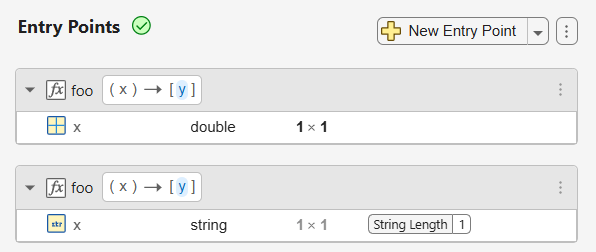
In previous releases, providing incompatible input types during automatic type definition caused the app to produce an error.
See Define Types of Entry-Point Inputs by Using the MATLAB Coder App.
Merge automatically defined input types with existing types in MATLAB Coder app
Starting in R2026b, you can instruct the MATLAB Coder app to merge automatically defined input types with existing types for an entry point, if these types are compatible. Click the Actions button next to the New Entry Point button. In the Automatic Type Definition section, select Apply detected types by > Merging with existing types.
If the Merging with existing types option is selected and the
new type is incompatible with the existing type (for example, double and
string), the app adds a new entry-point signature with the new
type.
For example, suppose that the type of the input x of your entry-point
function foo(x) is already specified as double 2 x 3.
During automatic type definition:
If you invoke the command
foo(zeros(3)), the app updates the existing type ofxtodouble :3 x :3.If you invoke the command
foo("a"), the app adds a new signature forfooin which the type ofxisstring 1 x 1with a string length of 1.
See Define Types of Entry-Point Inputs by Using the MATLAB Coder App.
Input types from MATLAB code: use mustBeScalar to specify scalar entry-point
function inputs
In R2026b, you can use the mustBeScalar
validation function inside an arguments block
to specify that an entry-point input is scalar for code generation. This is an alternative to
specifying the size as (1,1) in the argument declaration.
See Use Function Argument Validation to Specify Entry-Point Input Types.
Customize build process for target hardware using Target Framework
Starting in R2026b, you can customize the build process to target specific hardware by
implementing MATLAB classes that override hook methods of the coder.MATLABCoderBuildHooks interface class.
For an example, see Customize Build Process for Target Hardware Using Target Framework.
Upgrade coder.make.ToolchainInfo toolchains to Target Framework
Starting in R2026b, you can use the coder.make.upgradeToolchain function to assist you in upgrading coder.make.ToolchainInfo toolchains to their Target Framework equivalent.
For toolchain workflows that do not require compatibility with older releases, use the
Target Framework target.Toolchain
over coder.make.ToolchainInfo. The
coder.make.upgradeToolchain function generates MATLAB files that help
you upgrade your toolchain to its target.Toolchain equivalent. These files
might contain To do prompts that provide additional information about or
require you to amend the generated toolchain definition.
For details, see Use Automated Tool to Assist Migration of Existing Toolchain to Target Framework.
Microsoft Visual C++ 2026 toolchain support for Windows
On Microsoft® Windows® systems, you can compile generated code by using the Microsoft Visual C++® 2026 product family. For more information, see Supported Compilers.
Deep Learning with MATLAB Coder
Generate code for numeric inputs and unformatted dlarray inputs
In R2026b, you can generate code that makes predictions by using numeric arrays and
unformatted dlarray (Deep Learning Toolbox) objects.
When you call the predict (Deep Learning Toolbox) function for dlnetwork (Deep Learning Toolbox) objects, you can specify the inputs as:
Numeric arrays.
Unformatted
dlarrayobjects without explicitly specifying dimension labels.
In R2026a and earlier releases, you convert the numeric inputs to a formatted
dlarray object with specified dimension labels, and then extract the
numeric outputs from the prediction output. For example, this function works in R2026a and
earlier releases:
function out = myPredict(dlnet,in)
%#codegen

% Convert numeric input to formatted dlarray
dlIn = dlarray(in,"SSC");
dlOut = predict(net,dlIn);

% Extract numeric output
out = extractdata(dlOut);
end
dlarray objects.Make prediction using numeric inputs. | Make prediction using unformatted |
function out = myPredict(dlnet,in) %#codegen % Use the numeric input in for prediction out = predict(dlnet,in); end |
function out = myPredict(dlnet,in) %#codegen % No dimension labels specified dlIn = dlarray(in); dlOut = predict(dlnet,dlIn); out = extractdata(dlOut); end |
In addition, using numeric inputs directly simplifies integration with a MATLAB Function
block in Simulink®. You can pass numeric signals to the block and use them directly for prediction
without converting them to dlarray objects inside the block.
For more information, see:
Deep Learning Data Formats (Deep Learning Toolbox)
Generate code for FullyConnectedLayer that uses weight tying
In R2026b, you can generate code for a fullyConnectedLayer (Deep Learning Toolbox)
that uses weight tying. Weight tying is also known as weight sharing or learnable parameter
sharing. You can share learnable parameters with other layers by using the
InputLearnables and OutputLearnables properties of
the layer object. You can generate code for networks that share weights across multiple fully
connected layers, rather than duplicating them in each layer.
For more information about weight tying, see Neural Network Weight Tying (Deep Learning Toolbox).
Generate generic C/C++ code for additional layers
You can now generate generic C/C++ code for these layers:
embeddingLayer(Deep Learning Toolbox)formatLayer(Deep Learning Toolbox)sinusoidalPositionEncodingLayer(Deep Learning Toolbox)sliceLayer(Deep Learning Toolbox)
For more information, see Networks and Layers Supported for Code Generation.
Generate code for more functions that use dlarray
In R2026b, code generation supports the deep learning operation lstm (Deep Learning Toolbox) that operates
on dlarray objects.
You can also generate code for these MATLAB functions that use dlarray objects as inputs:
To see the full list of functions that support dlarray objects as input
for code generation, see Code Generation for dlarray.
Generate code for positionEmbeddingLayer with data that has no channel dimension
Code generation supports positionEmbeddingLayer (Deep Learning Toolbox) objects with input data that does not contain a "C" (channel) dimension.
Improved performance for pooling and grouped convolution layers with multi-batch inputs
In R2026b, C/C++ code generated for these layers has improved parallelization for multi-batch inputs, which improves inference performance:
groupedConvolution2dLayer(Deep Learning Toolbox)maxPooling2dLayer(Deep Learning Toolbox)averagePooling2dLayer(Deep Learning Toolbox)
Functionality being removed or changed
cnncodegen function will be removed
Still runs
The cnncodegen function will be removed in a future release. The
function generates code only for the ARM® Compute Mali target, for which code generation support will be removed in a
future release.
Instead, use the codegen
function to generate generic C/C++ code that does not depend on any third-party library.
Create a deep learning configuration object by using the coder.DeepLearningConfig function with the target library set to
"none". If you need to deploy to an ARM device that supports Neon instructions, set the
InstructionSetExtensions property of the code configuration object to
"Neon v7". For example, create a configuration object for a dynamic
library, set the deep learning configuration with no target library dependency, and enable
Neon v7 instructions:
cfg = coder.config("dll");
cfg.DeepLearningConfig = coder.DeepLearningConfig("none");
cfg.InstructionSetExtensions = "Neon v7";
Setting InstructionSetExtensions to "Neon v7"
requires Embedded Coder. The "none" target library workflow with instruction set
extensions is more capable in MATLAB and
Simulink, and supports a larger set of layers.
ARM Compute Library support for deep learning code generation will be removed
Still runs
Support for the ARM Compute Library as a target for deep learning code generation will be removed in a future release.
Instead, create a deep learning configuration object by using the
coder.DeepLearningConfig function with the target library set to
"none". If you need to deploy to an ARM device that supports Neon instructions, set the
InstructionSetExtensions property of the code configuration object to
"Neon v7". For example, create a configuration object for a dynamic
library, set the deep learning configuration with no target library dependency, and enable
Neon v7 instructions:
cfg = coder.config("dll");
cfg.DeepLearningConfig = coder.DeepLearningConfig("none");
cfg.InstructionSetExtensions = "Neon v7";
Setting InstructionSetExtensions to "Neon v7"
requires Embedded Coder. The "none" target library workflow with instruction set
extensions is more capable in MATLAB and
Simulink, and supports a larger set of layers.
CMSIS-NN library support for deep learning code generation will be removed
Still runs
Support for the Common Microcontroller Software Interface Standard - Neural Network (CMSIS-NN) library as a target for deep learning code generation will be removed in a future release.
Instead, create a deep learning configuration object by using the coder.DeepLearningConfig function with the target library set to
"none", and set the CodeReplacementLibrary property
of the code configuration object to "ARM Cortex-M". For example, create
a configuration object for a dynamic library, set the deep learning configuration with no
target library dependency, and enable the ARM
Cortex®-M code replacement library:
cfg = coder.config("dll");
cfg.DeepLearningConfig = coder.DeepLearningConfig("none");
cfg.CodeReplacementLibrary = "ARM Cortex-M";
The CodeReplacementLibrary property requires Embedded Coder. The ARM
Cortex-M code replacement library workflow, which uses the "none"
target library, is more capable in MATLAB and Simulink, and supports a larger set of layers.
For Simulink workflows, use exportNetworkToSimulink (Deep Learning Toolbox) to convert the network to layer blocks and target
CMSIS-NN.
MATLAB Coder Support Package for PyTorch and LiteRT Models
Generate code for quantized LiteRT models (Tech Preview)
Note
Code generation for quantized LiteRT models is a tech preview
feature. This feature is in active development and might change between the tech preview and
the general release. The primary purpose of the tech preview is to solicit feedback from
users. To enable this feature, enter enableCodegenForQuantizedLiteRTModels
at the command line before calling the loadLiteRTModel function or loading a model by using the LiteRT block. To
provide feedback, email
the development team or participate in a
survey.
In R2026b, you can generate C, C++ or CUDA code for quantized LiteRT models. You can deploy generated code to embedded targets such as Raspberry Pi®, ARM Cortex- M, and custom SoCs.
You can load quantized LiteRT models by using the loadLiteRTModel
function or the LiteRT block, and
generate code that runs inference on quantized models. You can then generate code from or
deploy the LiteRT models to your target hardware.
For more information, see:
Support for PyTorch 2.7.0 and later
You can now use the loadPyTorchExportedProgram function to load a PyTorch® ExportedProgram model file created by PyTorch version 2.7.0 and later. Before R2026b, you could only use the
loadPyTorchExportedProgram function to load ExportedProgram files for
models exported using PyTorch version 2.8.0.
For more information, see Prepare PyTorch Models for MATLAB and Simulink Code Generation.
coder.torchSetup has been removed
In R2026b, the coder.torchSetup
function and the optional install workflow for Python® and Torch-MLIR library have been removed. The support package installer now
automatically installs all required third-party tools. For more information, see Install MATLAB Coder Support Package for PyTorch and LiteRT Models.
MATLAB Coder Support Package for NVIDIA Jetson and NVIDIA DRIVE Platforms
Communicate with CAN FD interfaces on NVIDIA Jetson by using new Simulink blocks
In R2026b, you can use the Controller Area Network Flexible Data-Rate (CAN FD) protocol on NVIDIA® Jetson™ boards by using the new CAN FD Transmit and CAN FD Receive blocks. To communicate with CAN FD devices connected to NVIDIA Jetson, generate code from Simulink models containing these blocks. In the CAN FD Transmit block, you can improve bus throughput by selecting the Enable bit rate switching parameter. When you enable this parameter, the block sends data at a faster rate after arbitration. For an example, see Send and Receive CAN FD Messages on NVIDIA Jetson.
Communicate with I2C devices from NVIDIA Jetson by using new Simulink blocks
You can use I2C communication on NVIDIA Jetson boards by using the new I2C Controller Read and I2C Controller Write blocks. To communicate with I2C peripheral devices connected to Jetson hardware, generate code from Simulink models that contain these blocks. For an example, see Communicate with EEPROM Device From NVIDIA Jetson Hardware.
Generate code for I2C communication from NVIDIA Jetson
You can now generate standalone C, C++, or CUDA® code from MATLAB code that reads from and writes to I2C devices connected to NVIDIA
Jetson hardware. To deploy algorithms that communicate with I2C‑based sensors, EEPROMs,
and other peripherals, generate code from the i2cdev object and
these object functions:
Install Robot Operating System 2 Jazzy Jalisco on NVIDIA Jetson
You can now install the Jazzy Jalisco release of Robot Operating System 2 (ROS 2) on NVIDIA Jetson boards by using the Hardware Setup tool. To install Jazzy Jalisco, use the Hardware Setup tool with a Jetson board configured with NVIDIA JetPack™ version 7.
Functionality being removed or changed
i2cdev object no longer supports the HwHandle
property
Errors
The HwHandle property of the i2cdev object has
been removed. Delete code that uses this property.
Check bug reports for issues and fixes
Software is inherently complex and is not free of errors. The output of a code generator might contain bugs, some of which are not detected by a compiler. MathWorks reports critical known bugs brought to its attention on its Bug Report system at www.mathworks.com/support/bugreports/. In the search bar, type the phrase "Incorrect Code Generation" to obtain a report of known bugs that produce code that might compile and execute, but still produce wrong answers. To save a search, click Save Search.
The bug reports are an integral part of the documentation for each release. Examine periodically all bug reports for a release, as such reports may identify inconsistencies between the actual behavior of a release you are using and the behavior described in this documentation.
In addition to reviewing bug reports, you should implement a verification and validation strategy to identify potential bugs in your design, code, and tools.
Search R2026a Bug Reports
Known Bugs for Incorrect Code Generation
All Known Bugs for This Product
MATLAB Programming for Code Generation
Use MATLAB classes as entry points for C/C++ code generation (Tech Preview)
Note
Using a MATLAB class as an entry point for code generation is a tech preview. This
feature is in active development and may change between the tech preview and the general
release. The primary purpose of the tech preview is to solicit feedback from users. To
enable the feature, enter enableCodegenForEntryPointClasses at the
command line before calling the codegen function or creating a coder.Type object. To provide feedback, email the
development team or participate
in a survey.
In R2026a, you can use a MATLAB value class or handle class as an entry point for standalone code generation. An entry-point class is a class that you want to access directly from your custom C or C++ code. The code generator preserves the signatures of classes identified as entry points. Entry-point classes are stable interfaces to the generated code. For classes that you do not designate as entry points, the code generator uses internal heuristics to balance code performance and readability. This means that the code generator can eliminate, inline, or modify non-entry-point classes. Classes that you do not designate as entry points are not stable interfaces to the generated code.
In previous releases, you produced a C or C++ interface for a MATLAB class by writing a wrapper function for the class, using the wrapper function as an entry point, and disabling inlining. However, because these classes were not entry points, the interface produced by the code generator was unstable and was subject to change due to optimizations and other code generation heuristics.
When you generate C or C++ code for an entry-point class:
The MATLAB Coder app is not supported. You must generate code by using the
codegencommand.MEX function generation is not supported. You must generate standalone code.
Software-in-the-loop (SIL) and processor-in-the-loop (PIL) verification are not supported. Interact with the generated C++ class manually to test its behavior.
For an example showing how to generate code for an entry-point class, see Generate Standalone Code for Entry-Point Class (Tech Preview).
Generate code for handle classes that have custom copy functionality
Starting in R2026a, you can generate code for MATLAB functions that use subclasses of the matlab.mixin.Copyable abstract class. These subclasses inherit:
A public
copymethod that makes a shallow copy of a subclass instanceA protected
copyElementmethod that you can override to control the copy behavior of your subclass
Code generation supports both the copy and copyElement
methods. Code generation also supports the NonCopyable property
attribute, which you can use to indicate that you do not want to copy a particular property
value. See Implement Copy for Handle Classes.
Input Argument Validation: Generate code for multiple repeating input arguments in non-entry-point functions
Starting in R2026a, you can generate code for arguments
blocks in non-entry-point functions that contain multiple repeating input arguments. See
Generate Code for arguments Block That Validates Input and Output Arguments.
In previous releases, code generation supported only a single repeating input argument to a non-entry-point function.
Supported Functions
Code generation for more MATLAB functions
Code generation for more toolbox functions
In R2026a, you can generate code for additional toolbox functions and objects. For a list of all functions and objects that are supported for code generation, see:
These are links to the release notes of some toolboxes that added code generation support in R2026a:
MATLAB Coder
Starting in R2026a, you can use the new coder.findOrError function to find the indices and values of nonzero
elements in an array. Unlike the find function that always returns
variable-length vectors in code generation, the
coder.findOrError(X,n) function call returns vectors of fixed
length n if n is a constant during code
generation. If the array X contains fewer than n
nonzero elements, coder.findOrError(X,n) produces either a
compile-time or a run-time error.
Image Processing Toolbox
See C Code Generation: Generate code from additional functions using MATLAB Coder.
Signal Processing Toolbox
See Deep Learning: Code generation support for inverse short-time Fourier transform.
Statistics and Machine Learning Toolbox
See:
Wavelet Toolbox
See Deep Learning: Code generation for continuous wavelet transform.
mtimes and griddedInterpolant functions: Improved
performance of the generated C/C++ code
In R2026a, MATLAB
Coder improves the run-time performance of C/C++ MEX and standalone code generated for
mtimes and griddedInterpolant.
For example, the generated C MEX function for sparseMtimes is about 4x
faster than in the previous
release:
function y = sparseMtimes(a,b)
	y = a*b;
end
rng(10,"twister")
a = sprandn(1000,1000,0.1);
b = sprandn(1000,1000,0.1);
coder.timeit("sparseMtimes.m",1,{a,b})
The approximate execution times are:
R2025b: 0.0665 ms
R2026a: 0.0168 ms
Similarly, the generated C MEX function for sampleInterpolation is about
2x faster than in the previous
release:
function z = sampleInterpolation(x,y,q)
   F = griddedInterpolant(x,y,"spline","nearest");
   z = F(q);
end
x = linspace(-50,50,1000);
y = (2.*(x.^3) - (1/4).*(x.^2) + 6.*x - (7.8))';
y = [y (-8.*(x.^3) + (14).*(x.^2) + (7.6).*x - (9.3))'];
q = linspace(-100,100,5e7);
coder.timeit("sampleInterpolation.m",1,{x,y,q})R2025b: 0.2648 ms
R2026a: 0.1333 ms
The code was timed on a Windows 11, Intel
Xeon W-2133 CPU @ 3.60GHz 6-Core Processor using the coder.timeit
function.
Generated Code Improvements
Specify C data types with fixed-width integers using data type replacement
Starting in R2026a, you can generate code with fixed-width C integer data types
int8_t, uint8_t, int16_t,
uint16_t, int32_t, uint32_t,
int64_t, and uint64_t. Using the appropriate data types
enables the compiler to allocate memory more efficiently and can improve
performance.
To generate code with fixed-width C integer data types, use one of these approaches:
In a code generation configuration object, set the
DataTypeReplacementproperty to"CDataTypesFixedWidth".In the Code Generation Settings dialog box, set the Data type replacement parameter to
Use C data types with fixed-width
            integers
.
This table compares two versions of the generated C code for the adder
function. The first version uses C data types with fixed-width integers and the second version
uses built-in C data types.
| MATLAB Code | Generated C Code
| Generated C Code
|
|---|---|---|
% Entry-point function
function c = adder(a,b)
   %#codegen
   c = a + b;
end
% C code generation command cfg = coder.config("lib"); cfg.SaturateOnIntegerOverflow = true; cfg.DataTypeReplacement = "CDataTypesFixedWidth"; % or cfg.DataTypeReplacement = "CBuiltIn"; codegen -config cfg adder -args {int32(0),int32(0)} -report |
|
|
Generated code preserves enumeration instances
Starting in R2026a, when you generate code for a MATLAB enumeration class, the code generator preserves instances of enumerations in the generated code. However, if an entire block of code is removed due to optimization, enumerations within those blocks are not preserved. For more information, see Code Generation for Enumerations.
Generated C++ code produces shortest round-trip floating-point representation
The generated C++ code now produces the shortest round‑trip decimal representation for floating‑point constants and is independent of locale. For more information, see Differences Between Generated Code and MATLAB Code.
Code Generation Workflow
Functionality being removed or changed
Whitespaces, pathsep characters, and quotes treated literally in filenames and paths
Behavior change
Starting in R2026a, the code generator treats whitespaces, pathsep characters, and quotes in a filename or path literally. This
behavior applies to the CustomInclude,
CustomLibrary, and CustomSource code
configuration properties. In previous releases, using these characters in a filename or
path caused a code generation error.
Using semicolons to specify multiple reserved names has been removed
Errors
If you use semicolons in a character vector or string scalar to specify multiple
reserved names in the ReservedNameArray code configuration property,
the code generator produces an error. Use string arrays or cell arrays of character
vectors instead. For example:
Use a string array —
cfg.ReservedNameArray =
                            ["reserve1","reserve2","reserve3"]
Use a cell array of character vectors —
cfg.ReservedNameArray =
                            {'reserve1','reserve2','reserve3'}
Deep Learning with MATLAB Coder
Perform learnables compression in bfloat16 format for convolution
layers
In R2026a, you can perform learnables compression in bfloat16 format and
generate generic C or C++ code for these new layers:
For more information on the bfloat16 data format and a list of
supported layers, see Compress Networks Learnables in bfloat16 Format.
Generate generic C/C++ code for additional layers
You can now generate generic C/C++ code for these layers:
transposedConv2dLayer(Deep Learning Toolbox)spectralConvolution1dLayer(Deep Learning Toolbox)spectralConvolution2dLayer(Deep Learning Toolbox)spectralConvolution3dLayer(Deep Learning Toolbox)
For more information, see Networks and Layers Supported for Code Generation.
Generate code for more functions that use dlarray
In R2026a, code generation supports the deep learning operation gelu (Deep Learning Toolbox) that
operate on dlarray objects.
You can also generate code for these MATLAB functions that use dlarray
objects as inputs:
To see the full list of functions that support dlarray objects as input
for code generation, see Code Generation for dlarray.
Export and load dlarray objects with coder.write and
coder.read
In R2026a, you can export dlarray objects to .coderdata
files by using the coder.write function. For example, use this code to
create an unformatted 3-by-5 dlarray object and store the
dlarray object in a file named myfile.coderdata by
using the coder.write function:
s = dlarray(rand(3,5));
coder.write("myfile.coderdata",s);
To generate code that reads data from .coderdata files at run time, use
the coder.read function in your MATLAB code.
For more information, see coder.write
and coder.read.
MATLAB Coder Support Package for PyTorch and LiteRT Models
Code Generation for PyTorch ExportedProgram and LiteRT models
Use the new MATLAB Coder Support Package for PyTorch and LiteRT Models to add native integration for PyTorch ExportedProgram and LiteRT models to MATLAB and Simulink. You can generate generic, target-independent C/C++ code from deep learning models developed in Python by using the functions and blocks in the support package. With GPU Coder, you can also generate optimized plain CUDA code. You can load, simulate, and deploy PyTorch ExportedProgram and LiteRT models for a wide range of systems, from desktops to bare metal embedded devices.
For more information about installing the support package, see Install MATLAB Coder Support Package for PyTorch and LiteRT Models.
Integrate and generate code for PyTorch ExportedProgram and LiteRT models in MATLAB
You can load PyTorch ExportedProgram and LiteRT models into MATLAB for inspection and generate deployable generic, target-independent C/C++ or
plain CUDA code by using the MATLAB
Coder Support Package for PyTorch and LiteRT Models. You can use these functions to load and access specifications of PyTorch
models saved in torch.export.ExportedProgram format or LiteRT
models:
loadPyTorchExportedProgram | Load a pretrained PyTorch ExportedProgram model file and return a PyTorchExportedProgram object. |
loadLiteRTModel | Load a pretrained LiteRT model file and return a LiteRTModel object. |
Use these object functions with the PyTorchExportedProgram and LiteRTModel
objects:
summary | Display the input and output specifications of the model or of a specific function in the model. |
inputSpecifications | Return the input specifications for each function of the model. |
outputSpecifications | Return the output specifications for each function of the model. |
invoke | Compute the deep learning model output. |
To use these functions, objects, and their object functions, you must download the support package from the Add-On panel. For more information about installing the support package, see Install MATLAB Coder Support Package for PyTorch and LiteRT Models.
Use these new examples for integrating and generating code for PyTorch models in MATLAB:
Integrate and generate code for PyTorch and LiteRT models in Simulink
You can integrate models developed in PyTorch ExportedProgram or LiteRT into Simulink for simulation and code generation by using these blocks:
PyTorch ExportedProgram — Load a pretrained PyTorch ExportedProgram model into Simulink.
LiteRT — Load a pretrained LiteRT model into Simulink.
Use these new examples for integrating and generating code for PyTorch and LiteRT models in Simulink:
MATLAB Coder Support Package for NVIDIA Jetson and NVIDIA DRIVE Platforms
Install dependencies on NVIDIA Jetson by using Hardware Setup tool
You can use the new Hardware Setup
tool to install third-party dependencies on NVIDIA
Jetson boards. To open the tool, use the jetsonSetup function.
Connect the tool to the Jetson board by using the board address, username, and password. The
tool performs a guided installation of libraries that the MATLAB
Coder Support Package for NVIDIA
Jetson and NVIDIA
DRIVE® Platforms uses. For more information, see Prerequisites for Generating Code for NVIDIA Boards.
To minimize the installation footprint, you can customize which third-party libraries to install on the Jetson board. For more information, see Customize Installation of Third-Party Libraries for NVIDIA Hardware.
Model SPI interfaces in Simulink by using NVIDIA Jetson boards
You can now connect to an SPI peripheral device connected to an NVIDIA Jetson board by using these new Simulink blocks:
Each block has a Board parameter that you can use to select the type of Jetson board. Use the Chip Select Pin parameter to select the pin to read from or write to on the board.
Additionally, you can use model configuration parameters to adjust the bus speed for an
SPI chip select pin on the board. To set the bus speed, set the Hardware
board (Simulink) parameter to NVIDIA Jetson, then use
these parameters:
Use I2C communication with devices connected to NVIDIA Jetson boards
In R2026a, you can exchange data between MATLAB and devices connected to the I2C bus of a Jetson board. To scan the I2C buses on a Jetson board, create a jetson object,
and then use the new scanI2CBus
function. In this example, the Jetson board has two devices on bus i2c-7 at the hexadecimal
addresses 0x2D and
0x3E.
hwObj = jetson();
scanI2Cbus(hwObj);
Devices on i2c-0: .
Devices on i2c-7: 2D, 3E.
Create a connection to the device by using an i2cdev
object.
i2cObj = i2cdev(hwObj,"i2c-7",0x2D);Connected to device at address 45 on bus i2c-7.
Use these new functions to read from and write to the i2cdev object:
Improved performance for acquiring images from cameras and reading video files
In R2026a, generated code from the camera and
webcam objects
has improved performance. You use these objects to acquire images from a camera connected to
an NVIDIA
Jetson board.
Generated code from the VideoReader object that reads video files on a
Jetson board also has improved performance. You can use the
VideoReader object to read video files on the Jetson board. For more information, see Read Video Files on NVIDIA Hardware.
Applications use display environment 1.0 by default
When you deploy generated code to an NVIDIA Jetson or NVIDIA DRIVE hardware board, the application displays the output on display environment 1.0 by default.
To set the display environment value, use the setDisplayEnvironment function or the Display model configuration parameter. If you set the display environment in a previous MATLAB session, MATLAB reuses the last display environment value you set.
In previous releases, the default display environment was 0.0.
Check bug reports for issues and fixes
Software is inherently complex and is not free of errors. The output of a code generator might contain bugs, some of which are not detected by a compiler. MathWorks reports critical known bugs brought to its attention on its Bug Report system at www.mathworks.com/support/bugreports/. In the search bar, type the phrase "Incorrect Code Generation" to obtain a report of known bugs that produce code that might compile and execute, but still produce wrong answers. To save a search, click Save Search.
The bug reports are an integral part of the documentation for each release. Examine periodically all bug reports for a release, as such reports may identify inconsistencies between the actual behavior of a release you are using and the behavior described in this documentation.
In addition to reviewing bug reports, you should implement a verification and validation strategy to identify potential bugs in your design, code, and tools.
Search R2025b Bug Reports
Known Bugs for Incorrect Code Generation
All Known Bugs for This Product
Quality and stability improvements
R2025b delivers quality and stability improvements, building on the new features introduced in R2025a.
MATLAB Coder Support Package for NVIDIA Jetson and NVIDIA DRIVE Platforms: Generate code for NVIDIA Jetson AGX Thor and NVIDIA IGX Orin Boards (January 2026, Version 25.2.4)
You can now target NVIDIA
Jetson AGX Thor™ and NVIDIA IGX
Orin™ boards. To target the hardware boards, install the operating system and
required libraries, and then create a jetson object. For more information,
see Prerequisites for Generating Code for NVIDIA Boards.
Check bug reports for issues and fixes
Software is inherently complex and is not free of errors. The output of a code generator might contain bugs, some of which are not detected by a compiler. MathWorks reports critical known bugs brought to its attention on its Bug Report system at www.mathworks.com/support/bugreports/. In the search bar, type the phrase "Incorrect Code Generation" to obtain a report of known bugs that produce code that might compile and execute, but still produce wrong answers. To save a search, click Save Search.
The bug reports are an integral part of the documentation for each release. Examine periodically all bug reports for a release, as such reports may identify inconsistencies between the actual behavior of a release you are using and the behavior described in this documentation.
In addition to reviewing bug reports, you should implement a verification and validation strategy to identify potential bugs in your design, code, and tools.
Search R2025a Bug Reports
Known Bugs for Incorrect Code Generation
All Known Bugs for This Product
MATLAB Programming for Code Generation
Specify custom enumeration name in generated code
Starting in R2025a, when generating code for a MATLAB enumeration class, you can specify a custom name for the enumeration in the generated code. If the target language is C++, you can also specify a namespace for the enumeration. For imported enumerations, you can use this functionality to control the name and namespace of the enumeration definition that you provide when building the generated source code.
To specify these names, provide an implementation of the static method generatedCodeIdentifier in your MATLAB enumeration class definition. See Specify a Custom Enumeration Name.
Export enumeration definition to external header file
When generating code for a MATLAB enumeration class, you can instruct the code generator to export the enumeration definition in a header file that you specify. This functionality allows you to use the generated enumerated type in your hand-written C/C++ code that you want to integrate with the generated code. To do so, include the exported header file in your hand-written C/C++ files.
To instruct the code generator to export an enumeration, provide implementations of the
getDataScope and getHeaderFile static methods in
the MATLAB enumeration class definition. See Export Enumerated Type Definition to External Header File.
Modify imported enumeration member values without regenerating code
Starting in R2025a, when generating code for an imported MATLAB enumeration class, you can make the enumeration member values modifiable in the custom header file that you provide. Use this functionality to update the enumeration member values in the final build artifact without having to regenerate the source code.
To perform this action, provide implementations of the isTunableInCode and getHeaderfile static methods in your MATLAB enumeration class definition. See Modify Enumeration Member Values at Build Time.
Supported Functions
Code generation for more toolbox functions
In R2025a, you can generate code for many additional toolbox functions and objects. For a list of all functions and objects that are supported for code generation, see:
These are links to the release notes of some toolboxes that added code generation support in R2025a:
Image Processing Toolbox
See C Code Generation: Generate code from additional functions using MATLAB Coder.
Statistics and Machine Learning Toolbox
Code Generation Workflow
Use the redesigned MATLAB Coder app in the MATLAB desktop and in MATLAB Online
In R2025a, the redesigned MATLAB Coder app is integrated into the MATLAB desktop and is available in MATLAB Online™.
The new user interface includes:
The MATLAB Coder tab on the toolstrip, where you can configure code generation settings, control the language and build type of the generated code, open the Entry Points pane, generate code, and perform code verification.
The Entry Points pane, where you can add entry-point functions and global variables. You can also define input types automatically or manually.
The MATLAB Coder panel, which suggests next steps and summarizes entry points and global variable inputs. After you generate code, the Output section provides quick access to the generated code.
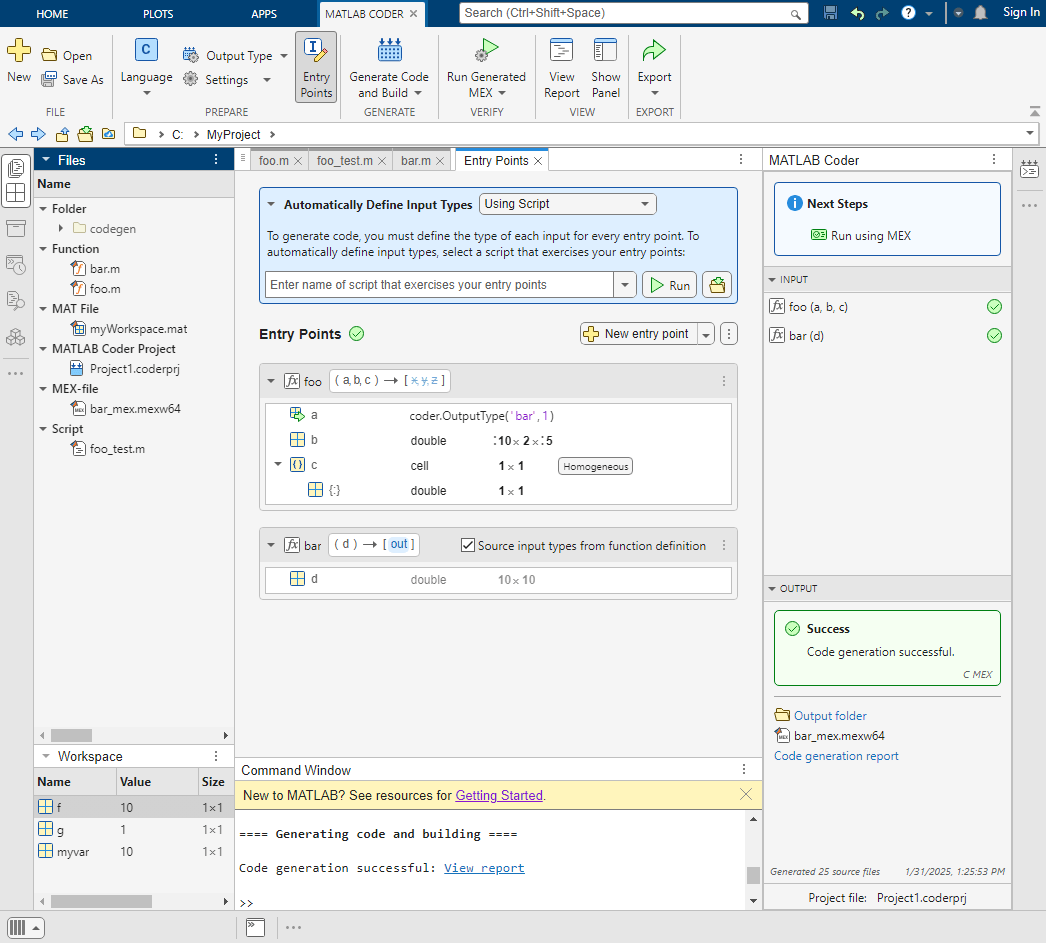
For more information about the MATLAB Coder app, see MATLAB Coder. To learn how to use the MATLAB Coder app to generate C code, see Generate C Code by Using the MATLAB Coder App.
Starting in R2025a:
The MATLAB Coder app saves code generation project files with a
.coderprjextension instead of with a.prjextension.The Check for issues step is replaced by Run Generated MEX.
Line execution counts for generated MEX functions are available by using the MATLAB Profiler.
The MATLAB Coder app no longer supports numeric conversion.
The Search paths parameter is no longer available in the MATLAB Coder app.
For details, see Functionality being removed or changed.
Terminate code generation by pressing Ctrl+C
You can now terminate the code generation process by pressing Ctrl+C.
Generate code files with long paths on Windows machines
Starting in R2025a, you can generate code files with long paths that exceed the Windows maximum path length. The generated file path is a concatenation of the build folder path and the relative path of the generated file. For more information about generated file locations, see Generated Files and Locations.
When compiling generated code files with paths that exceed 259 characters, the software produces an error to prevent compilation issues or conflicts with third-party make and compiler tools.
Functionality being removed or changed
DynamicMemoryAllocation configuration property is replaced by
EnableDynamicMemoryAllocation
Errors
The DynamicMemoryAllocation configuration option is no longer
supported. To dynamically allocate memory for variable-size arrays, use the
EnableDynamicMemoryAllocation option. To set the threshold, use the
DynamicMemoryAllocationThreshold option.
For more information, see Control Dynamic Memory Allocation for Fixed-Size Arrays.
MATLAB
Coder app saves project files with extension .coderprj
Behavior change
The MATLAB
Coder app saves code generation project files with a .coderprj
extension instead of with a .prj extension. If you open a MATLAB
Coder project file created before R2025a in the new app, the app saves a copy of
the PRJ file to a CODERPRJ file. If you save changes to your project, the changes are saved
to the CODERPRJ file, not the PRJ file. In some cases, the app is unable to migrate
parameters that are specific to a hardware support package from the PRJ file to the
CODERPRJ file. If you use a hardware support package, verify that the configuration
parameters are correct before generating code.
Check for Issues step in MATLAB Coder app replaced by Run Generated MEX
Behavior change
Starting in R2025a, to check for issues in the generated MEX file, use the Run Generated MEX button in the MATLAB Coder app toolstrip. To perform verification using MEX, you must provide a MATLAB Coder script that exercises your entry points (also known as a test bench). In previous releases, you verified the generated code by using the Check for Issues step in the MATLAB Coder app.
Line execution counts in the MATLAB Coder app available by using the MATLAB Profiler
Behavior change
Starting in R2025a, in the MATLAB Coder app, you can view line execution counts and other execution profile data by using the MATLAB Profiler. See Profile MEX Functions by Using MATLAB Profiler. Before R2025a, line execution counts were available in the MATLAB Coder app after completing the Check for Issues step.
MATLAB Coder app no longer supports numeric conversion
Errors
The MATLAB
Coder app no longer supports numeric conversion. Perform numeric conversion at the
command line by using the codegen command.
To convert floating-point MATLAB code to fixed-point C/C++ code, use the
codegencommand with the-float2fixedoption. See Convert MATLAB Code to Fixed-Point C Code. This conversion requires Fixed-Point Designer™.To convert double-precision MATLAB code to single-precision C/C++ code, use the
codegencommand with the-singleCoption. See Generate Single-Precision C Code at the Command Line. This conversion requires Fixed-Point Designer.
Search paths parameter is no longer available in the MATLAB Coder app
Errors
Starting in R2025a, the Search paths parameter is not
available when you generate code by using the MATLAB
Coder app. To add additional folders to the search path, generate code at the
command line by using the codegen command with the
-I option.
Performance
Automatic parallelization of for-loops enabled by default
In R2025a, Enable automatic parallelization is set to
true by default for code generation. This allows for automatic
parallelization of for-loops in the generated C/C++ code.
This table shows the MATLAB code for the function autoparExample, which computes and
returns the sin on every element of input vector A. In
the generated C code, the for-loop is parallelized using OpenMP
pragma.
| MATLAB Code | Generated C Code |
|---|---|
% MATLAB code
function y = autoparExample(A)
   y = zeros(size(A));
   for i = 1:numel(A)
      y(i) = sin(A(i));
   end
end
% C code generation command codegen autoparExample -args {1:100000} -config:lib -report |
|
For more information, see Automatic Parallelization of for-Loops in the Generated
Code.
Automatic parallelization support with SIMD
In R2025a, MATLAB
Coder supports Enable automatic parallelization of nested
for-loops with Leverage target hardware instruction set extensions (SIMD). The code generator
parallelizes the outermost for-loop and vectorizes the innermost
for-loop. This enables efficient execution of the nested
for-loops.
In previous releases, when automatic parallelization and SIMD were enabled, the generated code was vectorized and not parallelized.
This table shows an example that uses automatic parallelization and SIMD to generate code.
The MATLAB function autoparSimdExample takes two matrices,
A and B, as inputs and returns their element-wise sum
in C. In the generated code, the outer for-loop is
parallelized and the inner for-loop is vectorized.
| MATLAB Code | Generated C Code |
|---|---|
% MATLAB code
function C = autoparSimdExample(A,B)
   C = zeros(size(A));
   [m,n] = size(A);
   for i = 1:m
      for j = 1:n
         C(j,i) = A(j,i) + B(j,i);
      end
   end
end
% C code generation command input = magic(1000); codegen autoparSimdExample -args {input, input} -config:lib -report |
|
Automatic parallelization of for-loops with integrity checks for MEX
targets
In R2025a, for MEX targets, you can automatically parallelize for-loops
by enabling Check memory integrity parameter, which is enabled
by default. In previous releases, you had to disable integrity checks to automatically
parallelize for-loops.
The table shows the generated C code for a MATLAB function in R2025a and R2024b. The code generator automatically parallelizes the
for-loop with IntegrityChecks enabled in R2025a, but
does not in R2024b.
| MATLAB Code | Generated C Code (R2025a) | Generated C Code (R2024b) |
|---|---|---|
% MATLAB code
function out = integrityCheck(in)
  out = int32(0);
  for i = 1:numel(in)
    out = bitor(out,in(i));
  end
end
% C code generation command cfg = coder.config; cfg.EnableAutoParallelization = true; cfg.OptimizeReductions = true; codegen integrityCheck -args {1:10000} -config cfg -report |
|
|
Generate more cache-efficient and vectorizable code for matrix multiplication
Starting in R2025a, when you generate code for the matrix multiplication operation, successive
iterations of the innermost loop have a stride length of 1. Therefore,
the successive loop iterations access adjacent memory locations resulting in more
cache-efficient code. For a more detailed explanation, see Array Layout and Algorithmic Efficiency.
In addition, because successive operations process data stored in a contiguous chunk of memory, the generated code is more amenable to further SIMD optimizations.
This table compares the code generated for an example MATLAB function in the current and previous releases. To demonstrate the structure of
the generated nested for-loops, this code is generated with automatic
parallelization and SIMD disabled.
| MATLAB Code | Generated Code with SIMD Disabled (R2025a) | Generated Code with SIMD Disabled (R2024b) |
|---|---|---|
% Entry-point function
function C = myMult(A,B) %#codegen
C = A*B;
end
% Build script cfg = coder.config("lib"); cfg.InstructionSetExtensions = "None"; cfg.EnableAutoParallelization = false; cfg.GenCodeOnly = true; codegen -config cfg myMult -args {zeros(100,150),zeros(150,200)} -report |
|
|
In the code generated in R2024b, the innermost for-loop with index
i2 contains the expressions A[i + 100 * i2] and
B[i2 + 150 * i1]. Therefore, when accessing elements of the array
A, the memory stride between two successive iterations is
100. By contrast, in the code generated in R2025a, the innermost loop
has a single array-access expression A[i2 + 100 * i1] that has a stride
length of 1. This memory access pattern makes the generated code more
cache-efficient.
To see how this memory access pattern makes the code more vectorizable, generate code without disabling SIMD as shown in the following table. The code generated in R2025a now contains SIMD instructions. However, the code generated in R2024b remains the same and does not contain SIMD instructions.
| MATLAB Code | Generated Code with SIMD Enabled (R2025a) | Generated Code with SIMD Enabled (R2024b) |
|---|---|---|
% Entry-point function
function C = myMult(A,B) %#codegen
C = A*B;
end
% Build script cfg = coder.config("lib"); cfg.EnableAutoParallelization = false; cfg.GenCodeOnly = true; codegen -config cfg myMult -args {zeros(100,150),zeros(150,200)} -report |
|
|
Optimize the generated code by merging if statements with complementary
conditions
In R2025a, the code generator optimizes the generated code by merging if
statements with complementary condition expressions into a single if-else
construct. For example, consider these two adjacent if statements with
complementary conditions:
if (condition) {
    // Action for true condition
}
if (!condition) {
    // Action for false condition
}
The code generator combines them into a more efficient if-else
statement:
if (condition) {
    // Action for true condition
} else {
    // Action for false condition
}
The code generator merges these if statements while preserving the
logical behavior and correctness of the code. This reduces conditional checks, improving
run-time performance and reducing code size.
Enhanced Performance of Generated Standalone Code Using Predefined BLAS and LAPACK Callbacks
MathWorks® now provides a collection of BLAS and LAPACK callback classes for various platforms. These callback classes are designed to enhance the performance of your generated standalone code during code generation. You can download these libraries from this GitHub repository.
For more information on how to use these callbacks to generate code, see Speed Up of Standalone Generated Code Using Preconfigured BLAS and LAPACK Callbacks.
Deep Learning with MATLAB Coder
Support for runtime update of network parameters without regenerating code
In R2025a, code generation supports continuously updating the network parameters with new training data, without the need to regenerate code. The support enhances the portability and improves the real-time adaptability of deep learning networks. You can update network parameters for:
The generated generic C/C++ code that does not depend on any third-party libraries in MATLAB
The generated generic C/C++ code that does not depend on any third-party libraries for deep learning Simulink models
Simulink simulation for models that contain MATLAB Function Blocks and the deep learning target library is set to
"none"
For example, you can enable continuous learnables update by using the coder.ai.enableParameterUpdate function and update the learnables of a
dlnetwork object by
entering:
dlnet = coder.ai.enableParameterUpdate(dlnet);
dlnet.Learnables = newLearnables;
You can enable run-time update of learnable parameters for the following layers:
fullyConnectedLayer(Deep Learning Toolbox)lstmLayer(Deep Learning Toolbox)bilstmLayer(Deep Learning Toolbox)gruLayer(Deep Learning Toolbox)lstmProjectedLayer(Deep Learning Toolbox)gruProjectedLayer(Deep Learning Toolbox)
For more information, see:
Help topic: Update Network Parameters at Run Time
Example: Update the Network Learnables for a Battery State of Charge Estimation Model
Generate code for nested networks
In R2025a, you can generate generic C/C++ code that does not depend on any third-party libraries for a nested network. A nested network can be:
A nested object detector such as
peopleDetector(Computer Vision Toolbox).A
dlnetwork(Deep Learning Toolbox) object with a custom layer that contains anotherdlnetworkobject as a learnable parameter object.For example, you can define the nested custom layer by using this code.
classdef myLayer < nnet.layer.Layer & nnet.layer.Formattable
    %#codegen

    properties(Learnable)
        % Declare a nested network as a learnable parameter.
        Network
    end

    methods
        function layer = myLayer(name, dlnetwork)
            % Create a myLayer.
            layer.Name = name;
            layer.Network = dlnetwork;
        end

        function Y = predict(this, X)
            ...
        end
    end
end
For more information on creating nested custom layers, see Define Nested Deep Learning Layer Using Network Composition (Deep Learning Toolbox).
New ways of loading dlnetwork object
In R2025a, code generation supports additional ways of loading a deep learning network into
MATLAB and Simulink. To load a dlnetwork object and generate generic C/C++ code, you can:
Use the
coder.loadfunction in the entry-point function. For example, you can load the MAT file as a structure that contains the network.function out = foo1(matfile, varName, in) S = coder.load(matfile); dlnet = S.(varName); out = predict(dlnet, in); end
Load network from a compile-time extrinsic function. In this code, you declare the function
getNetworkas an extrinsic function and then load the network as a compile-time constant by using the functioncoder.const.function out = foo2(in) coder.extrinsic('getNetwork'); dlnet = coder.const(getNetwork()); out = predict(dlnet, in); end
Pass the
dlnetworkobject directly to the entry-point function. For example:function out = foo3(dlnet,in) out = predict(dlnet, in); end
For more information, see help topic Load Pretrained Networks for Code Generation.
Code generation supports more MATLAB functions that use
dlarray object
In R2025a, you can generate code for dlarray (Deep Learning Toolbox) objects
that you use for inference with dlnetwork (Deep Learning Toolbox). Code generation supports
these MATLAB functions that use dlarray objects as inputs:
awgn(Communications Toolbox) – Add white Gaussian noise to signalbit2int(Communications Toolbox) – Convert bits to integersdlmodwt(Wavelet Toolbox) – Compute maximal overlap discrete wavelet transform and multiresolution analysisdlstft(Signal Processing Toolbox) – Compute short-time Fourier transformfilter– Filter data along a single dimensiongenqammod(Communications Toolbox) – General quadrature amplitude modulationgroupnorm(Deep Learning Toolbox) – Normalize data across grouped subsets of channelsinstancenorm(Deep Learning Toolbox) – Normalize across each channellayernorm(Deep Learning Toolbox) – Normalize data across all channelslsqminnorm– Find minimum norm least-squares solution to linear equationmedian– Calculate median value of arrayofdmChannelResponse(Communications Toolbox) – Calculate OFDM channel responseofdmdemod(Communications Toolbox) – Demodulate using OFDM methodofdmEqualize(Communications Toolbox) – Equalize OFDM signalsofdmmod(Communications Toolbox) – Modulate using OFDM methodpagelsqminnorm– Find page-wise minimum-norm least-squares solution to linear equation
See the full list of functions with dlarray support in Code Generation for dlarray.
Code generation support for additional layers
In R2025a, you can generate C or C++ code that does not depend on any third-party libraries for these layers:
crop2dLayer(Deep Learning Toolbox)istftLayer(Signal Processing Toolbox)modwtLayer(Wavelet Toolbox)reshapeLayer(Deep Learning Toolbox)stftLayer(Signal Processing Toolbox)transposedConv1dLayer(Deep Learning Toolbox)
For more information, see Networks and Layers Supported for Code Generation.
Additional layer supported for learnables compression support in bfloat16
format
You can perform learnables compression in bfloat16 format and generate generic C or C++ code for convolution2dLayer (Deep Learning Toolbox).
For more information on bfloat16 data format and list of supported layers, see Compress Networks Learnables in bfloat16 Format.
In R2025a, learnables of the convolution2dLayer are stored in
bfloat16 data format when bfloat16 compression
is enabled. In earlier releases, the learnables of the
convolution2dLayer were stored in the single-precision data
format, with the least significant 16 bits set to zero to mimic
bfloat16 precision, which did not contribute to memory
compression.
New and updated examples and topics
Use these new examples and topics to progress with deep learning code generation.
Help Topics:
MATLAB Coder Support Package for NVIDIA Jetson and NVIDIA DRIVE Platforms
Monitor Simulink simulations on Jetson by using Simulation Data Inspector
In R2025a, setting the Hardware Board model configuration parameter to
NVIDIA Jetson sets the Communication
Interface parameter to XCP on TCP/IP. Before
R2025a, setting the Hardware Board parameter to NVIDIA
Jetson set the Communication Interface parameter to
TCP/IP. You can use the XCP on TCP/IP interface to log
signals from external mode Simulink simulations on NVIDIA
Jetson in the Simulation Data Inspector. For more information, see Parameter Tuning and Signal Monitoring Using External Mode (GPU Coder).
Measure execution times of Simulink generated code on NVIDIA Jetson
In R2025a, you can generate execution-time profiles from external mode simulations on NVIDIA Jetson boards. Use execution-time profiles to measure how long the generated code functions and tasks take to execute on the NVIDIA Jetson board. For more information, see Execution-Time Profiling for NVIDIA Jetson Platforms in Simulink.
Support for JetPack 6 SDK
The MATLAB Coder Support Package for NVIDIA Jetson and NVIDIA DRIVE Platforms now supports the NVIDIA JetPack 6 SDK. You can use the JetPack 6 SDK with these NVIDIA Jetson boards:
NVIDIA Jetson AGX Orin
NVIDIA Jetson Orin Nano
NVIDIA Jetson Orin NX (GPIO workflows are not supported)
By default, using JetPack 6 makes the GPIO pins of the NVIDIA Jetson board input-only. To use a GPIO pin for output, you must change the pin mux of the board. For more information, see the NVIDIA documentation for your board.
The MATLAB
Coder Support Package for NVIDIA
Jetson and NVIDIA
DRIVE Platforms does not support code generation with the TensorRT library for Jetson boards using JetPack 6.1. To generate code for deep neural networks for a
board using JetPack 6.1, create a configuration object that uses a different library by
calling the coder.DeepLearningConfig function and setting the target library to
none or cudnn.
New example about performing processor-in-the-loop (PIL) testing on NVIDIA Jetson
To learn more about performing PIL execution on an NVIDIA Jetson board, use the example Verify Generated Code on NVIDIA Targets Using PIL in Simulink.
Check bug reports for issues and fixes
Software is inherently complex and is not free of errors. The output of a code generator might contain bugs, some of which are not detected by a compiler. MathWorks reports critical known bugs brought to its attention on its Bug Report system at www.mathworks.com/support/bugreports/. In the search bar, type the phrase "Incorrect Code Generation" to obtain a report of known bugs that produce code that might compile and execute, but still produce wrong answers. To save a search, click Save Search.
The bug reports are an integral part of the documentation for each release. Examine periodically all bug reports for a release, as such reports may identify inconsistencies between the actual behavior of a release you are using and the behavior described in this documentation.
In addition to reviewing bug reports, you should implement a verification and validation strategy to identify potential bugs in your design, code, and tools.
Search R2024b Bug Reports
Known Bugs for Incorrect Code Generation
All Known Bugs for This Product
MATLAB Programming for Code Generation
Generate C/C++ code for MATLAB functions that use dictionaries
In R2024b, you can generate C/C++ code for MATLAB functions that use dictionary objects.
Code generation supports most data types for the keys and values in dictionaries, including:
Aggregate data types, such as structures and cells
Numeric, logical, half, character, string, and enumeration types
Complex numbers
To learn more about code generation for dictionaries, see Generate Code for Dictionaries. To generate code for MATLAB functions that use dictionaries, you must adhere to certain restrictions. See Dictionary Limitations for Code Generation.
Use class properties to define name-value arguments in MATLAB code for code generation
In MATLAB, you can use the public properties of a class to define name-value arguments
in an arguments
block by using the syntax structName.?ClassName. See Name-Value Arguments from Class Properties.
Starting in R2024b, you can generate C/C++ code for non-entry-point MATLAB functions that use this syntax in an arguments block.
Name-value arguments, including the structName.?ClassName syntax, are not
supported in entry-point functions. See Generate Code for arguments Block That Validates Input and Output
Arguments.
Code generation support for fixed-point data types greater than 128 bits
You can now generate code for fixed-point data types with word lengths up to 65,535 bits. Prior to R2024b, the maximum word length was 128 bits.
For more information, see Supported Data Types (Fixed-Point Designer).
Exclude functions from fixed-point conversion with
coder.float2fixed.skip
Use the new coder.float2fixed.skip pragma to designate functions that you do not want to
convert to fixed point when using the -float2fixed option with the codegen
command.
To exclude a function from fixed-point conversion, specify the function as a cell array
input to the pragma at the beginning of the code to be converted. You can specify both
custom and built-in functions. For example, exclude exp from fixed-point
conversion in designFunc, defined below.
function out = designFunc(inp)
    coder.float2fixed.skip({'exp'});
    out = exp(inp);
    [...]
end
Supported Functions
imread Function: Generate code for embedded targets
Starting in R2024b, you can generate code that uses the imread function with 8-bit JPEG images and then use the generated code on
embedded targets, such as the NVIDIA
Jetson. In previous releases, generated code that uses the
imread function could be used only on MATLAB host targets. Follow these steps to generate code that you can use on embedded
targets to read 8-bit JPEG images:
Generate source code and a makefile for the MATLAB code that uses
imreadwith the appropriate configuration, hardware, and input settings.Compile
libjpeg-turbofor the target, and install the shared libraries and header files. (Alternatively, for some targets, you might be able to use a prebuiltlibjpeg-turbobinary.)Compile the generated code by linking it with the
libjpeg-turbobuilt for the target.
Code generation for more toolbox functions
In R2024b, you can generate code for many additional toolbox functions and objects. For a list of all functions and objects that are supported for code generation, see:
These are links to the release notes of some toolboxes that added code generation support in R2024b:
Image Processing Toolbox
See C Code Generation: Generate code from additional functions using MATLAB Coder (Image Processing Toolbox).
Signal Processing Toolbox
See C/C++ code generation support for descriptive statistics, signal modeling, vibration analysis, and waveform generation (Signal Processing Toolbox).
Wavelet Toolbox
See C/C++ Code Generation: Automatically generate code for 2-D continuous wavelet transform (Wavelet Toolbox).
Generated Code Improvements
Support for additional C++ language standards
Starting in R2024b, the code generator can generate C++ code compatible with C++14 (ISO), C++17 (ISO), and C++20 (ISO). The default C++ language standard remains C++11 (ISO). See Change Language Standard Used for Code Generation.
Improved Code Portability: Generate code that depends on fewer platform-specific precompiled libraries
Starting in R2024b, you can instruct the code generator to produce code that avoids using platform-specific precompiled libraries when possible. The code generator uses precompiled libraries only if no alternative implementations of their algorithms are available.
By default, when generating C/C++ code, the code generator prefers to use the available precompiled libraries because these libraries are optimized for performance on specific platforms. However, because precompiled libraries are platform specific, their use restricts the portability of the generated code. Avoiding calls to these libraries and generating portable implementations of their algorithms as C/C++ source code produces applications that can run on many platforms.
To instruct the code generator to avoid using precompiled libraries when possible:
In a code generation configuration object, set the
UsePrecompiledLibrariesproperty to"Avoid".In the MATLAB Coder app, on the Custom Code tab, set the Use precompiled libraries parameter to
Avoid precompiled libraries when possible.
For CUDA code generation using GPU Coder™, the UsePrecompiledLibraries configuration parameter has a
different default, compared to C/C++ code generation. When generating CUDA code, the default behavior of the code generator is to avoid precompiled
libraries when possible. To change this default behavior, set the
UsePrecompiledLibraries parameter manually.
For certain precompiled libraries (for example, BLAS, LAPACK, and FFTW), there exist
individual configuration parameters that allow you to customize their usage. The
UsePrecompiledLibraries parameter does not
affect the use of these libraries.
This table compares two versions of C code generated for the imfilter (Image Processing Toolbox) function. The first version calls a precompiled static library to
perform the filtering. The second version implements the filtering algorithm as C source
code.
| MATLAB Code | Generated C Code
| Generated C Code
|
|---|---|---|
% Entry-point function
function filteredImage = libraryUsageTest(unfilteredImage)
h = [-1 0 1];
filteredImage = imfilter(unfilteredImage,h);
end
% Build script cfg = coder.config("lib"); cfg.UsePrecompiledLibraries = "Prefer"; % or "Avoid" codegen -config cfg libraryUsageTest -args {zeros(8)} -report |
void libraryUsageTest(const double unfilteredImage[64], double filteredImage[64])
{
  imfilter(unfilteredImage, filteredImage);
}
void imfilter(const double varargin_1[64], double b[64])
{
double aTmp[80];
int i;
for (i = 0; i < 8; i++) {
aTmp[i] = 0.0;
aTmp[i + 72] = 0.0;
memcpy(&aTmp[i * 8 + 8], &varargin_1[i * 8], 8U * sizeof(double));
}
double kernel[3];
double kernelSizeT[2];
double outSizeT[2];
double padSizeT[2];
outSizeT[0] = 8.0;
padSizeT[0] = 8.0;
outSizeT[1] = 8.0;
padSizeT[1] = 10.0;
kernel[0] = -1.0;
kernel[1] = 0.0;
kernel[2] = 1.0;
kernelSizeT[0] = 1.0;
kernelSizeT[1] = 3.0;
ippfilter_real64(&aTmp[0], &b[0], &outSizeT[0], 2.0, &padSizeT[0], &kernel[0],
&kernelSizeT[0], false); // Call to precompiled library
} |
void libraryUsageTest(const double unfilteredImage[64], double filteredImage[64])
{
  imfilter(unfilteredImage, filteredImage);
}
void imfilter(const double varargin_1[64], double b[64])
{
double aTmp[80];
int i;
int j;
int jb;
for (i = 0; i < 8; i++) {
aTmp[i] = 0.0;
aTmp[i + 72] = 0.0;
memcpy(&aTmp[i * 8 + 8], &varargin_1[i * 8], 8U * sizeof(double));
}
memset(&b[0], 0, 64U * sizeof(double));
for (j = 0; j < 8; j++) {
int cColOffset;
cColOffset = j << 3;
for (jb = 0; jb < 3; jb++) {
int ia;
ia = (j + jb) << 3;
for (i = 0; i < 8; i++) {
int b_tmp;
b_tmp = cColOffset + i;
b[b_tmp] += (-(2.0 - (double)jb) + 1.0) * aTmp[ia + i];
}
}
}
} |
Generate code that preserves entry-point input data
Starting in R2024b, if you want to protect your input data from modification when the generated code is called, you can do one of these actions:
In a
coder.CodeConfigorcoder.EmbeddedCodeConfigobject, set thePreserveInputDataproperty totrue.In the MATLAB Coder app, on the Speed tab, select the Preserve input data for entry-point functions check box.
If you enable this setting, the generated code might include extra copies of the input data. If you pass large-size data, this behavior might increase the execution time and memory use of the generated code.
If you generate code for a MATLAB entry-point function that uses the same variable as both an input and an
output, the code generator does not preserve this input data even when you set the
PreserveInputData configuration property to true.
See Avoid Data Copies of Function Inputs in Generated Code.
In this example, the MATLAB entry-point function sets the fifth element of the input array
x to 0 before computing the output. In the
generated code, the input double x[1024] is passed by reference. Code
generated with default settings contains the line x[4] = 0.0; that
directly modifies this input, thereby modifying the data in the caller's scope as well.
However, code generated with the PreserveInputData setting enabled first
copies the input x into a local variable b_x and then
performs the subsequent computations using b_x. This code pattern
preserves the input data that you supply to the generated
preserveInputDataTest function.
| MATLAB Code | Code Generated with PreserveInputData Disabled
(Default) | Code Generated with |
|---|---|---|
% Entry-point function
function y = preserveInputDataTest(x)
x(5) = 0;
y = x' * x;
end
% Build script cfg = coder.config("lib"); cfg.PreserveInputData = false; % or true cfg.InstructionSetExtensions = "None"; codegen -config cfg preserveInputDataTest ... -args ones(1,1024) |
|
|
Code Generation Workflow
Generate code for entry-point functions in namespaces
Starting in R2024b, you can generate code for an entry-point function that is in a MATLAB namespace by using dot notation. For example, to generate code for function
myFun in namespace mynamesp, use this
command:
codegen mynamesp.myFunWhen generating code for entry-point functions in namespaces, certain limitations apply. See Code Generation for Entry-Point Functions in Namespaces.
Prior to R2024b, if you generated code for an entry-point function in a namespace by calling
the codegen command with the relative path to the entry-point
function or by navigating directly to the entry-point function in the MATLAB
Coder app, the generated files and locations did not include the name of the
namespace. Starting in R2024b, the generated files and locations include the name of the
namespace, even if you generate code using this workflow. This change prevents name
conflicts when you generate code for functions with the same name that are located in
different namespaces.
This table shows the differences when generating code for function
myFun in namespace mynamesp and function
myFun2 in namespace mynamesp2.
| Difference | Prior to R2024a | R2024b |
|---|---|---|
| Generate MEX function, single entry point | codegen +mynamesp/myFun.m | codegen mynamsp.myFun |
| Call MEX function, single entry point | myFun_mex | mynamesp_myFun_mex |
| Generate MEX function, multiple entry points | codegen +mynamesp/myFun.m
+mynamesp2/myFun2.m | codegen mynamesp.myFun
mynamesp2.myFun2 |
| Call MEX function, multiple entry points |
|
|
Location of generated files
| codegen/ | codegen/ |
| Names of generated files | Generated file names begin with the name of the function. For
example, myFun.c | Generated file names begin with the name of the namespace and the
name of the function. For example,
mynamesp_myFun.c |
Code generation report contains information about precompiled libraries
Generated code can contain calls to precompiled libraries that are optimized for performance on specific platforms. Starting in R2024b, you can locate the precompiled libraries that the generated code uses by:
Opening the code generation report and viewing the Summary tab. If the generated code uses precompiled libraries, this tab now contains the link Precompiled Libraries.
Exporting code generation report information to a
coder.ReportInfoobject and inspecting theGeneratedFilesproperty of the exported object. This property now contains acoder.Fileobject for each precompiled library that the generated code uses. Seecoder.ReportInfo Properties.
Performance
Default configuration settings separate user-written and MathWorks functions to generate more readable code
Starting in R2024b, the default inlining behavior between user-written and MathWorks functions when generating standalone code is 'Readability'.
This means that, in standalone code, the code generator avoids inlining MathWorks functions called by user-written functions and user-written functions called
by MathWorks functions. Some very small functions can still be inlined when the inlining
behavior is 'Readability'. Avoiding inlining can keep the generated code
cleaner by preserving the separation between code that you wrote and MathWorks code. Prior to R2024b, the default inlining behavior was
'Speed'.
The table shows the difference in the generated code when the inlining behavior between
user-written and MathWorks functions is 'Readability' instead of
'Speed'.
| MATLAB Code | Generated C Code
| Generated C Code
|
|---|---|---|
% MATLAB code
function out = codeReadabilityTest(x)
%#codegen
y = sin(x);
out = pow2(y);
end
% C code generation command codegen -config:lib codeReadabilityTest ... -args {1:100} |
void codeReadabilityTest(const double x[100],
    double out[100])
{
  int k;
  for (k = 0; k < 100; k++) {
    double d;
    d = sin(x[k]);
    if (rtIsNaN(d)) {
      out[k] = rtNaN;
    } else {
      double d1;
      d1 = fabs(d);
      if (d1 == 0.0) {
        out[k] = 1.0;
      } else if (d1 == 1.0) {
        if (d > 0.0) {
          out[k] = 2.0;
        } else {
          out[k] = 0.5;
        }
      } else if (d == 0.5) {
        out[k] = 1.4142135623730951;
      } else {
        out[k] = pow(2.0, d);
      }
    }
  }
} |
void codeReadabilityTest(const double x[100],
    double out[100])
{
  double y[100];
  int k;
  for (k = 0; k < 100; k++) {
    y[k] = sin(x[k]);
  }
  pow2(y, out);
} |
If you generate standalone code using a MATLAB
Coder project or code configuration object created with a prior release, the
InlineBetweenUserAndMathWorksFunctions parameter is automatically
updated to 'Readability' unless you have specifically set a value for
this parameter.
For more information about inlining settings, see Control Inlining to Fine-Tune Performance and Readability of Generated Code.
Starting in R2024b, the default setting for the
InlineBetweenUserAndMathWorksFunctions code configuration option
is 'Readability' for standalone code generation.
Measure performance of generated code with
coder.timeit and coder.perfCompare
Starting in R2024b, you can use the coder.timeit and
coder.perfCompare
functions to measure the performance of the generated C/C++
code.
coder.timeit measures the time (in seconds) required to run the generated
code.
coder.perfCompare makes performance
comparisons between the generated code and MATLAB code, or among code generated using different configuration objects.
Automatic parallelization of for-loops with responsiveness
checks
In R2024b, for MEX targets, you can automatically parallelize for-loops
with the ResponsivenessChecks configuration parameter, which is set to
true by default. In previous releases, you must set
ResponsivenessChecks to false to automatically
parallelize for-loops.
The table shows the generated C code for a MATLAB function in R2024b and R2024a. The code generator automatically parallelizes the
for-loop with ResponsivenessChecks enabled in R2024b,
but does not in R2024a.
| MATLAB Code | Generated C Code (R2024b) | Generated C Code (R2024a) |
|---|---|---|
% MATLAB code
function out = fcn1(in1)
    a = 1;
    for i = 1:numel(in1)
        a = a + in1(i);
    end
    out = [a a];
end
% C code generation command cfg = coder.config('mex'); cfg.EnableAutoParallelization = true; cfg.OptimizeReductions = true; cfg.ResponsivenessChecks = true; codegen fcn1 -args {1:10000} -config cfg -report |
#pragma omp parallel num_threads(fcn1_numThreads) private(\
 aPrime, st, emlrtJBEnviron) firstprivate(emlrtHadParallelError)
 {
   if (setjmp(emlrtJBEnviron) == 0) {
     st.prev = sp;
     st.tls = emlrtAllocTLS((emlrtCTX)sp, omp_get_thread_num());
     st.site = NULL;
     emlrtSetJmpBuf(&st, &emlrtJBEnviron);
     aPrime = 0.0;
   } else {
     emlrtHadParallelError = true;
   }
#pragma omp for nowait
   for (i = 0; i < 10000; i++) {
     if (emlrtHadParallelError) {
       continue;
     }
     if (setjmp(emlrtJBEnviron) == 0) {
       aPrime += in1[i];
       if (*emlrtBreakCheckR2012bFlagVar != 0) {
         emlrtBreakCheckR2012b(&st);
       }
     } else {
       emlrtHadParallelError = true;
     }
   }
} |
real_T a;
int32_T i;
a = 1.0;
for (i = 0; i < 10000; i++) {
  a += in1[i];
  if (*emlrtBreakCheckR2012bFlagVar != 0) {
    emlrtBreakCheckR2012b((emlrtConstCTX)sp);
  }
}
out[0] = a;
out[1] = a; |
For more information, see Control Run-Time Checks, Automatically Parallelize for Loops in Generated Code,
and Reduction Operations Supported for Automatic Parallelization of
for-loops.
Deep Learning with MATLAB Coder
Enhanced code generation support for deep learning data formats
In R2024b, when generating C/C++ code that does not depend on third-party libraries, you can:
Pass
dlarrayobjects without a channel (C) dimension to adlnetworkobject.Modify the size of the batch (B) dimension using a custom layer.
Pass
dlarrayobjects with one or more unspecified (U) dimensions to adlnetworkobject.
This enhancement improves the capabilities for generating code for deep neural networks imported from external platforms.
Custom Layer: Use additional data types and generate code that is independent of third-party libraries
Starting in R2024b, custom layers using structures or non-primitive data types as properties
are supported for code generation. In previous releases, code generation only
supports nonscalar properties of type single,
double or char, and scalar numeric or
logical properties, or properties of type string.
For more information, see Define Custom Deep Learning Layer for Code Generation (Deep Learning Toolbox).
Generate code for complex-valued dlarray objects
In R2024b, code generation supports complex number functions with
dlarray objects. You can pass complex-valued inputs to
dlarray-supported complex number functions and generate C/C++
code.
For a full list of functions that support code generation with dlarray
input, see Code Generation for dlarray.
Enhanced Deep Learning workflow: Code generation support for network copies and state update
Starting in R2024b, you can generate code for an entry-point function that creates copies of a
dlnetwork object and updates the states of the copied network. The
original network is not updated. The support is only for generating code that does not
depend on any third-party libraries.
For example, this MATLAB code loads a dlnetwork object from a MAT file.
It creates a copy of the original network and updates the state of copied network. Then it
returns the prediction based on the original network. In the generated code, only the copied
network, dlnetCopy, is updated. The predict call does
not update the original network, dlnet.
function [dlout1,dlout2] = net_predict(in)
%#codegen
dlIn = dlarray(in);

persistent dlnet;
if isempty(dlnet)
    dlnet = coder.loadDeepLearningNetwork('dlnet.mat');
end

dlnetCopy = dlnet;
[~,dlnetCopy.State] = dlnetCopy.predict(dlIn);
dlout1 = predict(dlnet,dlIn);
dlout2 = predict(dlnetCopy,dlIn);

end
Code generation support for additional layers
In R2024b, you can generate C or C++ code that does not depend on third-party libraries for these layers:
yolov2TransformLayer(Computer Vision Toolbox)crossChannelNormalizationLayer(Deep Learning Toolbox)
For more information, see Networks and Layers Supported for Code Generation.
Check bug reports for issues and fixes
Software is inherently complex and is not free of errors. The output of a code generator might contain bugs, some of which are not detected by a compiler. MathWorks reports critical known bugs brought to its attention on its Bug Report system at www.mathworks.com/support/bugreports/. In the search bar, type the phrase "Incorrect Code Generation" to obtain a report of known bugs that produce code that might compile and execute, but still produce wrong answers. To save a search, click Save Search.
The bug reports are an integral part of the documentation for each release. Examine periodically all bug reports for a release, as such reports may identify inconsistencies between the actual behavior of a release you are using and the behavior described in this documentation.
In addition to reviewing bug reports, you should implement a verification and validation strategy to identify potential bugs in your design, code, and tools.
Search R2024a Bug Reports
Known Bugs for Incorrect Code Generation
All Known Bugs for This Product
MATLAB Programming for Code Generation
Specify header file within coder.ceval command
Starting in R2024a, you can specify a header file for a C/C++ function within a coder.ceval call by using the "-headerfile" name-value
argument. Prior to R2024a, you had to specify a header file separately by calling coder.cinclude before coder.ceval.
For example, to call the C function foo declared in header file
foo.h with input argument x, include this
coder.ceval command in your MATLAB
code:
y = coder.ceval("-headerfile","foo.h","foo",x);
Generate code for a for-loop that iterates over a cell array
In R2024a, you can generate code for a for-loop that iterates over a
cell array. The size of the first dimension of the cell array must be 1.
Code generation supports iterating over both homogeneous and heterogeneous cell
arrays.
For example, define the MATLAB function addStructFields that adds all the fields of an
input struct s. In the function code, access the fields of
s by looping over the cell array that
fieldnames(s) returns.
function out = addStructFields(s)
out = 0;
for f = fieldnames(s)'
    out = out + s.(f{1});
end
end
To generate a C MEX function that can accept a struct of doubles with field names
apples, oranges, and peaches,
run these commands:
s = struct('apples',0,'oranges',0,'peaches',0)
codegen addStructFields -args {coder.typeof(s)}
Generate code for uint32 enumerations greater than
intmax("int32")
Starting in R2024a, you can generate code for MATLAB enumerations derived from base type
uint32 with values greater than
intmax("int32"). Prior to R2024a, code generation supported
uint32 enumeration values less than or equal to
intmax("int32") only. See Code Generation for Enumerations.
Generate code for alternate execution paths depending on whether code configuration settings support unbounded variable-size arrays
In R2024a, you can use the coder.areUnboundedVariableSizedArraysSupported function in your MATLAB code that is intended for code generation. During code generation, this
function checks the state of these two code configuration settings:
Enable dynamic memory allocation (
EnableDynamicMemoryAllocation)Enable variable-sizing (
EnableVariableSizing)
If both of these settings are enabled, code generation supports unbounded variable-size
arrays and the coder.areUnboundedVariableSizedArraysSupported function
returns true. Otherwise, code generation does not support unbounded
variable-size arrays and the function returns false. Both options are
enabled by default.
In MATLAB execution, the
coder.areUnboundedVariableSizedArraysSupported function
always returns true.
For a demonstration of this functionality, consider the MATLAB function sumOfOneToN that computes the sum of the first
n natural numbers in two different ways.
function out = sumOfOneToN(n)
if (coder.areUnboundedVariableSizedArraysSupported)
    out = sum(1:n);  % Uses unbounded variable-size array
else
    out = n*(n+1)/2; % Does not use unbounded variable-size array
end
Code generated with the default configuration settings contains logic corresponding to the
if branch in the function sumOfOneToN. This branch
uses an unbounded variable-size array to compute the output.
By contrast, the code generated with dynamic memory allocation disabled contains logic
corresponding the else branch in the function
sumOfOneToN. This branch does not use unbounded variable-size arrays
to compute the output.
Supported Functions
Code generation for more toolbox functions
In R2024a, you can generate code for many additional toolbox functions and objects. For a list of all functions and objects that are supported for code generation, see:
These are links to the release notes of some toolboxes that added code generation support in R2024a:
Computer Vision Toolbox
See MATLAB Coder Support: Generate C and C++ code using additional functions (Computer Vision Toolbox).
Image Processing Toolbox
See C Code Generation: Generate code from additional functions using MATLAB Coder (Image Processing Toolbox).
Signal Processing Toolbox
See Generate C/C++ code for signal generation and spectral analysis (Signal Processing Toolbox).
Wavelet Toolbox
See C/C++ Code Generation: Automatically generate code for wavelet functions (Wavelet Toolbox).
Generated Code Improvements
Improved automatic parallelization of for-loops
In R2024a, improvements are made in the automatic parallelization of for-loops. These include:
Support for bitwise reduction operations (
bitand,bitor, andbitxor) for integer data types.Improved code insights to facilitate better understanding and usage of the code.
Support for control-flow statements using the same reduction variable. The table shows the MATLAB code performing arithmetic reductions on the reduction variable
a.MATLAB Code Generated C Code % MATLAB code function a = autoparExample(b,c) a = 0; for i = 1:numel(b) if b(i) > c(i) a = a + 1; else a = a + 2; end end
% C code generation commands
cfg = coder.config('lib');
cfg.EnableAutoParallelization = true;
cfg.OptimizeReductions = true;
codegen autoparExample -args {(1:1000),(1:1000)} -config cfg -launchreport
a = 0.0;
#pragma omp parallel num_threads(omp_get_max_threads()) private(aPrime)
  {
    aPrime = 0.0;
#pragma omp for nowait
    for (i = 0; i < 1000; i++) {
      if (b[i] > c[i]) {
        aPrime++;
      } else {
        aPrime += 2.0;
      }
    }
    omp_set_nest_lock(&foo_nestLockGlobal);
    {
      a += aPrime;
    }
    omp_unset_nest_lock(&foo_nestLockGlobal);
  }
  return a;
For more information, see Reduction Operations Supported for Automatic Parallelization of
for-loops and Automatically Parallelize for Loops in Generated Code.
Generate C++03 code that passes variables by reference
In R2024a, when you generate C++03 code for your MATLAB code, the code generator passes pointer arguments as references whenever it can establish that those arguments are not null. This behavior applies to functions that are not entry-point functions. Passing function arguments by reference improves MISRA™ compliance and makes the generated code more idiomatic.
Code Generation Workflow
Functionality being removed or changed
Code configuration parameter CppPackagesToNamespaces will be
removed
Still runs
The
CppPackagesToNamespacesconfiguration parameter will be removed in a future release. To preserve MATLAB namespaces in generated C++ code, use the parameterCppPreserveNamespacesin the code configuration object.On the Code Appearance tab in the MATLAB Coder app, the option Generate C++ namespaces from MATLAB packages has been renamed Generate C++ namespaces from MATLAB namespaces. The underlying behavior of this option has not changed.
Using quotes to specify a single filename or path that contains white space has been removed
Errors
If you try to use quotes to specify a single filename or path that contains white
space (for example, '"folder1\folder2\sp ace\fun3.c"') for the
CustomInclude, CustomLibrary, and
CustomSource code configuration parameters, the code generator
produces an error.
Using semicolons to specify multiple header files in
coder.ReplacementTypes object has been removed
Errors
If you try to use semicolons in a character vector to separate multiple filenames for
the HeaderFiles property of a coder.ReplacementTypes object, the code generator produces an error. Use
string arrays or cell arrays of character vectors instead. For example:
Use a string array —
cfg.ReplacementTypes.HeaderFiles =
                            ["myHeader1.h","myHeader2.h","myHeader3.h"]
Use a cell array of character vectors —
cfg.ReplacementTypes.HeaderFiles =
                            {'myHeader1.h','myHeader2.h','myHeader3.h'}
DynamicMemoryAllocation configuration option to be removed
Warns
The DynamicMemoryAllocation configuration option will be removed
in a future release. Use these options instead:
EnableDynamicMemoryAllocation— Controls whether to dynamically allocate memory for variable-size arrays.DynamicMemoryAllocationThreshold— Specifies the size threshold (in bytes) at or above which variable-size arrays use dynamic memory allocation.
This table shows how the previous DynamicMemoryAllocation values
correspond to the new configuration options.
| Old Setting | Equivalent Configuration | Behavior |
|---|---|---|
cfg.DynamicMemoryAllocation = "Threshold" | cfg.EnableDynamicMemoryAllocation = true | Dynamically allocate memory for variable-size arrays whose size (in bytes) is greater than or equal to the dynamic memory allocation threshold. |
cfg.DynamicMemoryAllocation =
"AllVariableSizeArrays" |
| Dynamically allocate memory for all variable-size arrays. |
cfg.DynamicMemoryAllocation = "Off" | cfg.EnableDynamicMemoryAllocation = false | Do not dynamically allocate memory for variable-size arrays. |
For more information, see Control Memory Allocation for Variable-Size Arrays.
lcc-win64 compiler not supported
Errors
The lcc-win64 compiler is no longer supported. For information
about supported compilers, see Supported and Compatible Compilers - Windows.
Performance
Control function inlining at the function call site using
coder.inlineCall and coder.nonInlineCall
Starting in R2024a, you can call functions using coder.inlineCall and coder.nonInlineCall to instruct the code generator whether or not to inline
the called function. The coder.inlineCall and
coder.nonInlineCall functions override coder.inline directives in the called function. You can use
coder.inlineCall and coder.nonInlineCall to
fine-tune the inlining behavior of the generated code when you cannot modify the called
function. See Control Inlining to Fine-Tune Performance and
Readability of Generated Code.
For example, you can inline function foo and prevent the inlining of
function bar in the generated code by calling foo and
bar in your MATLAB code using coder.inlineCall and
coder.nonInlineCall,
respectively.
...
coder.inlineCall(foo);
coder.nonInlineCall(bar);
...
The coder.inlineCall and coder.nonInlineCall
functions are subject to the same limitations as the coder.inline
directive.
Generate SIMD instructions by default for Intel
MATLAB
Coder generates SIMD instructions by default when you generate non-MEX code for
Intel hardware. The new default value of the Leverage target hardware
instruction set extensions parameter
(InstructionSetExtensions in the coder.CodeConfig
or coder.EmbeddedCodeConfig object) is Auto, which
resolves to SSE2 for Intel hardware. For more information, see Generate SIMD Code from MATLAB Functions for Intel Platforms.
Deep Learning with MATLAB Coder
Write large constants generated for deep neural networks to binary data files
In R2024a, when you generate generic C/C++ deep learning code, the code generator writes
the large constants for a deep neural network (DNN) to binary data files instead of
embedding the constants in the generated code. This behavior is controlled by the
configuration parameter LargeConstantGeneration whose default value is
'WriteOnlyDNNConstantsToDataFiles'.
To specify the threshold (in bytes) above which the DNN constants are written to data files, do one of the following:
In a MEX or standalone code configuration object, set the
LargeConstantThresholdconfiguration parameter. The default value of this parameter is131072.In the MATLAB Coder app, in the Generate step, click More Settings. Select Code Appearance and set the Large constant threshold parameter. The default value of this parameter is
131072.
The generated binary files are located in the code generation folder and are loaded by the generated code at run time. This behavior helps avoid C/C++ compiler errors caused by large constants in deep learning networks. It also improves the readability of the generated source files for the deep neural networks.
For an example of this functionality, see Generate Code for a Deep Learning Network for x86-64 Platforms Using Advanced Vector Instructions.
In R2024a, if you generate generic C/C++ deep learning code with large DNN constants, the code generation folder contains additional binary files that are loaded by the generated code at run time. Therefore, you need a file system to execute the generated code. In previous releases, the large constants were embedded in the generated code and you did not need a file system to execute the code.
In R2024a, to change this default behavior of the code generator and to keep the large constants hard-coded in generated source files for the deep neural networks, do one of the following:
In a MEX or standalone code configuration object, set the
LargeConstantGenerationconfiguration parameter to'KeepInSourceFiles'.In the MATLAB Coder app, in the Generate step, click More Settings. Select Code Appearance and set the Large constant generation parameter to
Keep in source
                            files
.
Code generation support for 1-D layers and networks
In R2024a, you can generate C or C++ code that does not depend on third-party libraries for these 1-D layers:
averagePooling1dLayer(Deep Learning Toolbox)convolution1dLayer(Deep Learning Toolbox)globalAveragePooling1dLayer(Deep Learning Toolbox)globalMaxPooling1dLayer(Deep Learning Toolbox)maxPooling1dLayer(Deep Learning Toolbox)
For more information, see Networks and Layers Supported for Code Generation.
Code generation support for additional layers
In R2024a, you can generate C or C++ code that does not depend on third-party libraries for these layers:
attentionLayer(Deep Learning Toolbox)embeddingConcatenationLayer(Deep Learning Toolbox)indexing1dLayer(Deep Learning Toolbox)patchEmbeddingLayer(Computer Vision Toolbox)positionEmbeddingLayer(Deep Learning Toolbox)selfAttentionLayer(Deep Learning Toolbox)wordEmbeddingLayer(Text Analytics Toolbox)
For more information, see Networks and Layers Supported for Code Generation.
Code generation supports stateful predict workflow for a dlnetwork
object
In R2024a, you can generate generic C/C++ code for this syntax of the predict (Deep Learning Toolbox)
function:
[__, state] = predict(__)
For example, you can update the State property of a dlnetwork (Deep Learning Toolbox) object by using
the output of the predict (Deep Learning Toolbox)
function.
in = dlarray(randn(1,10,'single'), 'CB')
[out, updatedState] = predict(dlnet, in);

dlnet.State = updatedState;
For more information, see examples:
Code generation supports passing any number of spatial dimensions to a
dlnetwork object
In R2024a, code generation supports additional data formats for data in a dlnetwork (Deep Learning Toolbox) object. You can generate C or C++ code that does not depend on any
third-party libraries.
You can now pass data with the following formats to these input layers:
Zero, one, two, or three spatial dimensions to
sequenceInputLayer(Deep Learning Toolbox). In previous releases, you can only pass zero or two spatial dimensions to thesequenceInputLayer.Any number of spatial dimensions to
inputLayer(Deep Learning Toolbox). For example, code generation supports the input format"SSSCBT"(spatial, spatial, spatial, channel, batch, time) forinputLayer.inputSize = [10 15 20 3 4 5]; inputFormat = 'SSSCBT'; layers = [inputLayer(inputSize, inputFormat); ... eluLayer(); ... fullyConnectedLayer(4)]; dlnet = dlnetwork(layers);
You can also pass any number of spatial dimensions to custom layers.
In addition, code generation newly supports passing input data with one spatial dimension to these 1d layers:
averagePooling1dLayer(Deep Learning Toolbox).convolution1dLayer(Deep Learning Toolbox).globalAveragePooling1dLayer(Deep Learning Toolbox)globalMaxPooling1dLayer(Deep Learning Toolbox).maxPooling1dLayer(Deep Learning Toolbox).
Generate code for more dlarray functions and MATLAB functions that use
dlarray
In R2024a, you can generate code for the dlarray (Deep Learning Toolbox) objects
that you use for inference with dlnetwork (Deep Learning Toolbox). Code generation supports
these dlarray object functions:
You can also generate code for these MATLAB functions that use dlarray
objects as inputs:
not— Find logical not.pinv— Compute Moore-Penrose pseudoinverse.sort— Sortdlarrayelements.underlyingType— Find the name of the underlying MATLAB data type.validateattributes— Check validity ofdlarrayobject.
For more information, see Code Generation for dlarray.
Add default value to DeepLearningConfig property of
coder.config configuration object
In R2024a, if you want to generate code that does not use any third-party library, you can
simply create a coder.config configuration object. The default
value of the DeepLearningConfig property is a coder.DeepLearningCodeConfig object.
In previous releases, you need to create a deep learning configuration object using the
syntax coder.DeepLearningConfig(TargetLibrary = targetlib). Then assign
it to the DeepLearningConfig property of the cfg
configuration object. For comparison, see the table below.
| R2023b | R2024a |
>> cfg = coder.config; By
default, the >> cfg.DeepLearningConfig ans = 0×0 coder.DeepLearningConfigBase array with properties: TargetLibrary | >> cfg = coder.config; The
default value of the >>cfg.DeepLearningConfig ans = coder.DeepLearningCodeConfig with properties: TargetLibrary: none --CPU code generation specific parameters-- LearnablesCompression: None |
dlnetwork workflow: New and updated functions and application
examples
Starting in R2024a, it is recommended to use dlnetwork (Deep Learning Toolbox) objects for deep learning code generation workflow. For more
information, see LayerGraph, DAGNetwork, and SeriesNetwork objects are not recommended (Deep Learning Toolbox).
Use these new functions to help with updating your code to use dlnetwork (Deep Learning Toolbox) objects.
| Function | Description |
|---|---|
dag2dlnetwork (Deep Learning Toolbox) | Convert SeriesNetwork and DAGNetwork
objects to dlnetwork objects. |
imagePretrainedNetwork (Deep Learning Toolbox) | Load and adapt pretrained neural networks as dlnetwork
objects. |
scores2label (Deep Learning Toolbox) | Convert neural network prediction scores to classification labels. |
Use these updated examples for deep learning with MATLAB Coder:
Generate Generic C Code for Sequence-to-Sequence Regression Using Deep Learning
Generate Code for a Deep Learning Network for x86-64 Platforms Using Advanced Vector Instructions
Generate Code and Deploy MobileNet-v2 Network to Raspberry Pi
Code Generation for Sequence-to-Sequence Classification with Learnables Compression
MATLAB Coder Support Package for NVIDIA Jetson and NVIDIA DRIVE Platforms
Read video frames from multimedia file
In R2024a, you can use the Video Read block to receive video frames from a multimedia file on the NVIDIA Jetson or NVIDIA NVIDIA DRIVE platforms. The Video read block is available in the NVIDIA Jetson & NVIDIA DRIVE Audio and Video Library.
New application examples
Use these new examples for NVIDIA Jetson and NVIDIA DRIVE Platforms:
Check bug reports for issues and fixes
Software is inherently complex and is not free of errors. The output of a code generator might contain bugs, some of which are not detected by a compiler. MathWorks reports critical known bugs brought to its attention on its Bug Report system at www.mathworks.com/support/bugreports/. In the search bar, type the phrase "Incorrect Code Generation" to obtain a report of known bugs that produce code that might compile and execute, but still produce wrong answers. To save a search, click Save Search.
The bug reports are an integral part of the documentation for each release. Examine periodically all bug reports for a release, as such reports may identify inconsistencies between the actual behavior of a release you are using and the behavior described in this documentation.
In addition to reviewing bug reports, you should implement a verification and validation strategy to identify potential bugs in your design, code, and tools.
Search R2023b Bug Reports
Known Bugs for Incorrect Code Generation
All Known Bugs for This Product
MATLAB Programming for Code Generation
New argument and property validation functions specific to code generation workflows
In R2023b, when authoring MATLAB code for which you intend to generate code, you can use these validation
functions inside arguments and
properties blocks:
coder.mustBeComplex— Validate that the value lies on the complex plane for code generation.coder.mustBeConst— Validate that the value is a constant during code generation.coder.specifyAsGPU— Validate that the value is a GPU input to an entry-point function for GPU code generation.
You can use the coder.mustBeComplex and
coder.specifyAsGPU functions to specify input types to entry-point
functions. See Input Types from MATLAB Code: Use argument and property validation to specify entry-point input types.
Programmatically retrieve reserved keywords
The code generator attempts to rename identifiers that match certain reserved keywords. Starting in R2023b, you can programmatically retrieve a list of the reserved identifiers by running the new RTW.reservedIdentifiers command from the MATLAB Command Window.
The command returns structures that contain lists of reserved identifiers that the code generator attempts to replace. For more information, see Reserved Keywords.
Supported Functions
Code generation for more MATLAB functions
Code generation for more toolbox functions
In R2023b, you can generate code for many additional toolbox functions and objects. For a list of all functions and objects that are supported for code generation, see:
These are links to the release notes of some toolboxes that added code generation support in R2023b:
Computer Vision Toolbox
See Generate C and C++ Code Using MATLAB Coder: Support for functions (Computer Vision Toolbox).
Image Processing Toolbox
See C Code Generation: Generate code from additional functions using MATLAB Coder (Image Processing Toolbox).
ROS Toolbox
See C++ Code Generation Support Enhancement for ROS 2: Deploy ROS nodes to target hardware using MATLAB Coder (ROS Toolbox).
Signal Processing Toolbox
See C/C++ Code Generation Support: Code generation for spectral analysis and signal modeling (Signal Processing Toolbox).
Statistics and Machine Learning Toolbox
See:
Generate C/C++ code for anomaly detection using one-class support vector machine (SVM) model (requires MATLAB Coder) (Statistics and Machine Learning Toolbox)
Generate C/C++ code for calculating multivariate normal probability density and cumulative distribution functions (requires MATLAB Coder) (Statistics and Machine Learning Toolbox)
Generate C/C++ code for density-based spatial clustering of applications with noise (requires MATLAB Coder) (Statistics and Machine Learning Toolbox)
Generated Code Improvements
Improved loop fusion in code generated for MATLAB code that uses handle objects
In R2023b, the code generated for MATLAB code that uses handle objects might have fewer for loops
compared to previous releases because of improved loop fusion optimization during code
generation. This optimization is likely to improve both the performance and the readability
of the generated code.
Code Generation Workflow
Input Types from MATLAB Code: Use argument and property validation to specify entry-point input types
In R2023b, you can specify input types using arguments
blocks in your MATLAB entry-point functions. If one or more of these inputs are instances of
MATLAB classes that you authored, you can also specify the types of the class
properties using property validation in the class definition.
This functionality allows you to generate code without having to specify input types
separately either using the -args option with the codegen command or in the Define Input Types pane in
the MATLAB
Coder app.
Specifying input types using argument and property validation supports:
Classes — Numeric, logical, half, character, string, enumerations, and user-authored MATLAB classes that contain property validation.
Sizes — Fixed-size dimensions and unbounded variable-size dimensions specified using colons (
:).Special Attributes — Such as complexity, sparsity, or if input represents GPU data. To specify these attributes, use the validation functions listed below.
You can also use these validation functions inside arguments and
properties blocks to specify input types: mustBeA,
mustBeReal, coder.mustBeComplex, mustBeSparse,
mustBeNonsparse, and coder.specifyAsGPU.
See Use Argument and Property Validation to Specify Entry-Point Input Types.
To specify input types and sizes not included in the above list, use the
-args option with the codegen command, the
Define Input Types pane in the MATLAB
Coder app, or the assert function in your MATLAB code.
Simplified toolchain registration
Using the target package, you can define and register custom
toolchains. In R2023b, you can use a single command to capture toolchain information in a
target.Toolchain
object. For more information, see:
Functionality being removed or changed
Specifying multiple files or paths for a configuration property using character vector to be removed
Errors
If you try to specify multiple filenames or paths for the
CustomInclude, CustomLibrary, and
CustomSource code configuration properties using character
vectors or string scalars that have delimiters, the code generator produces an
error.
Use string arrays or cell arrays of character vectors instead. For example, to include
multiple folder names, set the CustomInclude property using either of
these syntaxes:
Use a string array —
cfg.CustomInclude = ["C:\Project","C:\Custom
                            Files"]
Use a cell array of character vectors —
cfg.CustomInclude =
                            {'C:\Project','C:\Custom Files'}
Using quotes to specify single filename or path that contains white spaces to be removed
Warns
In a future release, the capability of using quotes to specify a single filename or
path that contains white spaces (for example, '"sp ace/fun3.c"') for
the CustomInclude, CustomLibrary, and
CustomSource code configuration properties will be removed.
Using semicolons to specify multiple header files in
coder.ReplacementTypes object to be removed
Warns
In a future release, the capability of using semicolons in a character vector to
separate multiple filenames for the HeaderFiles property of a coder.ReplacementTypes object will be removed. Use string arrays or cell
arrays of character vectors instead. For example:
Use a string array —
cfg.ReplacementTypes.HeaderFiles =
                            ["myHeader1.h","myHeader2.h","myHeader3.h"]
Use a cell array of character vectors —
cfg.ReplacementTypes.HeaderFiles =
                            {'myHeader1.h','myHeader2.h','myHeader3.h'}
DynamicMemoryAllocation configuration option to be removed
Warns
The DynamicMemoryAllocation configuration option will be removed in
a future release. To dynamically allocate memory for variable-sized arrays, use the
EnableDynamicMemoryAllocation option. To set the threshold, use
the DynamicMemoryAllocationThreshold option.
For more information, see Control Dynamic Memory Allocation for Fixed-Size Arrays.
lcc-win64 compiler will be removed
Warns
The lcc-win64 compiler will be removed in a future release. For
information about supported compilers, see Supported and Compatible Compilers - Windows.
Performance
Enhanced capabilities for automatic parallelization of for-loops with
reduction operations
In R2023b, automatic parallelization of for-loops during C/C++ code generation supports:
Multiple reduction operations - for-loops that perform two or more reduction operations on a set of variables.
minandmaxreduction operations - for-loops that compare a variable with one or more other variables and determine the maximum or minimum values between them.
These enhancements improve the run-time performance of the generated C/C++ code.
In the table, the left column shows an example MATLAB function that contains a for-loop. The loop performs multiple reduction operations
on variables, one of which is the min reduction operation. The right column
shows the generated C++ code. The OpenMP pragmas in the generated code indicate the
parallelization of the for-loop.
| MATLAB Code | Generated C++ Code |
|---|---|
function out = autoparExample(arr)
    minEle = 0;
    maxProd = 1;
    % for-loop performing multiple reductions
    for i = 1:numel(arr)
        if arr(i) > 0
            maxProd = maxProd * arr(i);
        else
            % min reduction operation
            minEle = min(minEle,arr(i));
        end
    end
    out = max(maxProd,abs(minEle));
end
% code generation cfg = coder.config('lib'); cfg.EnableAutoParallelization = true; cfg.OptimizeReductions = true; limit = 1000000; in1 = rand(1,limit); codegen -config cfg autoparExample -args {in1} -report |
minEle = 0.0; maxProd = 1.0; #pragma omp parallel num_threads(omp_get_max_threads()) private(\ maxProdPrime, minElePrime, d) { minElePrime = rtInf; maxProdPrime = 1.0; #pragma omp for nowait for (i = 0; i < 1000000; i++) { d = arr[i]; if (d > 0.0) { maxProdPrime *= d; } else { minElePrime = fmin(minElePrime, d); } } omp_set_nest_lock(&autoparExample_nestLockGlobal); { minEle = fmin(minEle, minElePrime); maxProd *= maxProdPrime; } omp_unset_nest_lock(&autoparExample_nestLockGlobal); } out = fmax(maxProd, fabs(minEle)); return out; |
For more information, see Reduction Operations Supported for Automatic Parallelization of
for-loops.
Deep Learning with MATLAB Coder
Deep Learning Networks: Generate code for YOLOX network
In R2023b, you can generate C/C++ code for the yoloxObjectDetector (Computer Vision Toolbox) object detector. The generated code can take advantage of either the Intel MKL-DNN or ARM Compute library. For an example, see Code Generation for Detect Defects on Printed Circuit Boards Using YOLOX Network.
This feature requires the Automated Visual Inspection Library for Computer Vision Toolbox™. You can install the Automated Visual Inspection Library for Computer Vision Toolbox from Add-On Explorer. For more information about installing add-ons, see Get and Manage Add-Ons.
Generate code for averagePooling2dLayer with mean padding
In R2023b, you can generate C/C++ code in MATLAB for averagePooling2dLayer by using the 'mean' setting for
PaddingValue property. The generated code can take advantage of
either the Intel MKL-DNN or the ARM Compute library.
Generate code with learnables compression in bfloat16 format
In R2023b, you can perform learnables compression in bfloat16 format
and generate generic C or C++ code for these layers:
channel-wise convolution (also known as depth-wise convolution) layer with
groupedConvolution2dLayerGRUProjectedLayer(Deep Learning Toolbox)
For more information, see Generate bfloat16 Code for Deep Learning Networks.
Generate code for the maxpool and avgpool
dlarray functions
In R2023b, you can generate code for the dlarray (Deep Learning Toolbox) data type that you use for inference with
dlnetwork (Deep Learning Toolbox). Code generation support includes invoking
a subset of functions on dlarray objects, including the object functions
maxpool (Deep Learning Toolbox) and avgpool (Deep Learning Toolbox).
For more information, see:
Generate code for the dlconv function
In R2023b, you can generate generic C/C++ code for the function dlconv (Deep Learning Toolbox). Code
generation supports both 1-D and 2-D spatio-temporal data.
Improved performance for mex code
In R2023b, generated MEX code may show performance improvement using the SIMD intrinsics. Only generic C/C++ code generation is supported. For more information, see Generate SIMD Code for MATLAB Functions.
MATLAB Coder Support Package for NVIDIA Jetson and NVIDIA DRIVE Platforms
Support package documentation moved into MATLAB Coder documentation
Starting in R2023b, the MATLAB Coder Support Package for NVIDIA Jetson and NVIDIA DRIVE Platforms documentation is included in the MATLAB Coder product documentation and all support package updates are announced in the MATLAB Coder release notes. In previous releases, the support package documentation installs with the support package software.
Video Streaming to Network Devices
The Video Send block sends a UDP video stream to a network address. Send images as a video feed to another hardware board, such as the NVIDIA Jetson, or other compatible GStreamer clients. You can also specify the compression, quality of the video stream, and enable the use of NVIDIA hardware accelerated libraries for accelerated encoding.
Code Replacement Library Support for 64-bit ARM Cortex-A Processors
MATLAB Coder Support Package for NVIDIA Jetson and NVIDIA DRIVE Platforms now generates NEON optimized SIMD code when using the ARM Cortex-A 64-bit library.
Check bug reports for issues and fixes
Software is inherently complex and is not free of errors. The output of a code generator might contain bugs, some of which are not detected by a compiler. MathWorks reports critical known bugs brought to its attention on its Bug Report system at www.mathworks.com/support/bugreports/. In the search bar, type the phrase "Incorrect Code Generation" to obtain a report of known bugs that produce code that might compile and execute, but still produce wrong answers. To save a search, click Save Search.
The bug reports are an integral part of the documentation for each release. Examine periodically all bug reports for a release, as such reports may identify inconsistencies between the actual behavior of a release you are using and the behavior described in this documentation.
In addition to reviewing bug reports, you should implement a verification and validation strategy to identify potential bugs in your design, code, and tools.
Search R2023a Bug Reports
Known Bugs for Incorrect Code Generation
All Known Bugs for This Product
MATLAB Programming for Code Generation
Name-Value Argument Validation: Generate code for arguments blocks in MATLAB functions
In R2023a, you can generate code for arguments
blocks that validate name-value arguments in your MATLAB function. You declare name-value arguments in an
arguments block using dot notation to define the fields of a
structure. See Validate Name-Value Arguments.
In this example code snippet, the structure named NameValueArgs defines
two name-value arguments, Name1 and Name2. You can use
any valid MATLAB identifier for the structure name and the field
names.
function result = myFunction(NameValueArgs)
    arguments
        NameValueArgs.Name1
        NameValueArgs.Name2
    end
    ...
end
Code generation supports most features of arguments blocks for
name-value arguments, including size and class validation, validation functions, and default
values. Code generation also supports the namedargs2cell function.
Code generation does not support these features of name-value argument validation:
Name-value input arguments at entry-point functions
Name-value arguments from class properties using the
structName.?ClassNamesyntax
See Generate Code for arguments Block That Validates Input and Output
Arguments.
Output Argument Validation: Generate code for arguments(Output) blocks in
MATLAB functions
In R2023a, you can generate code for arguments
blocks that perform output argument validation in your MATLAB function. Output argument validation declares specific restrictions on
function output arguments. Using argument validation, you can constrain the class, size, and
other aspects of function output values without writing code in the body of the function to
perform these tests.
Code generation supports most features of arguments blocks for output
variables, including size and class validation, and validation functions. For repeating
output arguments, code generation does not support size validation, class validation, and
validation functions.
See Generate Code for arguments Block That Validates Input and Output
Arguments.
Input Argument Validation: Use any name for repeating input arguments
In R2023a, you can use any valid MATLAB identifier for the name of a repeating input argument inside an arguments block. Code generation only supports a single repeating argument for a function.
In previous releases, code generation supported only varargin as a repeating input argument.
Generate code for growing arrays with (end + 1) indexing
In R2023a, you can generate code for MATLAB code that uses the (end + 1) indexing syntax to grow the
size of arrays. For example, you can generate code for this code snippet:
...
a = [1 2 3 4 5 6];
a(end + 1) = 7;

b = [1 2];
for i = 3:10
    b(end + 1) = i;
end
...
To use this functionality, make sure that the code generation configuration property
EnableVariableSizing or the corresponding setting Enable
variable-sizing in the MATLAB
Coder app is enabled. See Generate Code for Growing Arrays and Cell Arrays with end + 1
Indexing.
Generate code for uint32 enumerations
In R2023a, you can generate code for a MATLAB enumeration that derives from the base type uint32. For members of uint32 enumerations, code
generation supports values that are less than or equal to
intmax("int32"). See Code Generation for Enumerations.
coder.read and coder.write: Read data from
.coderdata file into your deployed application
In R2023a, you can use the coder.read
function to read data from .coderdata files. In contrast with MAT-files
that can be read only inside the MATLAB environment, you can read .coderdata files on any
deployment platform that supports a file system. In addition, the
.coderdata format supports most primitive and aggregate MATLAB data types, including arrays, structures, and cell arrays. So, the C/C++ code
generated for coder.read can be used to read complex aggregate data
from .coderdata files into your deployed application.
To export MATLAB data to .coderdata files, use the coder.write
function. This function is not supported for code generation.
The code generated for coder.read has
two distinct advantages over the code generated for the coder.load function:
You can update the data stored in
.coderdatafiles without having to regenerate code, as long as the type and size of the new data matches those of the old data.The data is not hard-coded in the generated code, thereby improving the readability of the generated code.
This is an example workflow that uses the coder.read and
coder.write functions:
Use the
coder.writefunction at the MATLAB command line to store the data in.coderdatafiles. For example, create a file namedmyfile.coderdataby using these commands:c = rand(100); coder.write('myfile.coderdata',c);In your MATLAB entry-point function (for which you intend to generate code), use the
coder.readfunction to read data from the.coderdatafiles. For example:function y = my_entry_point(x) %#codegen dataOut = coder.read('myfile.coderdata'); y = x + mean(dataOut,"all"); end
Generate MEX or standalone C/C++ code for the entry-point function by using the
codegencommand or the MATLAB Coder app. For example, generate a MEX functionmy_entry_point_mexand then call the generated MEX by running these commands:codegen my_entry_point -args {0} my_entry_point_mex(1)
Code generation successful.

ans =

    1.4996
You can now update the data stored in
myfile.coderdatato a different100-by-100array of double type. If you then callmy_entry_point_mexthat you already generated, the MEX now reads and uses the new data.d = rand(100) - 1; coder.write('myfile.coderdata',d); my_entry_point_mex(1)Wrote file 'myfile.coderdata'. You can read this file with 'coder.read'. ans = 0.4963
For more information and examples, see coder.read,
coder.write,
and Data Read and Write Considerations.
Dynamic memory allocation for fixed-size arrays
Starting in R2023a, you can dynamically allocate memory to heap for fixed-size arrays. By default, dynamic memory allocation for fixed-size arrays is disabled.
To enable dynamic memory allocation for fixed-size arrays:
In a configuration object for code generation, set the
EnableDynamicMemoryAllocationandDynamicMemoryAllocationForFixedSizeArraysparameters totrue.In the MATLAB Coder app, in the Memory settings, select Enable dynamic memory allocation and Enable dynamic memory allocation for fixed-sized arrays.
For more information, see Control Dynamic Memory Allocation for Fixed-Size Arrays.
The DynamicMemoryAllocation configuration option will be removed in
a future release. To dynamically allocate memory for variable-sized arrays, use the
EnableDynamicMemoryAllocation option. To set the threshold, use
the DynamicMemoryAllocationThreshold option.
Supported Functions
Code generation for more toolbox functions
In R2023a, you can generate code for many additional toolbox functions and objects. For a list of all functions and objects that are supported for code generation, see:
These are links to the release notes of some toolboxes that added code generation support in R2023a:
Computer Vision Toolbox
See Generate C and C++ Code Using MATLAB Coder: Support for functions (Computer Vision Toolbox).
Image Processing Toolbox
See C Code Generation: Generate code from additional functions using MATLAB Coder (Image Processing Toolbox).
Signal Processing Toolbox
See C/C++ Code Generation Support: Code generation for digital filter design, multirate signal processing, and waveform generation (Signal Processing Toolbox).
Statistics and Machine Learning Toolbox
See Generate C/C++ code for prediction using Gaussian kernel classification and regression models (requires MATLAB Coder) (Statistics and Machine Learning Toolbox).
Wavelet Toolbox
See C/C++ Code Generation: Automatically generate code for wavelet functions (Wavelet Toolbox).
Generated Code Improvements
Generate C++11 code that passes variables by reference
In R2023a, when you generate C++11 code for your MATLAB code, the code generator passes pointer arguments as references whenever it can establish that those arguments are not null. This behavior applies to functions that are not entry-point functions. Passing function arguments by reference improves MISRA compliance and makes the generated code more idiomatic.
Improved quality of code generated for logical indexing operations
In R2023a, the code generated for logical indexing operations in MATLAB is more readable and closer to hand-written C/C++ code for such operations. In some situations, the generated code can also have better performance compared to previous releases.
| MATLAB Code | R2023a Generated Code | R2022b Generated Code |
|---|---|---|
% entry-point function
function A = foo(A)
A(A < 0) = A(A < 0) * -1;
end
% code generation codegen -config:lib foo -args {coder.typeof(1,[5 5],[1 1])} | void foo(double A_data[], const int A_size[2])
{
int end;
int i;
end = A_size[0] * A_size[1] - 1;
for (i = 0; i <= end; i++) {
double d;
d = A_data[i];
if (d < 0.0) {
d = -d;
A_data[i] = d;
}
}
} | void foo(double A_data[], const int A_size[2])
{
double b_A_data[25];
int end_tmp;
int i;
int partialTrueCount;
int trueCount;
signed char b_tmp_data[25];
signed char tmp_data[25];
end_tmp = A_size[0] * A_size[1] - 1;
trueCount = 0;
partialTrueCount = 0;
for (i = 0; i <= end_tmp; i++) {
if (A_data[i] < 0.0) {
trueCount++;
tmp_data[partialTrueCount] = (signed char)(i + 1);
partialTrueCount++;
}
}
partialTrueCount = 0;
for (i = 0; i <= end_tmp; i++) {
if (A_data[i] < 0.0) {
b_tmp_data[partialTrueCount] = (signed char)(i + 1);
partialTrueCount++;
}
}
for (end_tmp = 0; end_tmp < trueCount; end_tmp++) {
b_A_data[end_tmp] = -A_data[tmp_data[end_tmp] - 1];
}
for (end_tmp = 0; end_tmp < trueCount; end_tmp++) {
A_data[b_tmp_data[end_tmp] - 1] = b_A_data[end_tmp];
}
} |
Improved loop fusion for vectorized operations that use variable-size arrays
Vectorized operations involving arrays in your MATLAB code get converted to loops in the generated code. If the arrays are variable-size, the corresponding loop upper bounds are also variable-size. In R2023a, if the code generator produces multiple loops that have identical variable-size upper bounds, it often fuses them into a single loop. This optimization is likely to improve both the performance and the readability of the generated code.
| MATLAB Code | R2023a Generated Code | R2022b Generated Code |
|---|---|---|
% entry-point function
function A = bar(B)
A = [B;B];
end
% code generation codegen -config:lib bar -args {coder.typeof(1,[10 10],[1 1])} | ...
for (i = 0; i < result; i++) {
for (i1 = 0; i1 < input_sizes_idx_0_tmp; i1++) {
A_data[i1 + A_size[0] * i] = B_data[i1 + input_sizes_idx_0 * i];
}
for (i1 = 0; i1 < sizes_idx_0_tmp; i1++) {
A_data[(i1 + input_sizes_idx_0) + A_size[0] * i] =
B_data[i1 + sizes_idx_0 * i];
}
}
... | ...
for (i = 0; i < result; i++) {
for (i1 = 0; i1 < input_sizes_idx_0_tmp; i1++) {
A_data[i1 + A_size[0] * i] = B_data[i1 + input_sizes_idx_0 * i];
}
}
for (i = 0; i < result; i++) {
for (i1 = 0; i1 < sizes_idx_0_tmp; i1++) {
A_data[(i1 + input_sizes_idx_0) + A_size[0] * i] =
B_data[i1 + sizes_idx_0 * i];
}
}
... |
Removed redundant operations that use identical values
In R2023a, the generated code no longer contains some redundant operations that access values that are identical at run time. By eliminating these redundant operations, the generated code shows improved execution speed.
For example, consider this sigmoid function, which uses a variable-size input.
function sigm = sigmoidFcn(x)
    sigm = 1 ./ (1 + exp(-x));
end
In R2022b, the generated code for sigmoidFcn contained this code, which accesses the data in the sigm_data array in three separate for loops.
    int32_T k;
    int32_T loop_ub;
    sigm_size[0] = x_size[0];
    sigm_size[1] = x_size[1];
    loop_ub = x_size[0] * x_size[1];
    for (k = 0; k < loop_ub; k++) {
        sigm_data[k] = -x_data[k];
    }

    loop_ub = x_size[0] * x_size[1];
    for (k = 0; k < loop_ub; k++) {
        sigm_data[k] = exp(sigm_data[k]);
    }

    for (k = 0; k < loop_ub; k++) {
        sigm_data[k] = 1.0 / (sigm_data[k] + 1.0);
    }
sigm_data array in only one for loop. int32_T k;
int32_T loop_ub_tmp;
sigm_size[0] = x_size[0];
sigm_size[1] = x_size[1];
loop_ub_tmp = x_size[0] * x_size[1];
for (k = 0; k < loop_ub_tmp; k++) {
sigm_data[k] = 1.0 / (exp(-x_data[k]) + 1.0);
}
Code Generation Workflow
Generate generic CMakeLists.txt file when you generate source code
only
In R2023a, when you generate only the C/C++ source code for your MATLAB code, you can instruct the code generator to also produce a
CMakeLists.txt file that does not depend on specific build tools. Do
one of the following:
In a
coder.CodeConfigorcoder.EmbeddedCodeConfigobject, set theToolchainproperty to"CMake".In the MATLAB Coder app, in the Generate Code step, on the More Settings > Hardware tab, set Toolchain to
CMake.
Improved Error Recovery: Code generation produces fewer unhelpful cascading errors
In previous releases, a single unsupported construct in your MATLAB code often produced multiple cascading errors during code generation. In such situations, only the first error was helpful because fixing it also fixed the subsequent cascading errors. In R2023a, for most situations, code generation only produces the initial error and suppresses the subsequent unhelpful cascading errors.
Functionality being removed or changed
Specifying Multiple Files or Paths for a Configuration Property by Using Character Vector to be Removed
Warns
In a future release, the capability to specify multiple file
names or paths for the
CustomInclude,
CustomLibrary, and
CustomSource code configuration
properties by using character vectors or string
scalars that have delimiters will be removed. Use
string arrays or cell arrays of character vectors
instead. For example, to include multiple folder
names, set the CustomInclude
property by using either of these syntaxes:
Use string array:
cfg.CustomInclude
                                                  = ["C:\Project","C:\Custom
                                                  Files"]
Use cell array of character vectors:
cfg.CustomInclude =
                                                  {'C:\Project','C:\Custom Files'}
lcc-win64 compiler will be removed
Still runs
The lcc-win64 compiler will be removed in a future release. For
information about supported compilers, see Supported and Compatible Compilers - Windows.
Performance
Generate standalone code that uses built-in FFTW library
In R2023a, the required FFTW library is shipped with MATLAB and the code generation process is simpler compared to previous releases. To generate code that produces calls to this built-in FFTW library for fast Fourier transform (FFT) functions in your MATLAB code, do one of the following:
In a
coder.CodeConfigorcoder.EmbeddedCodeConfigobject, set the propertyUseBuiltinFFTWLibrarytotrue.In the MATLAB Coder app, on the Custom Code tab, select the Use built-in FFTW library option.
Prior to R2023a, to generate code that uses the FFTW library, you had to install the FFTW
library, write a custom callback class to specify the FFTW library installation using coder.fftw.StandaloneFFTW3Interface, and then set the configuration parameter
Custom FFT library callback (CustomFFTCallback)
to the name of the callback class. This functionality continues to exist and is particularly
useful if you want to either customize the FFTW options or use your own compiled version of
the FFTW library for deployment on an embedded device. See Speed Up Fast Fourier Transforms in Generated Standalone Code by Using FFTW Library
Calls.
Loop Optimization: Use coder.loop.Control objects to improve
for loop performance in generated code
In R2023a, you can instruct the code generator to transform specific for
loops in your MATLAB code in a variety of ways (such as parallelize or vectorize) during code
generation. These transforms can often improve the run-time performance of large loops. To
specify these transforms, use the following directives in your MATLAB functions for which you intend to generate code:
coder.loop.interchange: Interchange nested loops to improve cache performance when accessing array elements.coder.loop.parallelize: Parallelize loop execution to improve speed by utilizing available threads.coder.loop.reverse: Reverse the execution order of loop iterations. In some situations, the reversed loop execution can be faster.coder.loop.tile: Tile loop nests to reduce memory access latency.coder.loop.unrollAndJam: Unroll and jam loops to improve cache locality.coder.loop.vectorize: Generate code that uses SIMD instructions to apply an operation simultaneously to multiple instances.
In your MATLAB code, call the directive immediately before the loop you intend to transform. You can combine multiple transforms into a single call by using the dot builder syntax shown in this code snippet. Use the loop index variable name to specify the loop to which you intend to apply a certain transform.
coder.loop.parallelize('loopId').interchange('loopId','loopId2');
for loopId = 1:100
    for loopId2 = 1:100
...
end
In some situations, you might want to combine multiple transforms in more complex ways
than is possible by using this simple dot builder syntax. For example, you might want to
apply one of the transforms only if a certain compile-time condition is satisfied. In such
situations, use the coder.loop.Control objects and the associated object functions. For
example:
...
loopControl = coder.loop.Control;
loopControl = loopControl.parallelize('loopId');

% You can apply multiple transforms to the same object
if inputVal > threshold
    loopControl = loopControl.interchange('loopId','loopId2');
end

% Call the apply method to inform the code
% generator to affect the loops in the generated code
loopControl.apply;

for loopId = 1:100
    for loopId2 = 1:100
...
end
Generate SIMD instructions in MEX code
In R2023a, you can improve the performance of generated MEX code on
Intel and AMD® platforms by including vectorized SIMD instructions in the
generated code. Set the new configuration parameter Hardware SIMD
acceleration or the command-line property
SIMDAcceleration to one of these values:
Portable (default) — Use the SSE2 instruction set
Full — Use the AVX2 instruction set
None — Do not use instruction sets
MATLAB Coder generates portable MEX code using the SSE2 instruction set by default. For more information, see Generate SIMD Code for MATLAB Functions.
Functionality being removed or changed
Code generator no longer produces calls to FFTW cleanup functions
Behavior change
In previous releases, when you used the coder.fftw.StandaloneFFTW3Interface callback class to generate standalone
code that calls FFTW library functions, the generated terminate function included calls
to one or more of the following memory cleanup functions.
fftw_cleanupfftwf_cleanupfftw_cleanup_threadsfftwf_cleanup_threads
These functions are called to clean up memory that the FFTW library functions use while the calling process is still running. By contrast, when the calling process terminates, FFTW library functions automatically free the memory and these cleanup functions don't need to be called.
In R2023a, these functions calls are no longer included in the generated terminate function. To clean up memory that the FFTW library functions use while the calling process is still running, you must incorporate the generated code into your own project and manually call the appropriate cleanup function after executing the generated code. Follow these rules to decide which cleanup function to use:
If you use single-precision floating point numbers in calls to FFT functions, use the
fftwfprefixed cleanup functions.If you use double-precision floating point numbers in calls to FFT functions, use the
fftwprefixed cleanup functions.If your implementation of the
coder.fftw.StandaloneFFTW3Interface.getNumThreadsmethod returns a value that is greater than1, use the cleanup functions that have thethreadssuffix.
See Speed Up Fast Fourier Transforms in Generated Standalone Code by Using FFTW Library Calls.
Deep Learning with MATLAB Coder
Generate code for variable-size dlarray data type
In R2023a, you can generate code for MATLAB code that uses variable-size dlarray (Deep Learning Toolbox)
objects.
For example, define this MATLAB design file:
function out = fooAdd(in1,in2) %#codegen
dlIn1_1 = dlarray(in1);
dlIn1_2 = dlarray(in2);
out = dlIn1_1 + dlIn1_2;
end
Specify the two inputs in1 and in2 to be unbounded
two-dimensional arrays of single type. Create the appropriate code
configuration object cfg to generate generic C MEX code for
fooAdd. Generate MEX code and run the generated MEX.
t_in1 = coder.typeof(single(1),[inf inf],[1 1]);
t_in2 = coder.typeof(single(1),[inf inf],[1 1]);

codegen fooAdd -args {t_in1,t_in2} -report

out = fooAdd_mex(single(eye(4,4)),single(ones(4,1)));
When generating code for variable-size dlarray objects, adhere to these
restrictions:
The
Udimension of adlarrayobject must be of fixed size.If the
dlarraydata formatfmtcontains only one character, the corresponding data arrayXcan have only one variable-size dimension. All other dimensions ofXmust be singleton.For operations between a
dlarrayobject and a numeric array that might implicitly expand either operands, do not combine a fixed sizeUdimension of thedlarrayobject with a variable-size dimension of the numeric array.For unary operations such as
max,min, andmeanon a variable-sizedlarrayobject, specify the intended working dimension explicitly as a constant value. See Automatic dimension restriction.
Generate code for dlnetwork objects that accept variable sequence length
inputs
In R2023a, you can generate code for dlnetwork (Deep Learning Toolbox) objects that accept dlarray (Deep Learning Toolbox) inputs
with a variable-size time (T) dimension. You use such dlarray objects to
represent time series data of variable sequence length.
For more information on how to create variable-size dlarray objects for
code generation, see Generate code for variable-size dlarray data type.
Generate code for channel-wise convolution layer
In R2023a, you can generate C or C++ code that does not depend on third-party libraries for
channel-wise convolution (also known as depth-wise convolution) layer with groupedConvolution2dLayer (Deep Learning Toolbox).
Generate code for Pooling layers with mean padding
In R2023a, you can generate generic C/C++ code in MATLAB for the following layer using
'mean' for PaddingValue property:
averagePooling2dLayer(Deep Learning Toolbox)
Generate code that takes advantage of learnables compression in bfloat16
format
In 2023a, you can perform learnables compression and generate C/C++ code for these layers
in Brain Floating Point format, bfloat16:
fullyConnectedLayer(Deep Learning Toolbox)gruLayer(Deep Learning Toolbox)lstmLayer(Deep Learning Toolbox)bilstmLayer(Deep Learning Toolbox)lstmProjectedLayer(Deep Learning Toolbox)
bfloat16 format keeps the same number range as 32-bit IEEE 754
single-precision floating-point format. Compressing learnables from single-precision to
bfloat16 reduces memory usage of deep learning networks with accuracy
variance. This enables deployment of larger networks to devices with tight memory budget.
For more information on bfloat16 format, see Generate bfloat16 Code for Deep Learning Networks.
To enable learnables compression, set the LearnablesCompression
property of the deep learning configuration object coder.DeepLearningConfig to bfloat16.
dlcfg = coder.DeepLearningConfig(TargetLibrary = 'none');
dlcfg.LearnablesCompression = 'bfloat16';
Alternatively, you can set the new Learnables Compression property in the Deep Learning setting tab of the MATLAB Coder App or the Configuration Parameters dialog box.
Deep learning configuration object name change
coder.DeepLearningConfigBase configuration object is now called
coder.DeepLearningCodeConfig. The behavior remains the same.
Quantized TensorFlow Lite Models: Configure predict function to accept and
return fp32 values
Quantized deep learning models use reduced-precision numbers, usually 8-bit integers
(int8 or uint8) instead of 32-bit floating point
numbers (fp32), to represent the model's parameters. For inference
computation with quantized TFLite models, the predict (Deep Learning Toolbox)
function accepts and returns 8-bit integer values by default. In R2023a, when performing
inference computation with quantized TFLite models, you can configure the
predict function to accept and return fp32
values and perform the appropriate conversion at the function interface. To do this, use the
predict function with the additional name-value arguments
QuantizeInputs and DequantizeOutputs.
Use newer version of TensorFlow Lite library in simulation and code generation
In R2023a, you can perform inference with models created using TFLite version 2.8.0 in both simulation and code generation. TFLite models are forward and backward compatible. So, if your model was created using a different version of the library but contains layers that are available in version 2.8.0, you can still simulate, generate code, and deploy your model. For more information, see Prerequisites for Deep Learning with TensorFlow Lite Models (Deep Learning Toolbox).
Improved performance of generated generic C/C++ code
In R2023a, generated generic C/C++ code that does not depend on third-party libraries has improved performance for networks containing the following layers:
convolution2dLayer(Deep Learning Toolbox)maxPooling2dLayer(Deep Learning Toolbox)globalMaxPooling2dLayer(Deep Learning Toolbox)averagePooling2dLayer(Deep Learning Toolbox)globalAveragePooling2dLayer(Deep Learning Toolbox)reluLayer(Deep Learning Toolbox)leakyReluLayer(Deep Learning Toolbox)clippedReluLayer(Deep Learning Toolbox)additionLayer(Deep Learning Toolbox)multiplicationLayer(Deep Learning Toolbox)gruLayer(Deep Learning Toolbox)lstmLayer(Deep Learning Toolbox)bilstmLayer(Deep Learning Toolbox)lstmProjectedLayer(Deep Learning Toolbox)Layer that implements ONNX identity operator
nnet.onnx.layer.GlobalAveragePooling2dLayer(Deep Learning Toolbox)Layer that implements KERAS identity operator
nnet.keras.layer.GlobalAveragePooling2dLayer(Deep Learning Toolbox)
In addition, you are likely to have further performance improvement using the SIMD intrinsics. For more information, see Generate SIMD Code for MATLAB Functions.
Check bug reports for issues and fixes
Software is inherently complex and is not free of errors. The output of a code generator might contain bugs, some of which are not detected by a compiler. MathWorks reports critical known bugs brought to its attention on its Bug Report system at www.mathworks.com/support/bugreports/. In the search bar, type the phrase "Incorrect Code Generation" to obtain a report of known bugs that produce code that might compile and execute, but still produce wrong answers. To save a search, click Save Search.
The bug reports are an integral part of the documentation for each release. Examine periodically all bug reports for a release, as such reports may identify inconsistencies between the actual behavior of a release you are using and the behavior described in this documentation.
In addition to reviewing bug reports, you should implement a verification and validation strategy to identify potential bugs in your design, code, and tools.
Search R2022b Bug Reports
Known Bugs for Incorrect Code Generation
All Known Bugs for This Product
MATLAB Programming for Code Generation
Input Argument Validation: Generate code for arguments blocks in MATLAB functions
In R2022b, you can generate code for arguments
blocks that perform input argument validation in your MATLAB function. Input argument validation declares specific restrictions on function
input arguments. Using argument validation, you can constrain the class, size, and other
aspects of function input values without writing code in the body of the function to perform
these tests.
Code generation supports most features of arguments blocks, including
size and class validation, validation functions, and default values.
Code generation supports only varargin as a repeating argument. For
varargin, size validation, class validation, and validation
functions are not supported for code generation.
Code generation does not support these features of arguments blocks:
Repeating arguments other than
vararginName-value arguments
Output argument validation
See Generate Code for arguments Block That Validates Input
Arguments.
More MATLAB functions declared as auto-extrinsic
In R2022b, code generation automatically treats several additional MATLAB functions as extrinsic. You do not need to explicitly specify that these
functions are extrinsic by using the coder.extrinsic construct.
These functions include:
For more information, see coder.extrinsic and Use MATLAB Engine to Execute a Function Call in Generated Code.
Supported Functions
Code generation for more MATLAB functions
Code generation for more toolbox functions
In R2022b, you can generate code for many additional toolbox functions and objects. For a list of all functions and objects that are supported for code generation, see:
Code Generation Workflow
Improved representation for string type objects
Starting in R2022b, the representation of the string data type as coder type objects that you
create by using coder.typeof() and coder.newtype()
is easier to use, more succinct, and excludes internal state values. Pass a
coder.StringType object as an input to the codegen
-args option to specify inputs to the generated code as a string.
The following code snippet shows the representation of a string input type that is created
by using the coder.typeof() function.
t = coder.typeof("Hello")t = coder.StringType 1×1 string StringLength: 5 VariableStringLength: false
To change the string length of the string type object, set the
StringLength property to the required value. To make the string
length variable size, set VariableStringLength to
true. Setting StringLength to Inf
automatically sets VariableStringLength to true.
Consider the following example:
t = coder.typeof("world");

% To specify t string length as upperbound at 10
t.StringLength = 10;
t.VariableStringLength = true;

% To specify t string length as variable-size without upper bound
t.StringLength = Inf;
In prior releases, to change the string length of the type object, the
Value property must be set accordingly. Similarly, to make the
string length variable size, the Value property must be made
variable-size. The legacy interface is accessible in this release. Consider the
following example:
t = coder.typeof("hello");

% To specify t string length as upperbound character vector
t.Properties.Value = coder.typeof('a',[1 10],[0 1]);

% To specify t string length as variable-size without upper bound
t.Properties.Value = coder.typeof('a',[1 Inf]);
Specify code generation target language by using coder.target
Starting in R2022b, code generator allows you to specialize the MATLAB code for specific target language.
You can use coder.target in the MATLAB code for which you are generating code as the following.
coder.target('CUDA');Supported target languages for code generation are:
C
C++
CUDA
OpenCL
SystemC
SystemVerilog
Verilog
VHDL
Build generated code with CMake
To build code generated from MATLAB code, R2022b provides CMake toolchain definitions for:
Microsoft Visual C++ and MinGW® on Windows, GCC on Linux®, and Xcode on Mac computers, using Ninja and makefile generators.
Microsoft Visual Studio® and Xcode project builds.
CMake and the associated CMakeLists.txt file are widely used for
building C++ code and can be directly leveraged by command-line tools and IDEs like
Microsoft
Visual Studio, Microsoft
Visual Studio Code, Xcode, and CLion.
If a supported toolchain is installed on your development computer, you can specify the
corresponding CMake toolchain definition during code generation. When you run codegen at the command line or click the Generate
Code button in the MATLAB
Coder app, CMake:
Uses configuration (
CMakeLists.txt) files to generate standard build files.Runs the compiler and other build tools to create executable code.
For more information, see Configure CMake Build Process and https://www.mathworks.com/support/requirements/supported-compilers.html.
Creation of custom CMake toolchain definitions
Using the target package,
create custom CMake toolchain definitions for building code generated from MATLAB code. You can:
Specify CMake parameters, for example,
GeneratorandToolchain file.Associate the toolchain with operating systems of your development computers.
Associate the toolchain with your target hardware.
Add the toolchain definition to an internal database, which enables you to use the toolchain in subsequent MATLAB sessions.
For more information, see Create Custom CMake Toolchain Definition and https://www.mathworks.com/support/requirements/supported-compilers.html.
Performance
Improved cache efficiency of generated code containing loop distribution, interchange, and reversal
In R2022b, the code generator can optimize the generated code by applying loop interchange
and distribution. These loop transformations increase the number of cache hits and improve the
code execution time. The optimizations apply to code generation targets for which the cache
information is available to the code generator. To increase the availability of cache
information to the code generation target, specify the target hardware information by using the
coder.HardwareImplementation object ProdHWDeviceType.
This code performs operations on the elements of the two input matrices of dimension [180x80] by using for loops.
function out = MatLabFun(A, B)

sizeRow=90;
sizeCol=80;

for i = 2 : sizeRow
    for j = 2 : sizeCol
        B(i*2,j) =  B((i*2)-1,j)+i*j;
        for k = 2 : sizeCol
            A(i*2,k) =  A(i-1,k)+i+j;
        end
    end
end

out = [A;B];
end
B_tmp at the innermost
position.void MatLabFun(double A[14400], double B[14400], double out[28800])
{
int A_tmp;
int B_tmp;
int B_tmp_tmp;
int i;
int j;
for (i = 0; i < 89; i++) {
B_tmp_tmp = (i + 2) << 1;
for (j = 0; j < 79; j++) {
B_tmp = B_tmp_tmp + 180 * (j + 1);
B[B_tmp - 1] = B[B_tmp - 2] + (double)((i + 2) * (j + 2));
for (B_tmp = 0; B_tmp < 79; B_tmp++) {
A_tmp = 180 * (B_tmp + 1);
A[(B_tmp_tmp + A_tmp) - 1] =
(A[i + A_tmp] + ((double)i + 2.0)) + ((double)j + 2.0);
}
}
}
for (B_tmp = 0; B_tmp < 80; B_tmp++) {
for (A_tmp = 0; A_tmp < 180; A_tmp++) {
i = A_tmp + 180 * B_tmp;
B_tmp_tmp = A_tmp + 360 * B_tmp;
out[B_tmp_tmp] = A[i];
out[B_tmp_tmp + 180] = B[i];
}
}
}In R2022b, the loop in the generated code is distributed to two loop nests. The loop nests
are interchanged to evaluate the loop with iteration variable j at the
innermost position.
void MatLabFun(double A[14400], double B[14400], double out[28800])
{
  int A_tmp;
  int B_tmp;
  int i;
  int j;
  for (j = 0; j < 79; j++) {
    for (i = 0; i < 89; i++) {
      B_tmp = ((i + 2) << 1) + 180 * (j + 1);
      B[B_tmp - 1] = B[B_tmp - 2] + (double)((i + 2) * (j + 2));
    }
  }
  for (B_tmp = 0; B_tmp < 79; B_tmp++) {
    A_tmp = 180 * (B_tmp + 1);
    for (i = 0; i < 89; i++) {
      for (j = 0; j < 79; j++) {
        A[(((i + 2) << 1) + A_tmp) - 1] =
            (A[i + A_tmp] + ((double)i + 2.0)) + ((double)j + 2.0);
      }
    }
  }
  for (B_tmp = 0; B_tmp < 80; B_tmp++) {
    for (A_tmp = 0; A_tmp < 180; A_tmp++) {
      j = A_tmp + 180 * B_tmp;
      i = A_tmp + 360 * B_tmp;
      out[i] = A[j];
      out[i + 180] = B[j];
    }
  }
}Improved performance of generated MEX files
In R2022b, performance improvements to generated MEX files include:
Optimization of the run-time library that is used by the generated MEX files.
Reduction of the initialization overhead of the generated MEX file.
SIMD code for bitwise and shift operations
In R2022b, you can generate SIMD code for bitwise operations and shift operations. When you select an instruction set by using the Leverage target hardware instruction set extensions parameter, the generated code includes the associated instructions for these bitwise operations and shift operations:
For more information, see Generate SIMD Code for MATLAB Functions.
Deep Learning with MATLAB Coder
Deep Learning: Analyze and find issues in the network for code generation
You can analyze code generation compatibility of deep learning networks by using the
analyzeNetworkForCodegen function. Use the network code generation analyzer
to validate a SeriesNetwork, DAGNetwork, and
dlnetwork for non-library and library targets and detect problems
before code generation. Supported library targets include MKL-DNN,
ARM Compute, and CMSIS-NN. Problems that
analyzeNetworkForCodegen detects include unsupported layers for code
generation, network issues, built-in layer specific issues, and issues with custom
layers.
The analyzeNetworkForCodegen function requires the MATLAB Coder Interface for Deep Learning and GPU Coder Interface for Deep Learning support packages. To download and install support package, use the Add-On
Explorer. You can also download the support packages from MathWorks
GPU Coder Team and MathWorks
MATLAB Coder Team. For more information, see Analyze Network for Code Generation.
TensorFlow Lite: Generate C++ code for pretrained models and deploy on Windows platforms
Use the loadTFLiteModel (Deep Learning Toolbox) function to load a pretrained TensorFlow™ Lite model into a TFLiteModel (Deep Learning Toolbox) object. Use this object with the predict (Deep Learning Toolbox) function in your MATLAB code to perform inference in MATLAB execution, code generation, or inside MATLAB Function blocks in Simulink models.
To use this functionality, you must install the Deep Learning Toolbox™ Interface for TensorFlow Lite. For more information, see Prerequisites for Deep Learning with TensorFlow Lite Models (Deep Learning Toolbox). For examples, see:
Deploy Super Resolution Application That Uses TensorFlow Lite (TFLite) Model on Host and Raspberry Pi (Deep Learning Toolbox)
Generate Code for TensorFlow Lite (TFLite) Model and Deploy on Raspberry Pi (Deep Learning Toolbox)
Generate code for dlnetwork objects that do not have input layers
In R2022b, you can generate code for dlnetwork (Deep Learning Toolbox) objects that do not contain
input layers. This enables you to generate code for dlnetwork objects that
do not represent entire models but are used as intermediate building blocks that you connect
together to create complex networks. The generated code can take advantage of either the
Intel MKL-DNN or the ARM Compute library. You can also generate generic C/C++ code that does not depend
on any third-party libraries.
Deep Learning Arrays: Generate code for more functions that use dlarray
In R2022b, you can generate code for additional MATLAB functions that use dlarray (Deep Learning Toolbox) inputs.
You can now generate code for these functions:
To learn more about generating code from MATLAB functions when using dlarray (Deep Learning Toolbox), see
Code Generation for dlarray.
Deep Learning Networks: Generate code for additional networks
In R2022b, you can generate generic C/C++ code for these additional networks:
yolov3ObjectDetector(Computer Vision Toolbox)– YOLO v3 object detector. This feature requires the functions in the Computer Vision Toolbox Model for YOLO v3 Object Detection support package.yolov4ObjectDetector(Computer Vision Toolbox) – YOLO v4 object detector. This feature requires the functions in the Computer Vision Toolbox Model for YOLO v4 Object Detection support package.ssdObjectDetector(Computer Vision Toolbox) – SSD-based object detector.
Deep Learning: Generate code for additional layers
In R2022b, you can generate C or C++ code that does not depend on third-party libraries for these additional layers:
globalMaxPooling2dLayer(Deep Learning Toolbox)globalAveragePooling2dLayer(Deep Learning Toolbox)averagePooling2dLayer(Deep Learning Toolbox)depthConcatenationLayer(Deep Learning Toolbox)flattenLayer(Deep Learning Toolbox)focalLossLayer(Computer Vision Toolbox)anchorBoxLayer(Computer Vision Toolbox)rcnnBoxRegressionLayer(Computer Vision Toolbox)ssdMergeLayer(Computer Vision Toolbox)
See Networks and Layers Supported for Code Generation.
In addition, Spatio-Temporal data propagation support is added for generic C/C++ code generation. You can now pass 2D image sequences with both spatial and time dimensions to these layers and generate generic C/C++ code:
convolution2dLayer(Deep Learning Toolbox)maxPooling2dLayer(Deep Learning Toolbox)averagePooling2dLayer(Deep Learning Toolbox)globalMaxPooling2dLayer(Deep Learning Toolbox)globalAveragePooling2dLayer(Deep Learning Toolbox)
Improved performance of generated generic C/C++ code
In R2022b, the generated generic C/C++ code (that does not depend on third-party libraries) for the following layers has improved performance:
convolution2dLayer(Deep Learning Toolbox)fullyConnectedLayer(Deep Learning Toolbox)
In addition, generated code for certain network that contains convolutional layers followed by ReLU or Leaky ReLU layer is likely to have improved performance.
Functionality being removed or changed
coder.getDeepLearningLayers function is not recommended
Still runs
coder.getDeepLearningLayers is not recommended. Use analyzeNetworkForCodegen instead.
For more information, see analyzeNetworkForCodegen.
Code generation behavior change for dlarray inputs and
outputs
Behavior change
In R2022b, the generated code creates structures for the dlarray
inputs and outputs of entry-point functions. Data is a public field
that you can directly access it.
In previous releases, the generated code uses class to represent the
dlarray inputs and outputs of entry-point functions. In these
releases, you use the initializing function init to access the
Data field. This example shows the difference in the generated
code between the two releases:
| MATLAB Code | R2022a Generated Code | R2022b Generated Code |
|---|---|---|
% entry-point function
function out = foo(a)
    out = dims(a);
end
% code generation cfg = coder.config('dll'); cfg.TargetLang = 'C++'; codegen -config cfg foo -args dlarray(ones(5,4), 'SC') |
// File: dlarray.h (generated)
namespace coder {
class FOO_DLL_EXPORT dlarray {
public:
  void init(const double b_Data[20]);
  dlarray();
  ~dlarray();

private:
  double Data[20];
};
}
// File: main.cpp (generated)
static void argInit_dlarray(coder::dlarray *result)
{
double dv[20];
argInit_5x4_real_T(dv);
result->init(dv);
} |
// File: foo_types.h (generated)
namespace coder {
struct dlarray {
  double Data[20];
};
}
// File: main.cpp (generated)
static void argInit_dlarray(coder::dlarray *result)
{
argInit_5x4_real_T(result->Data);
}
|
Check bug reports for issues and fixes
Software is inherently complex and is not free of errors. The output of a code generator might contain bugs, some of which are not detected by a compiler. MathWorks reports critical known bugs brought to its attention on its Bug Report system at www.mathworks.com/support/bugreports/. In the search bar, type the phrase "Incorrect Code Generation" to obtain a report of known bugs that produce code that might compile and execute, but still produce wrong answers. To save a search, click Save Search.
The bug reports are an integral part of the documentation for each release. Examine periodically all bug reports for a release, as such reports may identify inconsistencies between the actual behavior of a release you are using and the behavior described in this documentation.
In addition to reviewing bug reports, you should implement a verification and validation strategy to identify potential bugs in your design, code, and tools.
Search R2022a Bug Reports
Known Bugs for Incorrect Code Generation
All Known Bugs for This Product
Supported Functions
Code generation for more MATLAB functions
Code generation for more toolbox functions
In R2022a, you can generate code for many additional toolbox functions and objects. For a list of all functions and objects that are supported for code generation, see:
Generated Code Improvements
Generate C++11 enumeration classes for MATLAB enumerations
In R2022a, when you generate C++11 MEX or standalone code for your MATLAB enumerations, the code generator produces C++11 enumeration classes by default. Using enumeration classes makes the generated C++11 code more idiomatic. They also improve code quality because:
The enumerators are contained in the scope of the enumeration and thus avoid name clashes.
The enumerators do not implicitly convert to the integer type that might cause unexpected behavior.
To instruct the code generator to produce ordinary C enumeration for a particular
MATLAB enumeration class, include the static method
generateEnumClass that returns false in the
implementation of that MATLAB enumeration class. See the example below.
| MATLAB Code | R2021b Generated Code | R2022a Generated Code |
|---|---|---|
classdef MyEnumClass < int32
    enumeration
        Red(0),
        Blue(1),
        Green(2)
    end
end
classdef MyEnumClass16 < int16 enumeration Orange(0), Yellow(1), Pink(2) end % particular enum opting out methods(Static) function y = generateEnumClass() y = false; end end end function [out1, out2] = xEnumIsCppEnumClass out1 = MyEnumClass.Green; out2 = MyEnumClass16.Pink; end |
enum MyEnumClass : int
{
  Red = 0, // Default value
  Blue,
  Green
};
enum MyEnumClass16 : short
{
Orange = 0, // Default value
Yellow,
Pink
};
void xEnumIsCppEnumClass(MyEnumClass *out1,
    MyEnumClass16 *out2)
{
  *out1 = Green;
  *out2 = Pink;
} |
enum class MyEnumClass : int
{
  Red = 0, // Default value
  Blue,
  Green
};
enum MyEnumClass16 : short
{
Orange = 0, // Default value
Yellow,
Pink
};void xEnumIsCppEnumClass(MyEnumClass *out1,
MyEnumClass16 *out2)
{
*out1 = MyEnumClass::Green;
*out2 = Pink;
} |
See Code Generation for Enumerations and Customize Enumerated Types in Generated Code.
You can change the default behavior of the code generator to produce ordinary C enumerations for all MATLAB enumerations in your code, similar to previous releases. Do one of the following:
In the code generation configuration object, set the
CppGenerateEnumClassproperty tofalse.In the MATLAB Coder app, in the Generate step, on the Code Appearance tab, clear the Generate C++ enum class from MATLAB enumeration check box.
Improvement to generated C++ code that uses externally specified enumerations
The code generator allows you to provide your own C++ implementation of a specific MATLAB enumeration in a header file. In R2022a, if you place such a MATLAB enumeration myEnum inside the package
pkg, code generation preserves the name of this enumeration and
places it inside the namespace pkg in the generated C++ code. Therefore,
in the header file that you provide, you must define this enumeration inside the namespace
pkg.
In previous releases, the generated code named the enumeration as
pkg_enum and did not place it inside a namespace. With this new
behavior, the C++ code generated for externally specified enumerations matches with the C++
code generated for enumerations in other situations. In addition, the current behavior
produces code that is better organized and easier to read and use.
| MATLAB Code | R2021b Generated C++11 Code | R2022a Generated C++11 Code |
|---|---|---|
% File: +pkg1\MyEnum.m
classdef(Enumeration) MyEnum < int32
    enumeration
        Red(0),
        Blue(1),
        Green(2)
    end
    methods(Static)
        function y = getHeaderFile()
            y = 'Header.h';
        end
    end
end
% File: foo.m function out = foo out = pkg1.MyEnum.Red; end |
// File: Header.h (you provide)
#pragma once
typedef enum pkg1_MyImportedEnum  {
    Red = 0,
    Blue = 1,
    Green = 2
}  MyImportedEnum ;
// File: foo.cpp (generated)
pkg1_MyEnum foo()
{
return Red;
} |
// File: Header.h (you provide)
#pragma once
namespace pkg1 {
enum class MyEnum : int
{
  Red = 0, // Default value
  Blue,
  Green
};
}
// File: foo.cpp (generated)
pkg1::MyEnum foo()
{
return pkg1::MyEnum::Red;
} |
See Customize Enumerated Types in Generated Code and Code Generation for Enumerations.
In previous releases, the generated code did not place an externally specified enumeration in a namespace. Instead, the name of the MATLAB package was prefixed to the name of the enumeration in the generated code. As a result, you had to implement the C++ enumeration in the header file differently compared to the current release, as illustrated in the above example. To use your legacy header files with the code generated in R2022a, modify them based on this example.
Additional improvements to generated C++11 code
In R2022a, in most situations, the code generator produces more concise and idiomatic C++11 code that uses these language constructs:
Empty constructors and destructors are denoted by using the
= defaultsyntax.Type aliases are created by using the
usingkeyword instead of thetypedefkeyword. For declaring aliases for anonymous structures, the generated code now uses thestructkeyword instead oftypedef.
Examples:
| R2021b Generated Code | R2022a Generated Code |
|---|---|
class foo {
   foo();
}
foo::foo() { } | class foo {
foo() = default;
} Or class foo {
foo();
}
foo::foo() = default; |
typedef int32 myInt;
typedef aStruct myStruct1;
typedef struct { ... } myStruct2; | using myInt = int32;
using myStruct1 = aStruct;
struct myStruct2 { ... }; |
Code Generation Workflow
New Code Generation Readiness Tool: View more information and navigate through readiness results more easily
In R2022a, the Code Generation Readiness Tool has a new user interface, more information, additional functionality, and improved navigation. In addition, you can now use the Code Generation Readiness Tool in MATLAB Online.
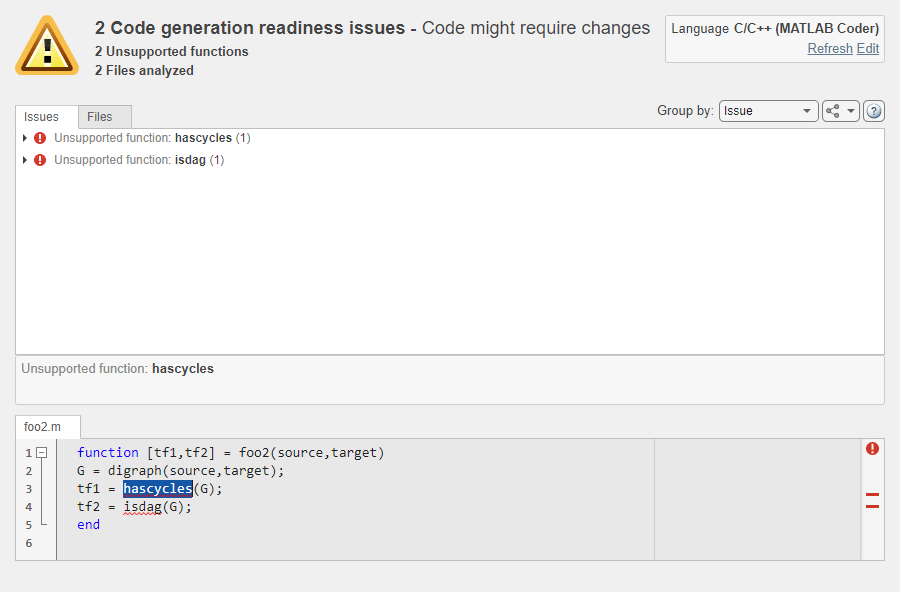
In addition to the existing functionalities, you can now:
View your MATLAB code inside the Code Generation Readiness Tool. When you select an issue, the part of your MATLAB code that caused this issue gets highlighted.
Group the readiness results either by issue or by file.
Select the language that the code generation readiness analysis uses.
Refresh the code generation readiness analysis if you updated your MATLAB code.
Export the analysis report either as plain text file or as a
coder.ScreenerInfoobject in the base workspace.
See:
coder.ScreenerInfo object: Access code generation readiness information programmatically
In R2022a, you can export the code generation readiness information about your MATLAB code to a variable in your base workspace. This variable contains a
coder.ScreenerInfo object whose properties contain information about:
MATLAB files analyzed by the Code Generation Readiness Tool
Code generation readiness messages
Calls to functions not supported for code generation
To export code generation readiness information about your the files
foo1.m, foo2.m, and foo3.mlx
to the variable info in your base workspace, execute this function
call:
info = coder.screener('foo1.m','foo2.m','foo3.mlx')
You can also export the entire report to a MATLAB string by executing the object function textReport:
reportString = textReport(info)
See:
Reference pages:
coder.ScreenerInfo Propertiesandcoder.screenerExample: Access Code Generation Readiness Results Programmatically
MATLAB Coder Interface for Visual Studio Code
            Debugging
If you install the support package MATLAB Coder Interface for Visual Studio Code Debugging, you can use Visual Studio Code as the graphical user interface for these debuggers:
MinGW GDB on Windows
GDB on Linux
LLDB on macOS
For information about installing the support package, in MATLAB
Central™
File
Exchange, search for MATLAB Coder Interface for Visual Studio Code
Debugging.
For information about debugger support, see Debug Generated Code During SIL Execution (Embedded Coder).
Generated MEX: UTF-8 system encoding on Windows platform
In R2022a, MATLAB uses UTF-8 as its system encoding on Windows platform. As a result, system calls made from within a generated MEX function
now accept and return UTF-8 encoded strings. By contrast, the code generated by MATLAB
Coder encodes text data by using the encoding specified by the Windows locale. So, if your MATLAB entry-point function uses coder.ceval to call external C/C++ functions that assume a different system
encoding, then the generated MEX function might produce garbled text. If this happens, you
must update the external C/C++ functions to handle this situation.
See MEX Functions: UTF-8 system encoding on Windows platforms.
Performance
SIMD code for reduction operations
In R2022a, you can generate SIMD code for reduction operations by using the new parameter Optimize reductions. The generated code uses the reduction operations from the instruction set that you specify by using the Instruction set extensions parameter.
You can generate SIMD code for these operations:
Sum
Product
Minimum
Maximum
Handwritten loops for the previous operations
For more information, see Generate SIMD Code for MATLAB Functions.
Parallelization of for-loops performing reduction operations
In R2022a, you can parallelize for-loops performing reduction
operations by using the configuration parameter Optimize
reductions.
During a reduction operation, the current iteration value depends on the previous
iteration value of the same variable in the for-loop. For example,
consider the MATLAB function addition, which computes the sum of first
n numbers.
function y = addition(n)
    y = 0;
    for i = 1:n
        y = y + i; % for-loop performing reduction operation
    end
end
The configuration property parallelizes only arithmetic reduction operations, such as
addition (+), subtraction (-), and product (*), in a for-loop.
To enable automatic parallelization of reduction operations, use either of these settings:
Set the
EnableAutoParallelizationproperty andOptimizeReductionsproperty totrue.cfg = coder.config('lib'); cfg.EnableAutoParallelization = true; cfg.OptimizeReductions = true;Open the MATLAB Coder app. On the Speed tab, select the Enable automatic parallelization option, and then select Optimize reductions option.
For more information, see Classification of Variables in parfor-Loops and Automatically Parallelize for Loops in Generated Code
Minimized variable scope for C99 (ISO) code generation
In R2022a, variables and functions are declared closer to their usage in the generated code when the target language is specified as C99 (ISO) to improve code readability.
This table shows the declaration of variables in R2021b generated code and R2022a
generated code with the target language as C99 (ISO). In the R2022a generated code, the
scope of array zee is minimized because it is placed inside the
if block.
| MATLAB Function | R2021b Generated Code | R2022a Generated Code |
|---|---|---|
function y = C99example(n) %#codegen y = zeros(1,n); for i = 1:n y(i) = 42; end end |
double C99example(int n)
{
  double zee[8];
  double u;
  int i;
  if (n < 40) {
    for (i = 0; i < 8; i++) {
      zee[i] = 1.0;
    }
    for (i = 0; i < n; i++) {
      zee[n - 1] += zee[0];
    }
    u = zee[0] + zee[n - 1];
  } else {
    u = 3.0;
  }
  return u;
}
|
double C99example(int n)
{
  double u;
  int i;
  if (n < 40) {
    double zee[8];
    for (i = 0; i < 8; i++) {
      zee[i] = 1.0;
    }
    for (i = 0; i < n; i++) {
      zee[n - 1] += zee[0];
    }
    u = zee[0] + zee[n - 1];
  } else {
    u = 3.0;
  }
  return u;
}
|
Deep Learning with MATLAB Coder
TensorFlow Lite: Generate C++ code for pretrained models and deploy on Linux platforms
In R2022a, you can use the loadTFLiteModel (Deep Learning Toolbox)
function to load a pretrained TensorFlow Lite model into a TFLiteModel (Deep Learning Toolbox)
object. Use this object with the predict (Deep Learning Toolbox)
function to perform inference with a pretrained TensorFlow Lite model. You can generate code for this functionality and deploy on
Linux platforms either on your MATLAB host computer or on ARM processors.
To use this functionality, you must install the Deep Learning Toolbox Interface for TensorFlow Lite. For more information, see Prerequisites for Deep Learning with TensorFlow Lite Models (Deep Learning Toolbox). For an example, see Generate Code for TensorFlow Lite Model and Deploy on Raspberry Pi (Deep Learning Toolbox).
CMSIS-NN Library: Generate code for quantized deep learning layers and deploy on ARM Cortex-M targets
You can generate C static library code for networks containing these layers that uses the CMSIS-NN library and performs inference computations in 8-bit integers:
Fully connected layer (
fullyConnectedLayer(Deep Learning Toolbox)).
Your deep learning network can also contain the following layers. The generated code performs computations for these layers in 32-bit floating point type.
Long short-term memory layer (
lstmLayer(Deep Learning Toolbox))Softmax layer (
softmaxLayer(Deep Learning Toolbox)).Input and output layers
C code generation for such quantized deep learning networks supports SeriesNetwork (Deep Learning Toolbox) objects and DAGNetwork (Deep Learning Toolbox) objects that can be converted to
SeriesNetwork objects. The generated code takes advantage
of the CMSIS-NN library version 5.7.0 and can be integrated into your project as a
static library that you can deploy to a variety of ARM Cortex-M CPU platforms. See:
Generate generic C/C++ code for dlnetwork workflows
Starting in R2022a, you can generate C or C++ code for the predict
function of a dlnetwork (Deep Learning Toolbox) object inside an entry-point
function. You can also generate code for the dlarray (Deep Learning Toolbox) data
type that you use for inference with dlnetwork. The generated code does
not depend on any third-party libraries.
Code generation support includes:
Construction of formatted and unformatted
dlarrayPassing
dlarrayto entry-point functions and returningdlarrayfrom entry-point functionsInvoking a subset of functions on
dlarrayobjects, including the object functionssoftmax(Deep Learning Toolbox),sigmoid(Deep Learning Toolbox), andfullyconnect(Deep Learning Toolbox)Passing formatted
dlarrayto thedlnetworkpredict function inside an entry-point function
For more information, see Code Generation for dlarray.
Code generation from MATLAB for dlnetwork objects that contain image sequences
Starting in R2022a, you can generate code for a dlnetwork (Deep Learning Toolbox) object that has image sequence inputs. Code generation includes:
A
dlarray(Deep Learning Toolbox) input containing image sequences that have'SSCT'or'SSCBT'data formats.Multi-input
dlnetworkwith heterogeneous input layers.
For more information, see dlnetwork (Deep Learning Toolbox).
Deep Learning Arrays: Generate code for more functions that use dlarray
In R2022a, you can generate code for additional MATLAB functions that use dlarray (Deep Learning Toolbox) inputs.
Code generation includes:
Binary math operations — Use
powerto perform binary element-wise power (.^) operation.Other math operations — Perform matrix multiplication by using
mtimes. Usepagemtimesto perform page-wise matrix multiplication.
Generate C++ code that performs inference computations in 8-bit integers for more layers
In R2022a, you can generate C++ code for these layers that uses the ARM Compute Library and performs inference computations in 8-bit integers:
averagePooling2dLayer(Deep Learning Toolbox)fullyConnectedLayer(Deep Learning Toolbox)
Deep Learning Networks: Generate code for additional networks
Code generation by using the Intel MKL-DNN library supports these additional networks:
yolov3ObjectDetector(Computer Vision Toolbox) – YOLO v3 object detector. This feature requires the functions in the Computer Vision Toolbox Model for YOLO v3 Object Detection support package.yolov4ObjectDetector(Computer Vision Toolbox) – YOLO v4 object detector. This feature requires the functions in the Computer Vision Toolbox Model for YOLO v4 Object Detection support package.pointPillarsObjectDetector– PointPillars network to detect objects in lidar point clouds. This feature requires the Point Cloud Toolbox™.
Code generation by using the ARM Compute library supports these additional networks:
yolov3ObjectDetector(Computer Vision Toolbox) – YOLO v3 object detector. This feature requires the functions in the Computer Vision Toolbox Model for YOLO v3 Object Detection support package.yolov4ObjectDetector(Computer Vision Toolbox) – YOLO v4 object detector. This feature requires the functions in the Computer Vision Toolbox Model for YOLO v4 Object Detection support package.pointPillarsObjectDetector– PointPillars network to detect objects in lidar point clouds. This feature requires the Point Cloud Toolbox.
Deep Learning: Generate code for additional layers
In R2022a, C++ code generation that uses the Intel MKL-DNN library supports these additional layers:
nnet.keras.layer.ClipLayernnet.keras.layer.PreluLayernnet.keras.layer.TimeDistributedFlattenCStyleLayernnet.onnx.layer.ClipLayernnet.onnx.layer.GlobalAveragePooling2dLayernnet.onnx.layer.PreluLayernnet.onnx.layer.SigmoidLayernnet.onnx.layer.TanhLayer
In R2022a, C++ code generation with the ARM Compute library supports these additional layers:
nnet.keras.layer.ClipLayernnet.keras.layer.PreluLayernnet.keras.layer.TimeDistributedFlattenCStyleLayernnet.onnx.layer.ClipLayernnet.onnx.layer.GlobalAveragePooling2dLayernnet.onnx.layer.PreluLayernnet.onnx.layer.SigmoidLayernnet.onnx.layer.TanhLayer
In R2022a, you can generate C or C++ code that does not depend on any third-party libraries for these additional layers:
batchNormalizationLayer(Deep Learning Toolbox)nnet.keras.layer.ClipLayernnet.keras.layer.PreluLayernnet.keras.layer.TimeDistributedFlattenCStyleLayernnet.onnx.layer.ClipLayernnet.onnx.layer.GlobalAveragePooling2dLayernnet.onnx.layer.PreluLayernnet.onnx.layer.SigmoidLayernnet.onnx.layer.TanhLayer
Improved performance of generated generic C/C++ code
In R2022a, the generated generic C/C++ code (that does not depend on third-party libraries) for the following layers has improved performance:
bilstmLayer(Deep Learning Toolbox)convolution2dLayer(Deep Learning Toolbox)fullyConnectedLayer(Deep Learning Toolbox)gruLayer(Deep Learning Toolbox)lstmLayer(Deep Learning Toolbox)
In addition, you can generate generic C/C++ code that uses SIMD intrinsics for these layers. Use of SIMD intrinsics is likely to further improve the performance the generated code. To generate code that uses SIMD intrinsics, do one of the following:
Specify a code replacement library that supports SIMD, for example, GCC ARM Cortex-A. To specify a code replacement library, set the code generation configuration parameter
CodeReplacementLibrary. Alternatively, in the MATLAB Coder app, in the project build settings, on the Custom Code tab, set the Code replacement library parameter.Specify SIMD instruction set for the target hardware by setting the code generation configuration parameter
InstructionSetExtensions. Alternatively, in the MATLAB Coder app, in the project build settings, on the Speed tab, set the Leverage target hardware instruction set extensions parameter.
Check bug reports for issues and fixes
Software is inherently complex and is not free of errors. The output of a code generator might contain bugs, some of which are not detected by a compiler. MathWorks reports critical known bugs brought to its attention on its Bug Report system at www.mathworks.com/support/bugreports/. In the search bar, type the phrase "Incorrect Code Generation" to obtain a report of known bugs that produce code that might compile and execute, but still produce wrong answers. To save a search, click Save Search.
The bug reports are an integral part of the documentation for each release. Examine periodically all bug reports for a release, as such reports may identify inconsistencies between the actual behavior of a release you are using and the behavior described in this documentation.
In addition to reviewing bug reports, you should implement a verification and validation strategy to identify potential bugs in your design, code, and tools.
Search R2021b Bug Reports
Known Bugs for Incorrect Code Generation
All Known Bugs for This Product
MATLAB Programming for Code Generation
Implicit Expansion: Generate code for element-wise operations and functions with automatic expansion of operand dimensions
In R2021b, you can generate code for MATLAB operators and functions that apply implicit expansion. These binary element-wise operators and functions implicitly expand their inputs to be the same size, if the input arrays have compatible sizes. Two arrays have compatible sizes if, for every dimension, the dimension sizes of the arrays are either the same or one of them is one. See Compatible Array Sizes for Basic Operations.
For example, you can calculate the mean of each column in a matrix A,
and then subtract the vector of mean values from each column by using A -
mean(A). The generated code for this operation is shown below.
| MATLAB Code | Generated Code with Implicit Expansion |
|---|---|
function out = meanSubtraction(A)
out = A - mean(A);
end
a = coder.typeof(1,[Inf Inf]) codegen -config:lib -report meanSubtraction -args {a} |
static void binary_expand_op(emxArray_real_T *out, const emxArray_real_T *A,
                             const emxArray_real_T *y)
{
  int aux_0_1;
  ....
  for (i = 0; i < loop_ub; i++) {
    b_loop_ub = A->size[0];
    for (i1 = 0; i1 < b_loop_ub; i1++) {
      out->data[i1 + out->size[0] * i] =
          A->data[i1 + A->size[0] * aux_0_1] - y->data[aux_1_1] / (double)b_A;
    }
    aux_1_1 += stride_1_1;
    aux_0_1 += stride_0_1;
  }
}
void meanSubtraction(const emxArray_real_T *A, emxArray_real_T *out)
{
  emxArray_real_T *y;
  ....
  if (A->size[1] == y->size[1]) {
    ....
      for (lastBlockLength = 0; lastBlockLength < nblocks; lastBlockLength++) {
        out->data[lastBlockLength + out->size[0] * xpageoffset] =
            A->data[lastBlockLength + A->size[0] * xpageoffset] -
            y->data[xpageoffset] / (double)A->size[0];
      }
    }
  } else {
    binary_expand_op(out, A, y);
  }
  emxFree_real_T(&y);
} |
If your MATLAB code includes operators or functions that apply implicit expansion, the
generated code includes a secondary function that performs implicit expansion, in this case
binary_expand_op. The function generated for the main operation
(meanSubtraction) calls the secondary operation. See Generate Code With Implicit Expansion Enabled.
In R2021b, by default, code generation supports implicit expansion. The code generator introduces modifications in the generated code for implicit expansion. These modifications might cause the code generated for functions that support implicit expansion to look and perform differently as compared to the code from previous releases. New errors might be generated due to mismatch of output sizes or types. For more information on how to control this feature, see Code generation behavior change due to implicit expansion.
This feature does not change the generated code for operations or functions applied on constant or fixed-size inputs.
Generate code for MATLAB code that uses class aliases
In R2021b, you can generate C/C++ code for MATLAB code that uses class aliases. When you need to change a MATLAB class name, you can create an alias to preserve compatibility with the code written before the name change. Once defined, you can use the aliases anywhere you use the class name.
See Class Aliasing: Create aliases for renamed classes to maintain backward compatibility.
Access name of currently running MATLAB function during debugging by using
coder.mfunctionname
In R2021b, you can access the name of the currently running MATLAB function either in the generated code or in MATLAB execution by inserting a call to coder.mfunctionname in the body of your MATLAB function. For example, when debugging either your MATLAB code or the generated code, you can use this functionality to print
the name of the currently running function.
Functionality being removed or changed
Code generation behavior change due to implicit expansion
In R2021b, the code generated for element-wise binary functions and operations that support implicit expansion might appear and perform differently as compared to the code from previous releases. The code generator introduces modifications in the generated code to perform implicit expansion. The changes in the generated code might result in excess code to expand the operands. In addition, the expansion of the operands might affect the performance of the generated code.
Implicit expansion might change the size of the outputs from the supported operators and functions causing size and type mismatch errors in your workflow. This feature does not change the generated code for operations or functions on constant or fixed-size inputs.
For more information, see Generate Code With Implicit Expansion Enabled and Optimize Implicit Expansion in Generated Code.
Supported Functions
Expanded code generation for tables and timetables
In R2021b, code generation supports more capabilities and MATLAB toolbox functions when you use tables and timetables.
The supported functions for tables and timetables are:
For more information, see Code Generation for Tables and Code Generation for Timetables.
Code generation for more toolbox functions
In R2021b, you can generate code for many additional toolbox functions and objects. For a list of all functions and objects that are supported for code generation, see:
These are links to the release notes of some toolboxes that added code generation support in R2021b:
Computer Vision Toolbox
See Generate C and C++ Code Using MATLAB Coder: Support for functions.
Image Processing Toolbox
See C Code Generation: Generate code from five functions using MATLAB Coder.
Signal Processing Toolbox
Wavelet Toolbox
See C/C++ Code Generation: Automatically generate code for wavelet functions.
Generated Code Improvements
Generate C++11 enumerations that specify underlying type
C++11 and subsequent C++ standards enable you to specify the underlying type of an
enumeration, just like MATLAB does. In addition, to comply with AUTOSAR C++14 Rule
A7-2-2 (Polyspace Bug Finder), the underlying types of enumerations in your C++ code must be
explicitly defined.
If you set the target language standard to 'C++11 (ISO)', the code
generator now converts a MATLAB enumeration class to a C++ enumeration that explicitly defines the underlying
type.
In the previous release, the C++11 code generated for MATLAB enumerations had the same appearance as the generated C++03 code in R2021b. The current behavior produces C++11 code that is easier to read and use.
See Code Generation for Enumerations.
| MATLAB Code | R2021a Generated Code | R2021b Generated Code |
|---|---|---|
classdef Bearing < int16
   enumeration
      North (0)
      East  (90)
      South (180)
      West  (270)
   end
end
classdef Vertical < int32 enumeration Up(0) Down(1) end end |
typedef short Bearing;

// enum Bearing
const Bearing North = 0;
const Bearing East = 90;
const Bearing South = 180;
const Bearing West = 270;
enum Vertical
{
Up = 0, // Default value
Down
};
|
enum Bearing : short
{
  North = 0, // Default value
  East = 90,
  South = 180,
  West = 270
};
enum Vertical : int
{
  Up = 0, // Default value
  Down
}; |
In the previous release, the representation of the enumerated type in generated C++11 code depended on the base type of the MATLAB enumeration:
If the base type was the native integer type for the target platform (for example,
int32), the code generator produced a C++ 11 enumeration. The generated C++11 enumeration did not contain an explicit specification of the underlying type.If the base type was different from the native integer type, the MATLAB enumeration members were converted to constants in the generated C++11 code.
In R2021b, irrespective of the base type, the MATLAB enumeration is converted to a C++11 enumeration. In addition, the C++11 enumeration explicitly specifies the underlying type.
Code Generation Workflow
Specify custom hardware targets during code generation
The code generator enables you to extend the range of supported hardware by using the
target.create
and target.add
functions to register new devices. In R2021b, after you register a new device, you can
create a coder.Hardware object for the device that contains the hardware
board parameters for C/C++ code generation from MATLAB code.
hw = coder.hardware('My New Device')To use this object hw for code generation, assign it to the
Hardware property of a coder.CodeConfig or coder.EmbeddedCodeConfig object that you pass
to codegen.
cfg = coder.config('lib');
cfg.Hardware = hw;
The registered device also appears as an option on the Hardware tab of the MATLAB Coder app. If you use the app to generate code, you can specify the device directly from the drop-down list.
See coder.hardware
and Register New Hardware Devices.
If you have Embedded Coder, you can now set up connectivity between MATLAB and your custom target hardware and run processor-in-the-loop (PIL)
simulations on the target. See Set Up PIL Connectivity by Using target Package (Embedded Coder).
Performance
SIMD code generation for Intel hardware
In R2021b, you can generate single instruction, multiple data (SIMD) code from MATLAB code by using Intel SSE technology. For computationally intensive operations on supported blocks, SIMD intrinsics can significantly improve the performance of the generated code on Intel platforms. To generate code that uses SIMD intrinsics, set the new configuration parameter Leverage target hardware instruction set extensions to SSE2. This parameter is on the Speed pane. If you have Embedded Coder, you can generate code that uses additional SIMD instruction sets. For more information, see Generate SIMD Code for MATLAB Functions.
C Code Generation: Generate portable C code that has improved performance for five functions
You can generate portable C code that has faster execution speed than in previous releases for these functions:
hsv2rgbimadjustimfillimfilterimreconstruct
The optimizations include multithreading and algorithm improvements. Generating portable C code requires MATLAB Coder.
Generate optimized code by unrolling parallel for loops
In R2021b, the code generator uses the configurable Loop unrolling threshold value to determine whether to automatically unroll parallel for-loops (parfor-loops).
When the code generator unrolls a parfor-loop, it produces a copy of the loop body for each iteration. For a small number of loop iterations that perform some simple calculation, parallelization is inefficient as it introduces overheads, which includes time taken for thread creation, data synchronization between threads, and thread deletion. Unrolling the loops that have a large number of iterations can significantly increase code generation time and generate inefficient code.
The default value of the Loop unrolling threshold is 5. By modifying the threshold, you can fine-tune loop unrolling. To modify the threshold, use either of these steps:
In a configuration object for standalone code generation, set the
LoopUnrollThresholdproperty.In the MATLAB Coder app, on the Speed tab, set Loop unrolling threshold.
Eliminated dead code lines containing variable indices
In R2021a, the code generated from a MATLAB function contained dead code involving variable indices. In R2021b, the code generator identifies the dead code that has a variable index and eliminates those. Eliminating the dead code or unnecessary data copies conserves RAM and ROM consumption, and improves execution speed.
Consider the MATLAB function mLoopDeadCode.
function B = mLoopDeadCode(A, idx)
    B = zeros(size(A));
    B(idx) = 2 * A(idx);
    B(idx) =  3 + A(idx);
end
In R2021a, the code generator produced this C code:
void mLoopDeadCode(const double A[4], double idx, double B[4])
{
  double B_tmp;
  B[0] = 0.0;
  B[1] = 0.0;
  B[2] = 0.0;
  B[3] = 0.0;
  B_tmp = A[(int)idx - 1];
  B[(int)idx - 1] = 2.0 * B_tmp;
  B[(int)idx - 1] = B_tmp + 3.0;
}(int)idx - 1.
This line was executed but the result was never used.In R2021b, the code generator produced this C code:
void mLoopDeadCode(const double A[4], double idx, double B[4])
{
  B[0] = 0.0;
  B[1] = 0.0;
  B[2] = 0.0;
  B[3] = 0.0;
  B[(int)idx - 1] = A[(int)idx - 1] + 3.0;
}Improved execution speed through common subexpression elimination
In R2021a, the code generated from a MATLAB function contained redundant subexpressions that were used to repeatedly cast the data type of the same expression value. In R2021b, the generated code uses a temporary variable to hold the value of these subexpressions, which eliminates redundant conversions of data type. This optimization improves the execution speed of the generated code.
This table compares the code generated in R2021b with the code generated in R2021a. For the comparison, use the supporting files that are present in the working folder of the example Generate C++ Classes for MATLAB® Classes That Model Simple and Damped Oscillators.
| MATLAB Code | R2021a Generated Code | R2021b Generated Code |
|---|---|---|
function [time,position] = evolution(obj,initialPosition,
initialVelocity,timeInterval,timeStep)
  numSteps = floor(timeInterval/timeStep);
  n = numSteps + 1;
  position = zeros(n,1);
  time = zeros(n,1);
  position(1) = initialPosition;
  for i = 1:numSteps
    position(i+1) = obj.dynamics(initialPosition,
    initialVelocity,i*timeStep);
        time(i+1) = i*timeStep;
            end
        end
|
void simpleOscillator::evolution
(double initialPosition, double
  initialVelocity, double timeInterval,
  double timeStep, coder::array<double,
  1U> &b_time, coder::array<double, 1U> &position) const
  {
    double numSteps;
    int i;
    int loop_ub;
    numSteps = std::floor(timeInterval / timeStep);
    position.set_size((static_cast<int>(numSteps + 1.0)));
    loop_ub = static_cast<int>(numSteps + 1.0);
    for (i = 0; i < loop_ub; i++) {
      position[i] = 0.0;
    }

    b_time.set_size((static_cast<int>(numSteps + 1.0)));
    loop_ub = static_cast<int>(numSteps + 1.0);
    for (i = 0; i < loop_ub; i++) {
      b_time[i] = 0.0;
} |
void simpleOscillator::evolution
(double initialPosition, double initialVelocity,
      double timeInterval, double timeStep,
      coder::array<double, 1U> &b_time,
      coder::array<double, 1U> &position) const
{
  double numSteps;
  int i;
  int loop_ub_tmp;
  numSteps = std::floor(timeInterval / timeStep);
  loop_ub_tmp = static_cast<int>(numSteps + 1.0);
  position.set_size(loop_ub_tmp);
  b_time.set_size(loop_ub_tmp);
  for (i = 0; i < loop_ub_tmp; i++) {
    position[i] = 0.0;
    b_time[i] = 0.0;
  }
|
In R2021a, the generated code contained subexpressions to repeatedly cast the data type of
the same expression (numSteps + 1.0). In R2021b, the generated code uses the
temporary variable loop_ub_tmp for holding the value of the subexpressions,
thereby eliminating the redundancy.
Generation of vectorized MEX code in JIT compilation mode
In R2021b, when you use just-in-time compilation for MEX code generation with the memory integrity checks disabled, the code generator generates vectorized code. To generate vectorized code for integer type and for loops, in addition to memory integrity checks, you must disable integer saturation and responsiveness checks respectively. This optimization improves execution speed of the generated MEX code. For more information, see Control Run-Time Checks.
Optimized dynamic array access
In R2021b, a new configuration parameter CacheDynamicArrayDataPointer is introduced in MATLAB Coder to improve the run-time performance of dynamic arrays. It hoists the data pointer to a temporary variable and uses this temporary variable to access the matrix data.
By default, the parameter is enabled for MEX, static library, dynamic linked library, and executable configurations.
To disable the parameter, do one of the following:
In a code generation configuration object, set the
CacheDynamicArrayDataPointerproperty to false.Alternatively, open the MATLAB Coder app. On the Advanced tab, deselect the Cache dynamic array data option.
Limitation:
This parameter is not supported for C++ coder::array.
For more information, see Optimize Dynamic Array Access.
Specify threads to parallelize for and
parfor-loops
In R2021b, you can control the number of threads required to execute parallel loops in the C/C++ code that you generate from MATLAB code. The cross-compilation enables you to generate code on the host machine and execute it on the target machine.
The table shows a for and parfor-loop example to
generate C/C++ code from MATLAB code by using the codegen
command.
| MATLAB Function | Commands To Generate Code | C/C++ Generated Code |
|---|---|---|
function y = forExample(n) %#codegen y = zeros(1,n); for i = 1:n y(i) = 42; end end |
n = 1000;
cfg = coder.config('lib');
cfg.EnableAutoParallelization = true;
cfg.NumberOfCpuThreads = 3;

codegen -config cfg forExample -args {n} -report |
#pragma omp parallel for num_threads(3 >
omp_get_max_threads() ? omp_get_max_threads() : 3)
    for (b_i = 0; b_i < i; b_i++) {
      y->data[b_i] = 42.0;
} |
function y = parforExample(n) %#codegen y = ones(1,n); parfor(i = 1:n) y(i) = i; end end |
n = 1000;
cfg = coder.config('lib');
cfg.NumberOfCpuThreads = 4;

codegen -config cfg parforExample -args {n} -report |
#pragma omp parallel for num_threads(4 >
 omp_get_max_threads() ? omp_get_max_threads() : 4)

    for (i = 0; i <= ub_loop; i++) {
    y->data[i] = (double)i + 1.0;
} |
The following table lists the ways to set number of threads required to parallelize
for-loops in the generated code and their precedence order.
| Precedence | Options to Set Number of Threads | Description |
|---|---|---|
| 1 | Parfor (for only
|
parfor (k = 1:10, 6) |
2 | Configuration property/option:
|
cfg.NumberOfCpuThreads = 8; |
3 | Target Processor property/option:
|
processor.NumberOfCores = 4; processor.NumberOfThreadsPerCore = 2; |
If you do not select any precedence order, then the number of threads is set to
omp_get_max_threads(), which returns a maximum number of available
threads during run time.
For more information, see Specify Maximum Number of Threads to Run Parallel for-Loops in the
Generated Code.
Deep Learning with MATLAB Coder
Deep Learning Workflow: Update network parameters after code generation
In R2021b, you can update learnable and state parameters of deep learning networks without
regenerating code for the network. You can update the network parameters for
SeriesNetwork, DAGNetwork and
dlnetwork objects. Use the coder.regenerateDeepLearningParameters function to regenerate files
containing network learnables and states parameters. Parameter update supports MEX and
standalone code generation for the Intel Math Kernel Library for Deep Neural Networks (MKL-DNN) and the ARM Compute libraries.
See:
Deep Learning Arrays: Generate code for more functions that use dlarray
In R2021b, you can generate code for additional MATLAB functions that use dlarray (Deep Learning Toolbox) inputs. Code generation support includes:
Unary math operations — Find the inverse tangent by using
atan2.Binary math operations — Use
minus(-),plus(+),rdivide(./), andtimes(.*) to perform binary element-wise math operations.Reduction operations — Perform reduction operations on
dlarrayby usingmean,prod, andsum.Comparison operations — Use
maxandminto find the maximum or minimum elements of a singledlarrayor between two formatteddlarrayinputs.Indexing operations — Use
colon,:for indexing into adlarray.Logical operations — Use functions such as
andandeqto perform logical operations on the data withindlarray. For other supported logical operations, see Logical Operations.Size manipulation functions — Manipulate the dimensions of a
dlarrayby usingreshapeandsqueeze.Transposition operations — Use
ctranspose,permute,ipermute, andtransposeto transposedlarraymatrices.Concatenation functions — Concatenate deep learning arrays by using
cat,horzcat, andvertcat.Conversion functions — Change the underlying
dlarraydata type by using thecastfunction.Size identification functions — Query the dimensions of the
dlarraydata by usingiscolumn,ismatrix,isrow,isscalar, andisvector.
Custom Layers: Use dlarray in deep learning networks that have custom layers
You can now generate code for custom deep learning layers that use deep learning arrays.
Custom layer code generation supports unformatted and formatted dlarray (Deep Learning Toolbox) for MEX
and standalone workflows. For other usage notes and limitations of custom layers with
dlarray, see Supported Layers.
Code generation from MATLAB for dlnetwork that contains sequences
In R2021b, you can generate code for dlnetwork (Deep Learning Toolbox) that have vector sequence inputs. Code generation support includes:
dlarray(Deep Learning Toolbox) containing vector sequences that have'CT'or'CBT'data formats.A
dlnetworkobject that has multiple inputs. For ARM Compute, thedlnetworkcan have sequence and non-sequence input layers. For Intel MKL-DNN, input layers must be all sequence input layers.
For more information, see dlnetwork (Deep Learning Toolbox).
Generate generic C/C++ code for more deep learning layers
In R2021b, you can generate C or C++ code that does not depend on any third-party libraries for these additional deep learning layers:
clippedReluLayer(Deep Learning Toolbox)concatenationLayer(Deep Learning Toolbox)convolution2dLayer(Deep Learning Toolbox)eluLayer(Deep Learning Toolbox)groupNormalizationLayer(Deep Learning Toolbox)leakyReluLayer(Deep Learning Toolbox)maxPooling2dLayer(Deep Learning Toolbox)scalingLayer(Reinforcement Learning Toolbox)nnet.keras.layer.FlattenCStyleLayernnet.keras.layer.GlobalAveragePooling2dLayernnet.keras.layer.SigmoidLayernnet.keras.layer.TanhLayernnet.keras.layer.ZeroPadding2dLayernnet.onnx.layer.ElementwiseAffineLayernnet.onnx.layer.FlattenInto2dLayernnet.onnx.layer.FlattenLayernnet.onnx.layer.IdentityLayernnet.onnx.layer.VerifyBatchSizeLayer
Deploy generic C/C++ code on ARM Cortex-M processors
In R2021b, you can deploy generic C/C++ code that does not depend on any third-party libraries on STMicroelectronics® Discovery boards and STMicroelectronics Nucleo boards that use ARM Cortex-M processors. For deployment on these devices, you must install one of these two support packages and the corresponding required products, as described in the support package documentation:
For deployment on STMicroelectronics Discovery boards, install the Embedded Coder Support Package for STMicroelectronics Discovery Boards (https://www.mathworks.com/hardware-support/stm32.html).
Supported boards:
STM32F746G-Discovery
STM32F769I-Discovery
STM32F4-Discovery
For deployment on STMicroelectronics Nucleo boards, install the Simulink Coder Support Package for STMicroelectronics Nucleo Boards (https://www.mathworks.com/hardware-support/stm32.html).
Supported boards:
Nucleo-F401RE
Nucleo-F103RB
Nucleo-F302R8
Nucleo-F031K6
Nucleo-L476RG
Nucleo-L053R8
Nucleo-F746ZG
Nucleo-F411RE
Nucleo-F767ZI
Nucleo-H743ZI/Nucleo-H743ZI2
For an example application, see Generate Code for LSTM Network and Deploy on Cortex-M Target .
Generate C++ code that performs inference computations in 8-bit integers for more layers
In R2021b, you can generate C++ code for these layers that uses the ARM Compute Library and performs inference computations in 8-bit integers:
maxPooling2dLayer(Deep Learning Toolbox)reluLayer(Deep Learning Toolbox)
Generate C++ code that uses third-party libraries for more deep learning layers
In R2021b, C++ code generation that uses the Intel MKL-DNN library or the ARM Compute library supports this additional layer:
groupNormalizationLayer(Deep Learning Toolbox)nnet.onnx.layer.FlattenInto2dLayernnet.onnx.layer.VerifyBatchSizeLayer
Functionality being removed or changed
cnncodegen Function: Support for CPU targets removed
Errors
In R2021b, the cnncodegen function does not generate C++ code for Intel and ARM CPU targets. To generate C++ code for deep learning layers and networks for these targets, use the codegen function.
See Code Generation for Deep Learning Networks with MKL-DNN and Code Generation for Deep Learning Networks with ARM Compute Library.
Support for ARM Compute library versions 18.11 and 19.02 removed
Errors
In R2021b, generation of C++ code that uses versions 18.11 or 19.02 of the ARM Compute library is no longer supported.
See: