Toshiaki Takeuchi
Toshiaki Takeuchi
Last activity on 1 Apr 2024

Looking for 10 candidates for a closed beta on new MATLAB live script features.
Do you use live scripts regularly in MATLAB? Do you collaborate with others using live scripts?
MathWorks is looking for 10 candidates for a closed beta on new features for live scripts. Help us develop exciting new features with your feedback.
Please apply via this web form. https://www.surveymonkey.com/r/TTComm
If you are selected, you will receive an email invitation to sign an NDA
I will post here when the quota is filled
The image was created with DALL-E 3.
Hello, brilliant minds of our engineering community!
We hope this message finds you in the midst of an exciting project or, perhaps, deep in the realms of a challenging problem, because we've got some groundbreaking news that might just make your day a whole lot more interesting.
🎉 Introducing PreAnswer AI - The Future of Community Support! 🎉
Have you ever found yourself pondering over a complex problem, wishing for an answer to magically appear before you even finish formulating the question? Well, wish no more! The MathWorks team, in collaboration with the most imaginative minds from the realms of science fiction, is thrilled to announce the launch of PreAnswer AI, an unprecedented feature set to revolutionize the way we interact within our MATLAB and Simulink community.
What is PreAnswer AI?
PreAnswer AI is our latest AI-driven initiative designed to answer your questions before you even ask them. Yes, you read that right! Through a combination of predictive analytics, machine learning, and a pinch of engineering wizardry, PreAnswer AI anticipates the challenges you're facing and provides you with solutions, insights, and code snippets in real-time.
How Does It Work?
  • Presentiment Algorithms: By simply logging into MATLAB Central, our AI begins to analyze your recent coding patterns, activity, and even the intensity of your keyboard strokes to understand your current state of mind.
  • Predictive Insights: Using a complex algorithm, affectionately dubbed "The Oracle", PreAnswer AI predicts the questions you're likely to ask and compiles comprehensive answers from our vast database of resources.
  • Efficiency and Speed: Imagine the time saved when the answers to your questions are already waiting for you. PreAnswer AI ensures you spend more time innovating and less time searching for solutions.

We are on the cusp of deploying PreAnswer AI in a beta phase and are eager for you to be among the first to experience its benefits. Your feedback will be invaluable as we refine this feature to better suit our community's needs.
---------------------------------------------------------------
Spoiler, it's April 1st if you hadn't noticed. While we might not (yet) have the technology to read minds or predict the future, we do have an incredible community filled with knowledgeable, supportive members ready to tackle any question you throw their way.
Let's continue to collaborate, innovate, and solve complex problems together, proving that while AI can do many things, the power of a united community of brilliant minds is truly unmatched.
Thank you for being such a fantastic part of our community. Here's to many more questions, answers, and shared laughs along the way.
Happy April Fools' Day!
Hans Scharler
Hans Scharler
Last activity on 29 Mar 2024

More than 500,000 people have subscribed to the MATLAB channel. MathWorks would like to thank everyone who has taken the time to watch one of our videos, leave us a comment, or share our videos with others. Together we’re accelerating the pace of engineering and science.
s = ['M','A','T','L','A','B']
9%
char([77,65,84,76,65,66])
7%
"MAT" + "LAB"
21%
upper(char('matlab' - '0' + 48))
17%
fliplr("BALTAM")
17%
rot90(rot90('BALTAM'))
30%
2929 votes
Hey MATLAB Community! 🌟
March has been bustling with activity on MATLAB Central, bringing forth a treasure trove of insights, innovations, and fun. Whether you're delving into the intricacies of spline conversions or seeking inspiration from Pi Day celebrations, there's something for everyone.
Here’s a roundup of the top posts from the past few weeks that you won't want to miss:
Interesting questions
Dive into the technicalities of converting spline forms with a focus on calculating coefficients. A must-read for anyone dealing with spline representations.
Explore the challenges and solutions in tuning autopilot gains within a non-linear model of a business jet aircraft.
Popular discussions
Celebrate Pi Day with cool MATLAB implementations and code. A delightful read filled with π-inspired creativity.
Get a glimpse of fun with MATLAB through an engaging visual shared by Athanasios. A light-hearted thread that showcases the fun side of mathematics.
From File Exchange
Unlock the secrets of global climate data with MATLAB. This thread offers tools and insights for analyzing precipitation variability.
Interact with a numerical puddle in real-time and explore the dynamics of disturbances. A fascinating exploration of fluid dynamics simulation.
From the Blogs
Revisit Pi Day with Jiro's picks of the coolest π visualizations. A post that combines art, math, and the joy of exploration.
Discover the synergy between MATLAB and Visual Studio Code, enhanced by GitHub Copilot support. A game-changer for MATLAB developers.
These threads are just the tip of the iceberg. Each post is a gateway to new knowledge, ideas, and community connections. Dive in, explore, and don't forget to contribute your insights and questions. Together, we make MATLAB Central a vibrant hub of innovation and support.
Happy Coding!
Adam Danz
Adam Danz
Last activity on 14 Mar 2024

'
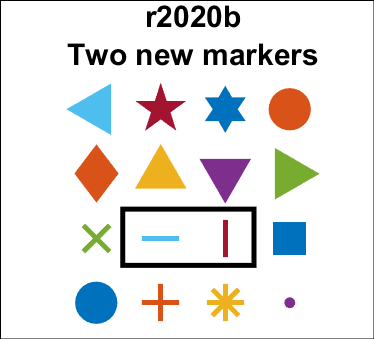
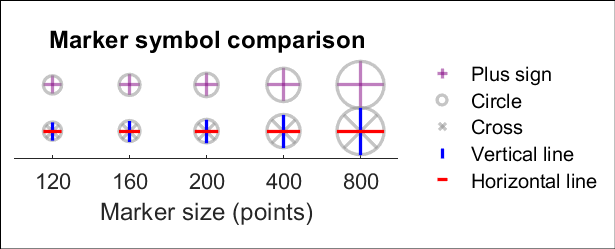
The Matlab r2020b release introduces the new horizontal ('_') and vertical (' | ') line marker symbols that are centered around the coordinate similarly to the plus marker ('+').
plot(x,y,'_')
plot(x,y,'|')
See the attached Live Script to reproduce all plots in this post.
'
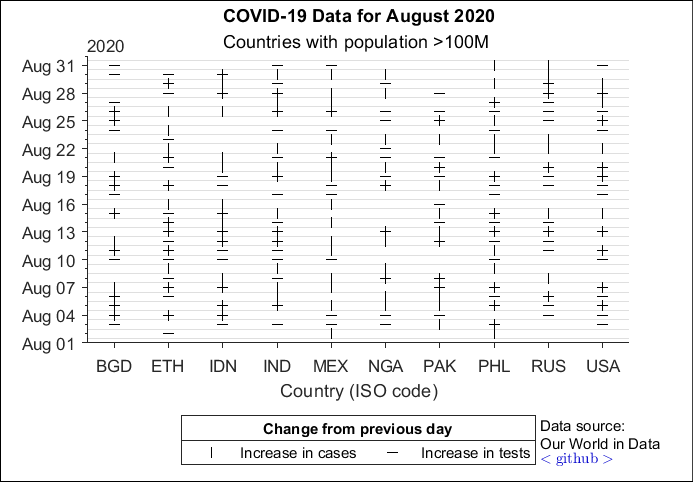
Use case example 1: Days in August 2020 that COVID-19 cases (vertical ticks) and number of tests (horizontal ticks) increased from the previous day in countries with populations greater than 100M (4 countries eliminated for incomplete data).
'
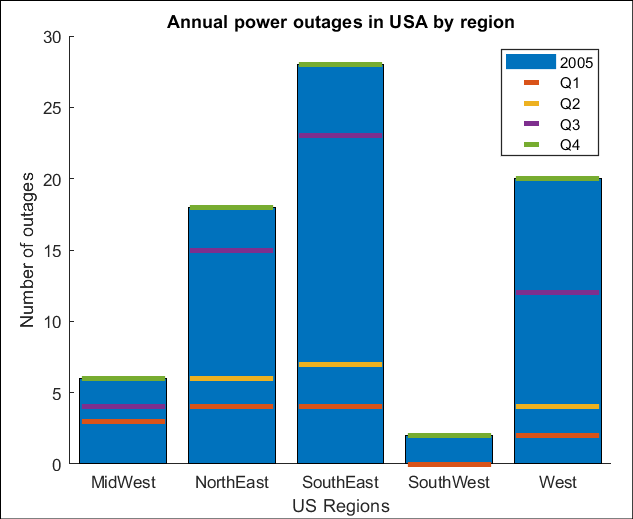
Use case example 2: (An alternative to stacked bar plots) Number of power outages in 2005 across regions of the USA, broken down by calendar quarters.
The File Exchange team is thrilled to introduce a more streamlined approach to working with GitHub and File Exchange - the MATLAB and Simulink Integration for GitHub!
Key Enhancements:
- Improves the existing connection between File Exchange and GitHub, ensuring quicker reflection of changes made in GitHub within File Exchange.
- Aligns with GitHub's standard and supported approach to building integrations.
Action Required for File Exchange Contributors!
If you are a File Exchange contributor and have linked any submissions to GitHub, it is essential to install the App.
Starting April 16, 2024, your File Exchange submissions will no longer update automatically unless you take the following steps:
1. Visit your My File Exchange page.
2. Follow the prompts on the page to install MATLAB and Simulink Integration for GitHub.
3. Complete the necessary steps in GitHub.
4. Return to the My File Exchange page and verify the installation.
A detailed description of the process is available here.
If you prefer your File Exchange submission not to update automatically from GitHub, no action is required. Users will still be able to find and download your submissions. However, to release a new version of your code, you must either install the GitHub App or disconnect from GitHub and manually upload new versions of your code.
Should you have any questions or encounter issues with the App, please feel free to comment on this post!
Big congratulations to @VBBV for achieving the remarkable milestone of 3,000 reputation points, earning the prestigious title of Editor within our community.
This achievement is a testament to @VBBV's exceptional contributions and steadfast commitment to the community. These efforts have also been endorsed by fellow top contributors, underscoring the value and impact of @VBBV's expertise.
Welcome to the Editors' Club, @VBBV – we are excited to witness and support your continued journey and influence within our community!
Image Analyst
Image Analyst
Last activity on 16 Feb 2024

American style football
12%
Soccer / football
39%
baseball
5%
basketball
12%
tennis or golf
7%
rugby, track, cricket, racing, etc.
26%
3712 votes
We are excited to unveil the ‘Open in MATLAB Online from File Exchange’ feature, which offers MATLAB users a new way to open File Exchange content!
Previously, to experiment with File Exchange code, you were required to download the file and execute it in MATLAB. But now, there's a quicker and easier way to explore the code!
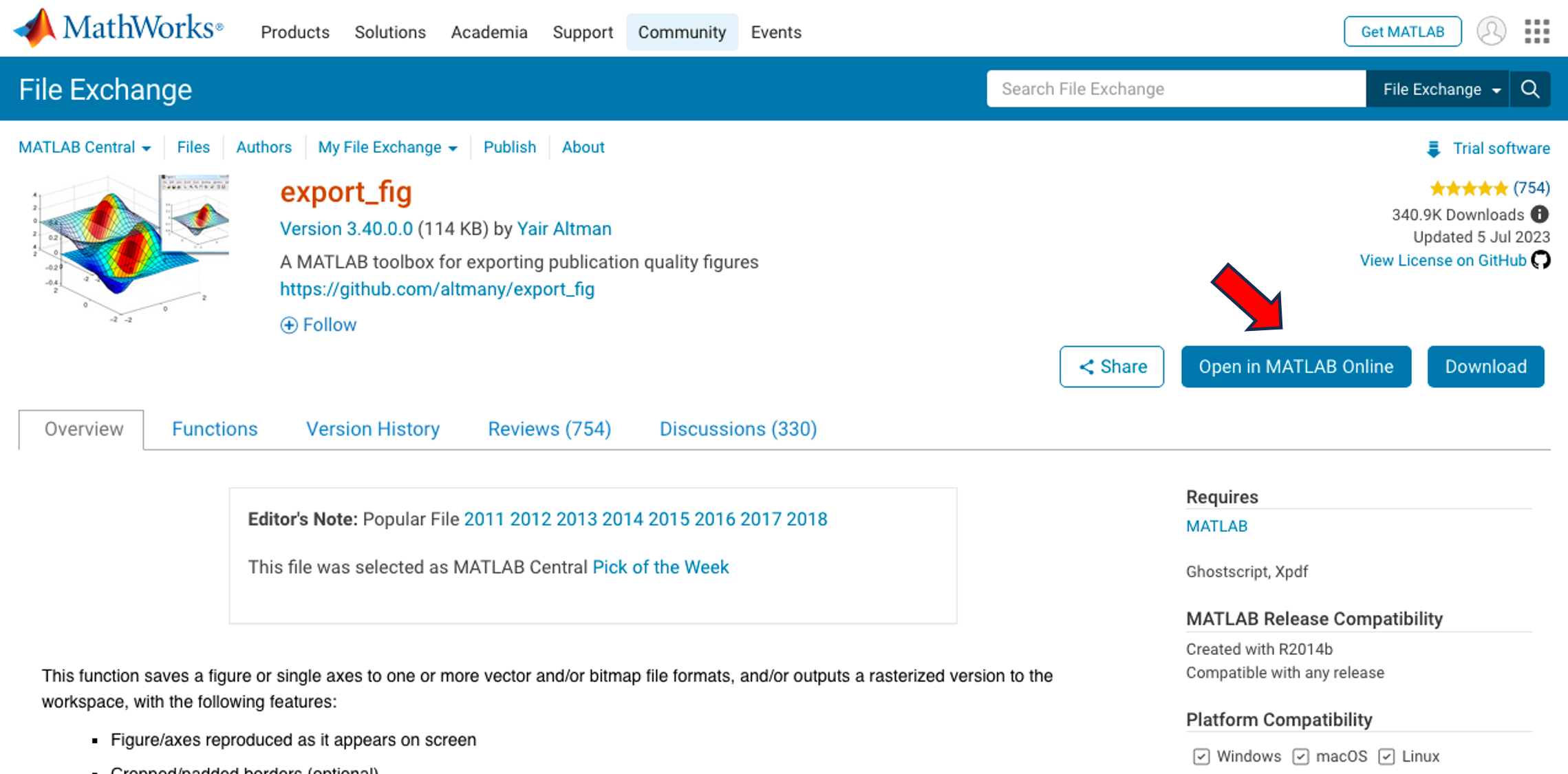
You will find the ‘Open in MATLAB Online’ button next to the ‘Download’ button (see the screenshot below). A simple click transports you directly into the MATLAB Online workflow. It's that straightforward and effortless.
We strongly encourage you to try this new feature. Please share your questions, comments, or ideas by responding to this post!
Hello, Community Members!
Every day, we witness the incredible exchange of knowledge as over 100,000 users visit our community for answers or to get some code. We have such a vibrant community because of the dedicated group of contributors who volunteer their time and expertise to help one another.
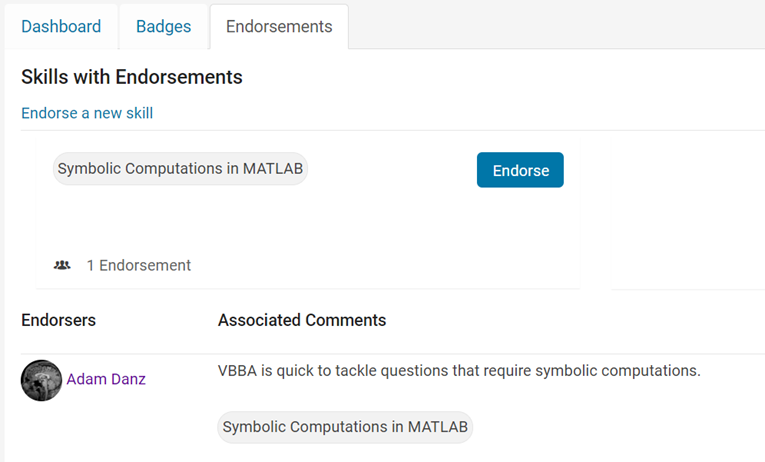
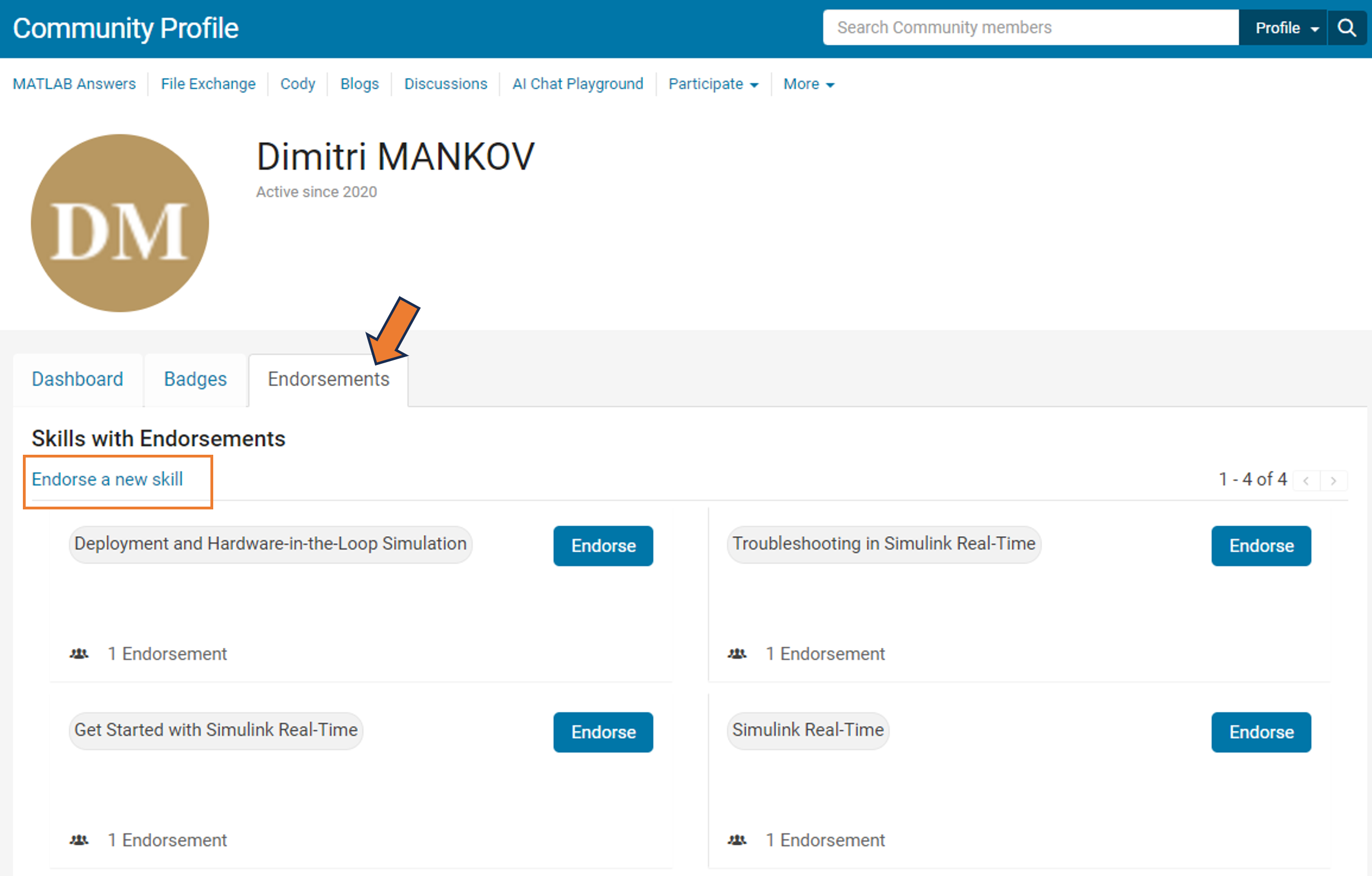
We learned that many community users are looking for different ways to show their appreciation to contributors. In response, we're thrilled to announce the launch of our latest feature – Skill Endorsements.
When you visit a contributor's profile page, you'll notice a brand-new 'Endorsements' tab. Here, you have the power to acknowledge the skills of your fellow members by either endorsing a new skill or bolstering existing ones.
But it's more than just saying "thank you." By highlighting the strengths of our members, you're contributing to an environment of trust and making it easier for users to connect with experts in specific areas.
So, take a moment to reflect: Who has made a difference in your community experience? Whose expertise has guided you through a challenge? Show your appreciation and support their contributions – start endorsing skills today!
Your participation makes all the difference.
Warm regards,
MATLAB Central Community Team
Congratulations, @Cris LaPierre for achieving 10K reputation points.
You reached this milestone by providing valuable contribution to the community since you started answering questions in Since September 2018.
You provided 3984 answers and received 1142 votes. You are ranked #24 in the community. Thank you for your contribution to the community and please keep up the good track record!
MATLAB Central Team
Yes, in my company that I own
35%
Yes, for someone else (or Univ.)
21%
Only for free, for charities
13%
Only in my charitable foundation
5%
No, I'd just play, travel, & relax
25%
15668 votes
What amazing animations can be created with no more than 2000 characters of MATLAB code? Check out our GALLERY from the MATLAB Flipbook Mini Hack contest.
Vote on your favorite animations before Dec. 3rd. We will give out MATLAB T-shirts to 10 lucky voters!
Tips: the more you vote, the higher your chance to win.
Congratuations, @Voss, for htting this important miletone!
You had a meteoric rise to in our community since you started answering questions in June 2020.
You provided 3218 answers and 926 votes. You are ranked #23 in the community. Thank you for your contribution to the community and please keep up the good track record!
MATLAB Central Team
Join us for three lightening talks about awesome MATLAB projects built by our community. Each talk will be 5-10 minutes and allow everyone a chance to ask questions.
  1. antonio - Using "uihtml" to create custom app components
  2. Balrog - Creating generative art with Matlab
  3. xxtankmasterx - Using Matlab on the Steam Deck for mobile processing and data collection
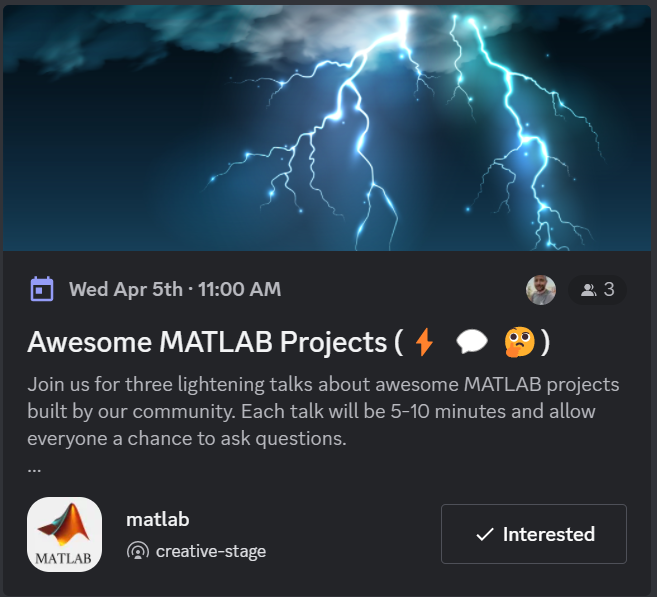
Where: MATLAB Discord Server (Online)
Contact me if you have a talk for our next event!
You are invited to join our 2023 community contest – MATLAB Flipbook Mini Hack! This year’s contest revolves around creating interesting animations using MATLAB.
Whether you are a seasoned MATLAB user or just getting started, this contest offers a fantastic opportunity to showcase your skills, learn from others, and engage with the vibrant MATLAB Central community.
Timeframe
This contest runs for 4 weeks from Nov. 6th to Dec. 3rd.
How to play
  • Create a new animation or remix an existing one with up to 2,000 characters of code.
  • Simply vote on the animations you love!

Prizes
You will have opportunities to win compelling prizes, including Amazon gift cards, MathWorks T-shirts, and virtual badges. We will give out both weekly prizes and grand prizes.
Check out the gallery and vote on the animations you like.
The MATLAB Central Community team
Adam Danz
Adam Danz
Last activity on 17 Oct 2023

New in R2021a, LimitsChangedFcn

LimitsChangedFcn is a callback function that responds to changes to axis limits ( release notes ). The function responds to axis interaction such as panning and zooming, programmatically setting the axis limits, or when axis limits are automatically adjusted by other processes.

LimitsChangedFcn is a property of ruler objects which are properties of axes and can be independently set for each axis. For example,

ax = gca(); 
ax.XAxis.LimitsChangedFcn = ... % Responds to changes to XLim
ax.YAxis.LimitsChangedFcn = ... % Responds to changes to YLim
ax.ZAxis.LimitsChangedFcn = ... % Responds to changes to ZLim

Previously, a listener could be assigned to respond to changes to axis limits. Here are some examples.

However, LimitsChangedFcn responds more reliably than a listener that responds to setting/getting axis limits. For example, after zooming or panning the axes in the demo below, the listener does not respond to the Restore View button in the axis toolbar but LimitsChangedFcn does! After restoring the view, try zooming out which does not result in changes to axis limits yet the listener will respond but the LimitsChangedFcn will not. Adding objects to axes after an axis-limit listener is set will not trigger the listener even if the added object expands the axis limits ( why not? ) but LimitsChangedFcn will!

ax = gca(); 
ax.UserData.Listener = addlistener(ax,'XLim','PostSet',@(~,~)disp('Listener')); 
ax.XAxis.LimitsChangedFcn = @(~,~)disp('LimitsChangedFcn')

How to use LimitsChangedFcn

The LimitsChangedFcn works like any other callback. For review,

The first input to the LimitsChangedFcn callback function is the handle to the axis ruler object that was changed.

The second input is a structure that contains the old and new limits. For example,

    LimitsChanged with properties:
      OldLimits: [0 1]
      NewLimits: [0.25 0.75]
         Source: [1×1 NumericRuler]
      EventName: 'LimitsChanged'

Importantly, since LimitsChangedFcn is a property of the axis rulers rather than the axis object, changes to the axes may clear the LimitsChangedFcn property if the axes aren't held using hold on. For example,

% Axes not held
ax = gca(); 
ax.XAxis.LimitsChangedFcn = @(ruler,~)title(ancestor(ruler,'axes'),'LimitsChangedFcn fired!'); 
plot(ax, 1:5, rand(1,5), 'o')
ax.XAxis.LimitsChangedFcn
ans =
    0×0 empty char array
% Axes held
ax = gca(); 
hold(ax,'on')
ax.XAxis.LimitsChangedFcn = @(ruler,~)title(ancestor(ruler,'axes'),'LimitsChangedFcn fired!'); 
plot(ax, 1:5, rand(1,5), 'o')
ax.XAxis.LimitsChangedFcn
ans =
  function_handle with value:
    @(ruler,~)title(ancestor(ruler,'axes'),'LimitsChangedFcn fired!')

Demo

In this simple app a LimitsChangedFcn callback function is assigned to the x and y axes. The function does two things:

  1. Text boxes showing the current axis limits are updated
  2. The prying eyes that are centered on the axes will move to the new axis center

This demo also uses Name=Value syntax and emoji text objects !

Create app

h.fig = uifigure(Name="LimitsChangedFcn Demo", ...
    Resize="off");
h.fig.Position(3:4) = [500,260];
movegui(h.fig)
h.ax = uiaxes(h.fig,...
    Units="pixels", ...
    Position=[200 26 250 208], ...
    Box="on");
grid(h.ax,"on")
title(h.ax,"I'm following you!")
h.eyeballs = text(h.ax, .5, .5, ...
    char([55357 56385 55357 56385]), ...
    HorizontalAlignment="center", ...
    FontSize=40);
h.label = uilabel(h.fig, ...
    Text="Axis limits", ...
    Position=[25 212 160 15], ...
    FontWeight="bold",...
    HorizontalAlignment="center");
h.xtxt = uitextarea(h.fig, ...
    position=[25 191 160 20], ...
    HorizontalAlignment="center", ...
    WordWrap="off", ...
    Editable="off",...
    FontName=get(groot, 'FixedWidthFontName'));
h.ytxt = uitextarea(h.fig, ...
    position=[25 165 160 20], ...
    HorizontalAlignment="center", ...
    WordWrap="off", ...
    Editable="off", ...
    FontName=get(groot, 'FixedWidthFontName'));
h.label = uilabel(h.fig, ...
    Text=['X',newline,newline,'Y'], ...
    Position=[10 170 15 38], ...
    FontWeight="bold");

Set LimitsChangedFcn of x and y axes

h.ax.XAxis.LimitsChangedFcn = @(hObj,data)limitsChangedCallbackFcn(hObj,data,h,'x');
h.ax.YAxis.LimitsChangedFcn = @(hObj,data)limitsChangedCallbackFcn(hObj,data,h,'y');

Update text fields

xlim(h.ax, [-100,100])
ylim(h.ax, [-100,100])

Define LimitsChangedFcn

function limitsChangedCallbackFcn(rulerHand, limChgData, handles, xy)
% limitsChangedCallbackFcn() responds to changes to x or y axis limits.
% - rulerHand: Ruler handle for x or y axis that was changed (not used in this demo)
% - limChgData: LimitsChanged data structure
% - handles: structure of App handles
% - xy: either 'x' or 'y' identifying rulerHand
switch lower(xy)
    case 'x'
        textHandle = handles.xtxt;
        positionIndex = 1; 
    case 'y'
        textHandle = handles.ytxt;
        positionIndex = 2; 
    otherwise
        error('xy is a character ''x'' or ''y''.')
end
% Update text boxes showing rounded axis limits
textHandle.Value = sprintf('[%.3f, %.3f]',limChgData.NewLimits);
% Move the eyes to the new center position
handles.eyeballs.Position(positionIndex) = limChgData.NewLimits(1)+range(limChgData.NewLimits)/2; % for linear scales only!
drawnow
end

See attached mlx file for a copy of this thread.

Highlight Icon image

Adam Danz
Adam Danz
Last activity on 17 Oct 2023

Starting in MATLAB R2021a, name-value arguments have a new optional syntax!

A property name can be paired with its value by an equal sign and the property name is not enclosed in quotes.

Compare the comma-separated name,value syntax to the new equal-sign syntax, either of which can be used in >=r2021a:

  • plot(x, y, "b-", "LineWidth", 2)
  • plot(x, y, "b-", LineWidth=2)

It comes with some limitations:

  1. It's recommended to use only one syntax in a function call but if you're feeling rebellious and want to mix the syntaxes, all of the name=value arguments must appear after the comma-separated name,value arguments.
  2. Like the comma-separated name,value arguments, the name=value arguments must appear after positional arguments.
  3. Name=value pairs must be used directly in function calls and cannot be wrapped in cell arrays or additional parentheses.

Some other notes:

  1. The property names are not case-sensitive so color='r' and Color='r' are both supported.
  2. Partial name matches are also supported. plot(1:5, LineW=4)

The new syntax is helpful in distinguishing property names from property values in long lists of name-value arguments within the same line.

For example, compare the following 2 lines:

h = uicontrol(hfig, "Style", "checkbox", "String", "Long", "Units", "Normalize", "Tag", "chkBox1")
h = uicontrol(hfig,  Style="checkbox",    String="Long",    Units="Normalize",    Tag="chkBox1")

Here's another side-by-side comparison of the two syntaxes. See the attached mlx file for the full code and all content of this Community Highlight.

MATLAB EXPO 2021 is May 4-5, 2021!

MATLAB EXPO is open to everyone:

  • It's free.
  • It's online.
  • Register now. [Edit: Registration is closed]

Industry Tracks:

  • AI in Engineering
  • Modeling and Simulation
  • Implementation, Verification, and DevOps
  • Algorithm Development and Deployment
  • 5G and Radar
  • FPGA, ASIC, and SoC Design
  • Autonomous Systems
  • Teaching with MATLAB and Simulink
  • Cloud and IoT
  • Motor and Power Control

Special Event: Women in Tech Ignite Session

Women in Tech Ignite is a networking event where the MATLAB community can meet and be inspired by a diverse group of women engineers and scientists and hear about the innovative ways they use MathWorks products. Attendees of all genders are welcome.

[Edit: Registration is closed]

About Highlights

View announcements and updates in the MATLAB and Simulink product community, including MATLAB Central and Discussions.

Share your feedback and join the conversation by participating in polls posted by staff and community power users. These polls appear across MathWorks.com, so look for them while signed in to community pages.