Dashboard
R2026bUse blocks from the Dashboard library to build an intuitive and interactive interface for your model. Control blocks (such as Knob and Slider) connect to tunable parameters and let you adjust values during simulation. Display blocks (such as Gauge and Lamp) connect to signals and show their values in real time. For more information, see Control Simulations with Interactive Dashboards.
To add blocks from this library to your model, see Add Blocks to Models.
You can design dashboard blocks that look like controls and displays in your real system using the blocks in the Customizable Blocks library.
Blocks
 | Callback Button | Execute MATLAB code using button |
 | Check Box | Select parameter or variable value |
 | Combo Box | Select parameter value from drop-down menu |
 | Dashboard Scope | Trace signals on scope display during simulation |
 | Display | Display signal value during simulation |
 | Edit | Enter new value for parameter |
 | Edit | Enter new value for parameter or variable during simulation in edit box with customizable appearance (Since R2026a) |
 | Gauge | Display signal value on circular scale |
 | Half Gauge | Display input value on semicircular scale |
 | Knob | Tune parameter value with dial |
 | Lamp | Display color that reflects signal value on lamp |
 | Linear Gauge | Display input value on linear scale |
 | MultiStateImage | Display image reflecting input value |
 | Push Button | Change parameter or variable value using button |
 | Quarter Gauge | Display input value on quadrant scale |
 | Radio Button | Select parameter value |
 | Rocker Switch | Toggle parameter between two values |
 | Rotary Switch | Switch parameter to set values on dial |
 | Slider | Tune parameter value with sliding scale |
 | Slider Switch | Toggle parameter between two values |
 | Toggle Switch | Toggle parameter between two values |
Tools
| Library Browser | Find and add blocks to model |
Topics
- Add Blocks to Models
Use the Library Browser and quick insert menu to insert blocks.
Related Information
Featured Examples
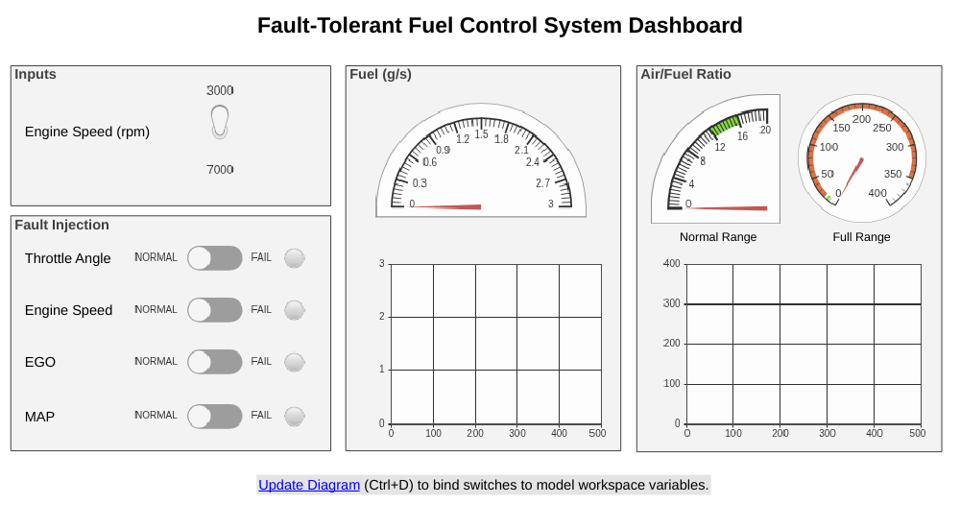
Model Fault-Tolerant Fuel Control System
Combine Stateflow® and Simulink® capabilities to model hybrid systems. This type of modeling is useful for systems that have many possible operational modes based on discrete events. Simulink handles traditional signal flow while Stateflow implements changes in control configuration. This example describes a fuel control system for a gasoline engine. The system is robust because it detects individual sensor failures, and dynamically reconfigures the control system for uninterrupted operation.

