Encoding graphics for the MATLAB One-Button Game Mini Hack
The MATLAB One-Button Game Mini Hack asks us to fit an entire game into 10,000 characters of MATLAB code. That becomes quite a challenge once we start adding detailed backgrounds, animated characters, and visual effects. But, as we've seen in previous Mini Hacks, embracing limitations can often spark ingenuity. And this year is no exception, as the contest's restrictions have brought out some rather creative programming, with participants finding ways to fit far more into their entries than the character limit might initially suggest.
In my earlier article on making games in MATLAB, I shared some of the graphics and programming ideas behind Arcade. This time, I would like to show how I created the artwork for my Mini Hack games and encoded it to fit inside the submitted code. We can draw a scene in MATLAB, reduce its images to the information needed to reconstruct them, and let the game recover the artwork from its own source. The same idea extends to the coordinates used to build 3D objects and their effects.
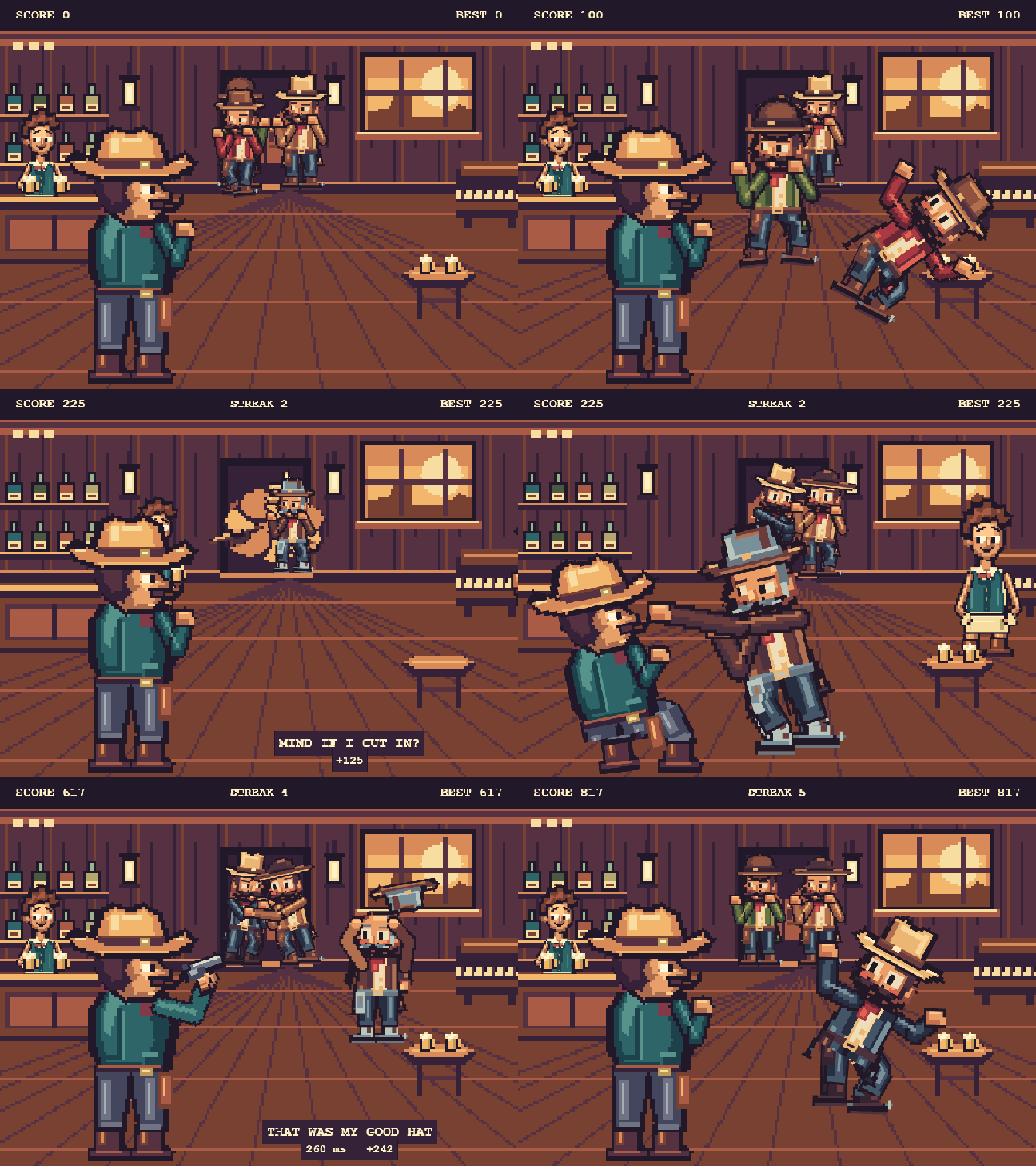
Saloon Brawl Knockout uses the characters from my earlier Western games for its fighters, background crowd, and bartender. Their separate body parts let them walk, duck, and throw punches while keeping the original pixel-art appearance:
The backgrounds and characters are prepared separately, so the same cast can appear in different locations. These are the four backgrounds from Trigger-Happy Mayhem, each drawn in MATLAB as a 150-by-200 image before the characters and props are added:
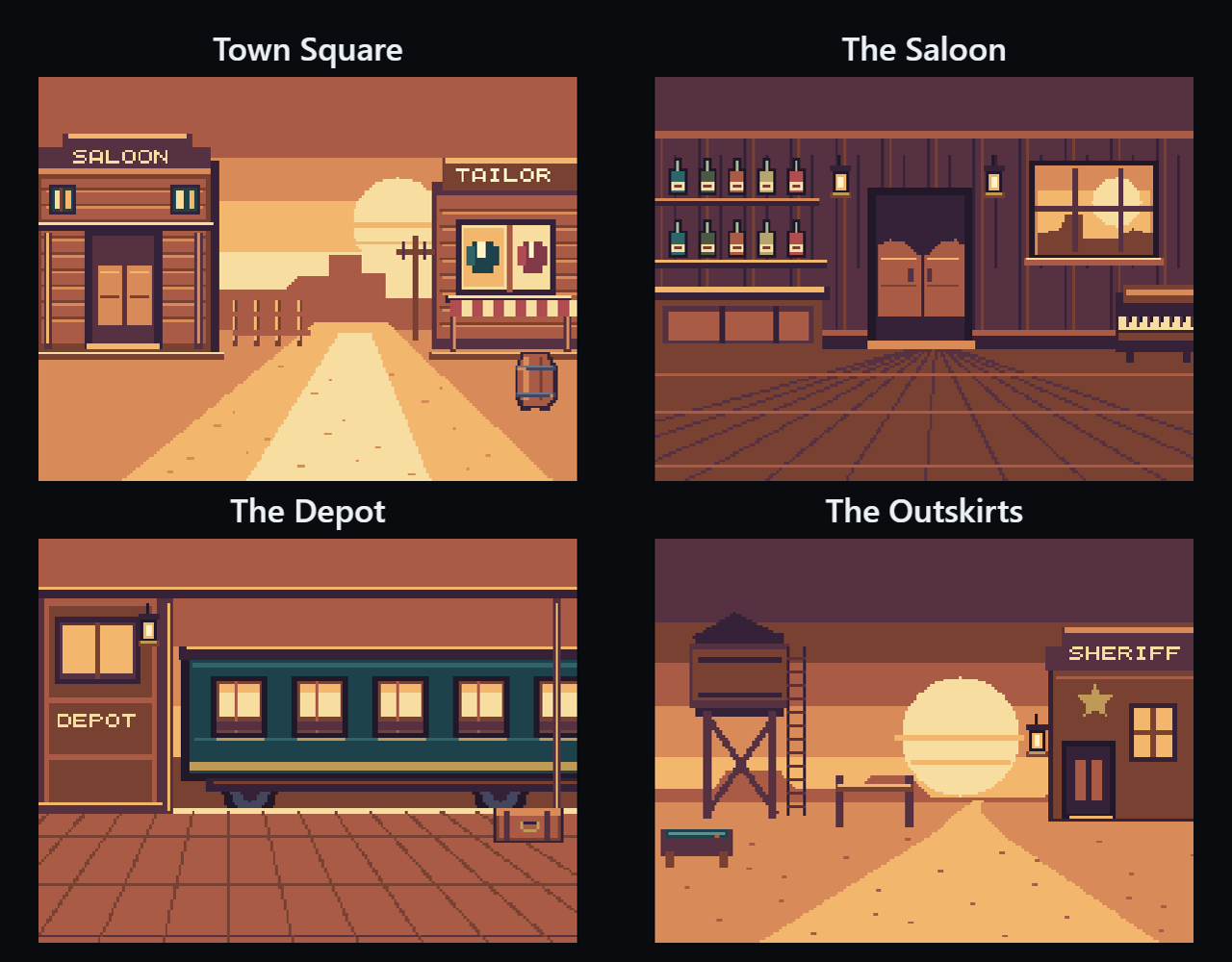
Together with the character parts and props, the original image arrays contain more than 1.5 million pixels. Sharing repeated artwork considerably reduces the data before compression. The encoded data is stored directly in game.m, alongside the code that reconstructs the images during initialization.
Drawing with palette indices
Let's start with a small piece of the artwork: the beer mug from Tipping Point. Its dark outline, amber fill, and foam fit into a 15-by-15 indexed image. Each array element stores a single integer that selects a color from a shared RGB palette, with 0 reserved for transparent pixels.
Filled polygons form the mug's body. The handle is added beside it, followed by the highlights and foam:
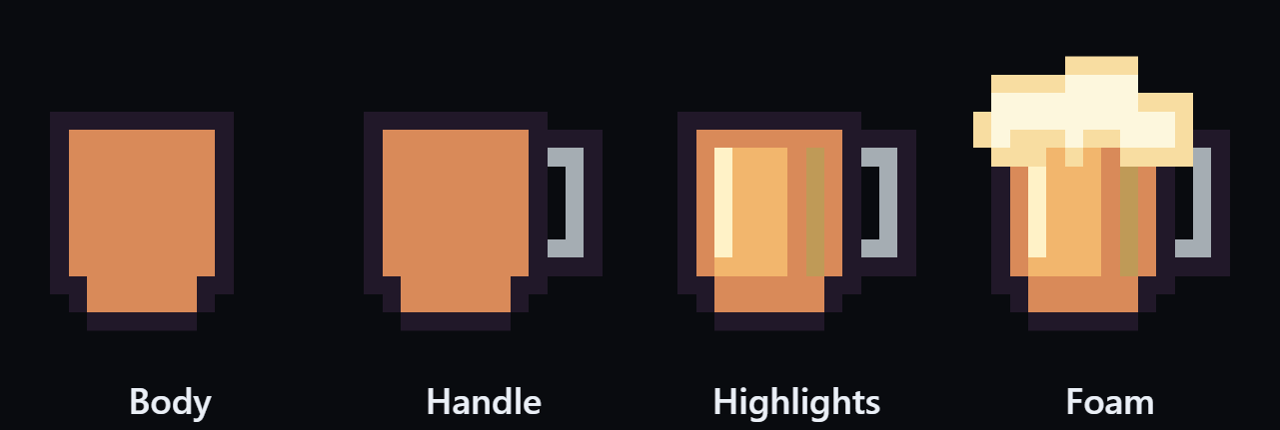
For example, these vertices define the dark outline of its body:
pixels = zeros(15, 15, 'uint8');
[x, y] = meshgrid(0:14);
outline = [1 3; 10 3; 10 12; 8 14; 3 14; 1 12];
pixels(inpolygon(x, y, outline(:,1), outline(:,2))) = 1;
The drawing coordinates run from 0 to 14, and meshgrid supplies the pixel centers. inpolygon selects the points inside or on the outline, so we can assign the value 1 to those pixels using logical indexing. A smaller polygon fills the body with amber. Rectangles add the visible part of the handle and the highlights, and further polygons form the foam.
The attached mugEncodingDemo.m contains the complete drawing, encoder, and decoder. Calling it with false returns the pixel array and RGB palette, which can be used to display the mug:
[pixels, palette] = mugEncodingDemo(false);
figure;
image(pixels, CDataMapping="direct", AlphaData=pixels ~= 0);
colormap(double(palette) / 255);
axis image off
For a uint8 indexed image, image maps each pixel value to the corresponding colormap row, following MATLAB's integer-image color mapping. AlphaData hides the pixels whose value is 0, while colormap assigns the palette after its RGB values have been scaled from the range 0–255 to 0–1.
The larger Western backgrounds use the same drawing operations. In Quickdraw, horizontal bands and alternating pixels form the sunset, polygons form the road and the hills, and rectangles build the storefronts, windows, signs, and boards. Loops are used to generate the repeated details. Once the scene is drawn, we can encode its pixel values into the game directly and omit the lengthy drawing routines.
Packing repeated pixels
Many neighboring pixels in the mug have the same value. Instead of writing each value separately, we can record the pixel value and length of each uninterrupted run. For example, in the fourth column highlighted below, the five consecutive pixels with value 9 become the pair 9, 5:
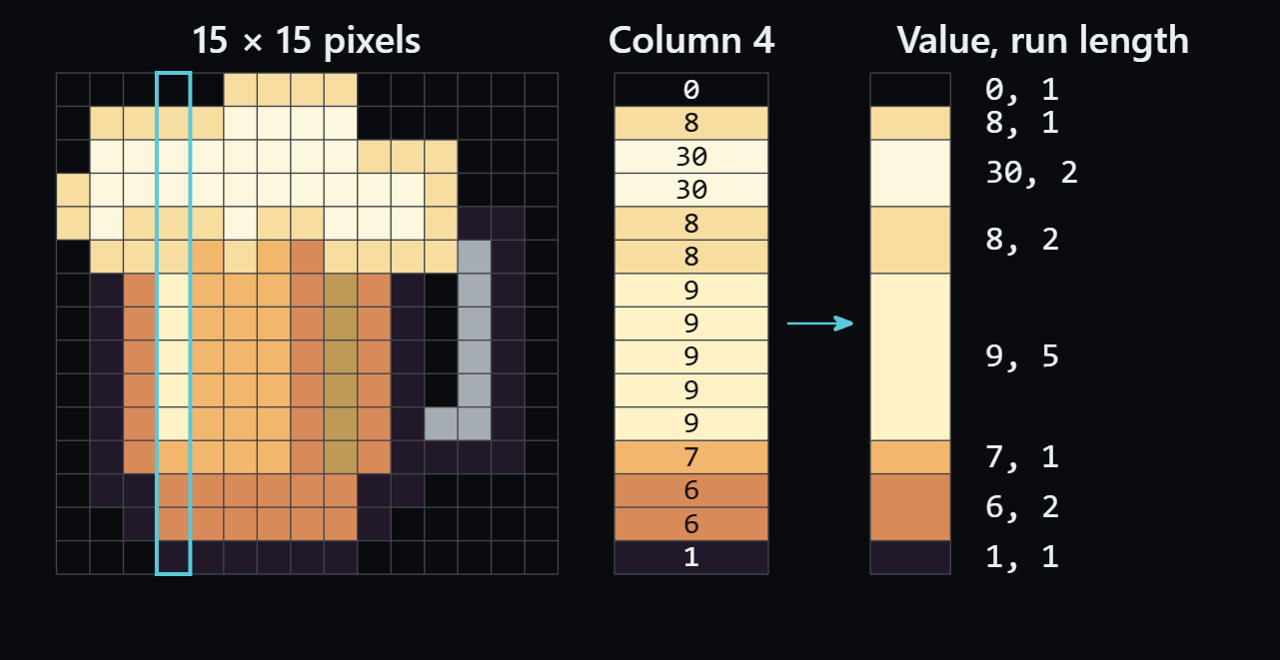
Tipping Point has 32 palette entries, so five bits are enough to represent a color index. Using another five bits for the run length lets us combine a color index from 0 to 31 with a length from 1 to 32:
token = colorIndex + 32 * (runLength - 1);
Dividing by 32 separates the two values: the remainder is the color index, and adding 1 to the integer quotient recovers the run length. Runs longer than 32 pixels are split into several tokens. To store those tokens compactly in the source file, we convert them to characters and recover their numeric codes when decoding:
values = double(pixels(:)');
starts = find([true, diff(values) ~= 0]);
runLengths = diff([starts, numel(values)+1]);
tokens = [];
for k = 1:numel(starts)
remaining = runLengths(k);
while remaining > 0
runLength = min(32, remaining);
tokens(end+1) = values(starts(k)) + 32 * (runLength-1);
remaining = remaining - runLength;
end
end
packed = char(19968 + tokens);
diff identifies changes between consecutive pixel values. Converting to double first preserves decreases as well as increases; unsigned integer subtraction would clip negative differences to 0. find returns the starting position of each run, and the differences between consecutive positions determine the run lengths.
Adding 19968 shifts the 1,024 possible token values into a range of Unicode character codes; char converts those codes to printable text. This range contains no quotation marks or control characters, so we can write the result between single quotes in game.m as a character vector literal. Each character represents one token, replacing the decimal digits and separators that would be needed to write that token as a number. This encoding takes place while preparing the artwork; the game starts with the resulting literal already in its source.
At initialization, double recovers the numeric character codes. Subtracting the offset restores the tokens, and mod and floor separate their colors and lengths. repelem expands the runs, and reshape reconstructs the original pixel array:
tokens = double(packed) - 19968;
colors = mod(tokens, 32);
lengths = floor(tokens / 32) + 1;
decoded = repelem(colors, lengths);
restored = uint8(reshape(decoded, 15, 15));
The mug's 225 pixels become 74 tokens, stored in 74 characters. The attached example verifies that decoding them reproduces every original pixel. Tipping Point combines the runs from all its images with their dimensions and palette, then compresses that collection further before embedding it in the game.
The double(packed) conversion above requires a character vector. A string scalar, written with double quotes, behaves differently: double("123") converts the text to the number 123. mxym discusses this distinction in their article on PULSE // PALS. The game also packs geometry, palette, and note-chart values into characters.
Pixel runs can also help when drawing an image. In their Ember Fox article, Cephas describes defining sprites as grids of # and . characters. Each horizontal run of # characters becomes one rectangle, reducing the number of shapes needed to draw the sprite. In addition, SunHuilin describes storing image data as pixel runs and each 7-by-7 effect pattern as seven integers in their Purrfect Fit article. The individual bits select the filled pixels, allowing the same drawing loop to produce hearts, paws, sparkles, and other effects.
Small numeric tables can also be packed into characters. Street Racer uses a 3-by-5 font, with each row represented by three bits. For the letter A, the five row values are 2, 5, 7, 5, 5, corresponding to 010, 101, 111, 101, 101. Five base-8 digits occupy 15 bits, so the whole glyph fits in one character:
rows = [2; 5; 7; 5; 5];
packed = char(256 + sum(rows .* 8.^(0:4)'));
rows = mod(floor((double(packed) - 256) ./ 8.^(0:4)'), 8);
pixels = logical(mod(floor(rows ./ [4 2 1]), 2));
The last line separates each row into its three bits, with 4, 2, and 1 corresponding to the left, middle, and right pixels. The same packing idea works for small coordinates and dimensions: Street Racer stores its car artwork as colored rectangle parameters, which the renderer uses to draw the intact and damaged cars.
Stefan Abendroth packs each car pixel in Drift Boss into four bits: three select one of eight palette colors, and one marks the pixel as opaque or transparent. Two pixels fit in each byte. Base64 represents those bytes as ASCII text in the source; during initialization, matlab.net.base64decode recovers the bytes before the color indices and opacity bits are separated.
Sharing character parts
Quickdraw's cowboy is assembled from separate layers for the body, trousers, head, hat, mustache, and arms. Most of these parts can remain in place while the arm moves through eight poses to draw the revolver. Keeping the layers separate also allows a well-timed shot to send the hat or mustache flying while the face underneath stays intact.
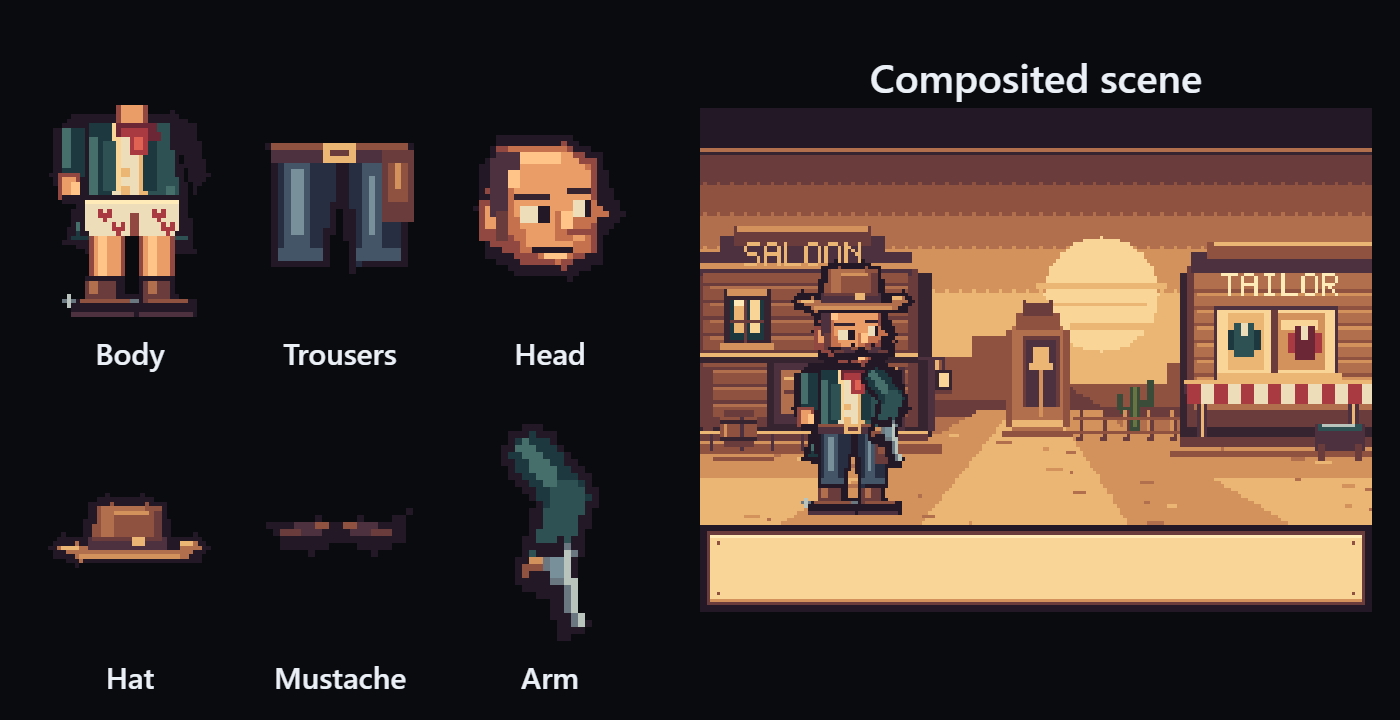
The original layers all use an 80-by-64 canvas, so the body parts align when overlaid. Much of each canvas is transparent. Before encoding it, the preparation code crops the layer to its nontransparent bounding box and stores the crop's position and size. During reconstruction, those values position the recovered pixels within the original canvas.
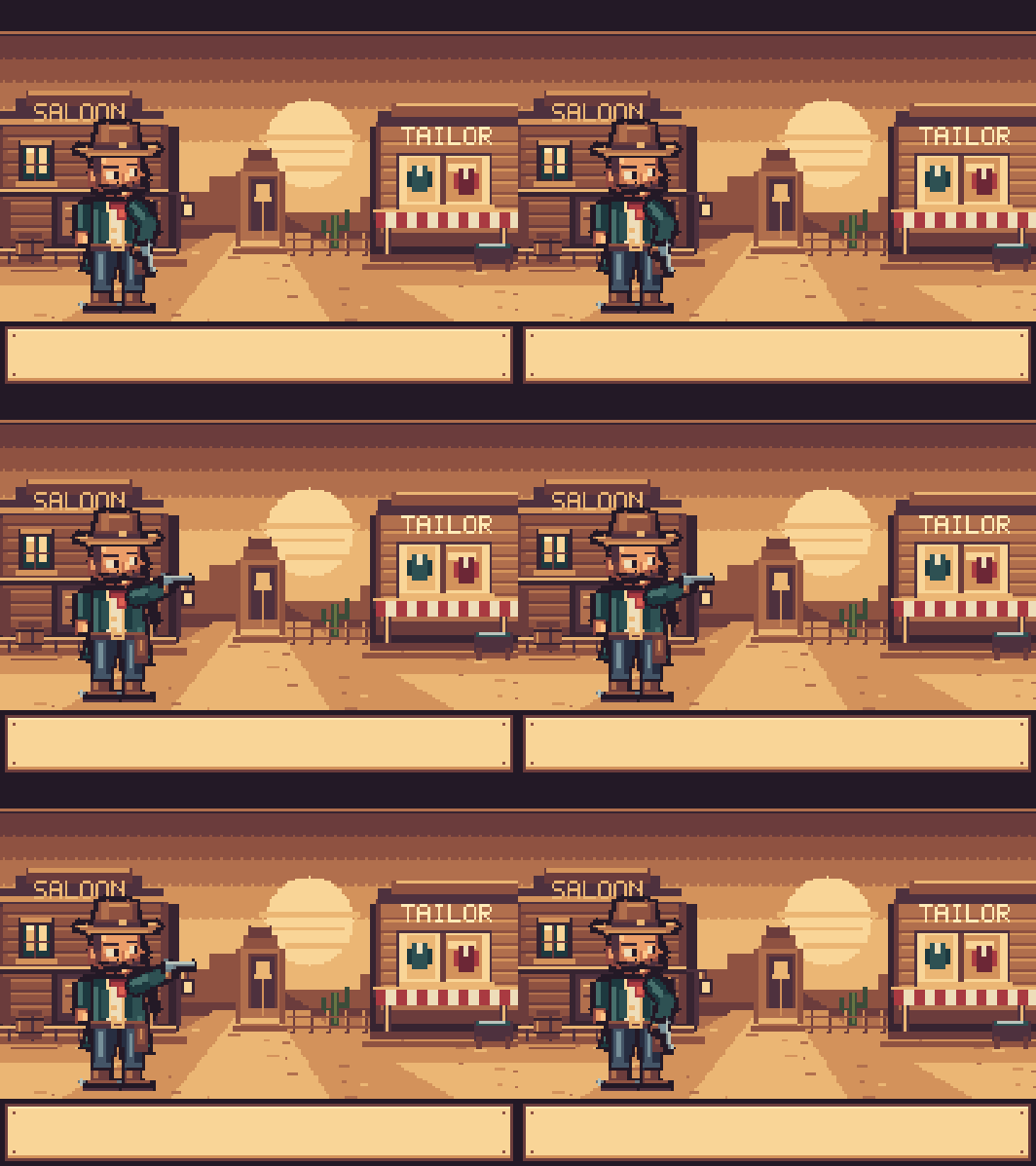
To animate the draw, the renderer selects the appropriate arm layer and overlays its nonzero pixels on the character. Transparent pixels leave the underlying image unchanged. Each pose is drawn beforehand from specified hand and elbow positions. Thick strokes form the sleeves and forearm, an ellipse forms the hand, and a small revolver image is rotated into position before the pose is encoded.
Trigger-Happy Mayhem shares parts across different characters as well. The preparation code groups crops that can be reconstructed from a common template and stores the color maps separately. The three rivals below share the same body template, with different maps supplying their jacket colors. Their faces, hats, arms, and lower bodies have separate template and color-map records. Rivals 1 and 3 also reuse identical faces, mustaches, legs, and trousers. The strips compare the maps used for the body:
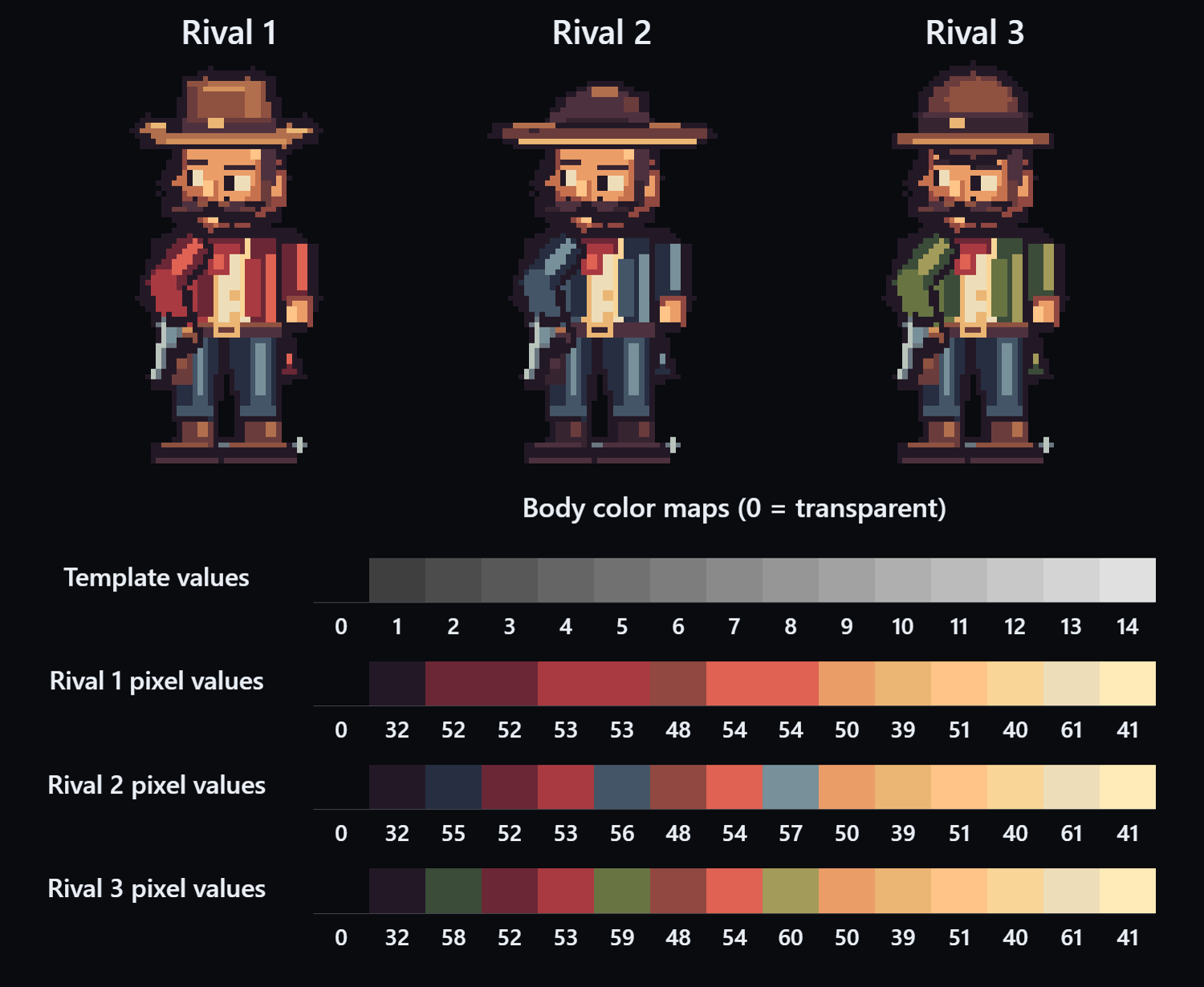
The shared body template is a pixel array; the top strip lists its distinct values, using gray shades to distinguish them. Each rival's row shows the pixel values returned by its lookup table, colorMap, and the palette colors they select. Applying that table to every template pixel reconstructs the crop:
crop = reshape(colorMap(double(template(:)) + 1), size(template));
Each rival's color map preserves 0 for transparent pixels and maps the remaining template values to that rival's pixel values. For example, Rival 1's map converts both 2 and 3 to 52, while Rival 2's maps them to 55 and 52, and Rival 3's to 58 and 52. The stored crop offset places the result back in its original canvas.
The game reconstructs 207 image arrays from 64 templates and 85 color maps, including the four backgrounds, character layers, and props. A short record identifies each image's template and color map and specifies its original canvas size and crop position.
During preparation, the template pixels are compressed using their surroundings to estimate the probability of each possible value. Pixels are processed row by row, using their left, upper, upper-left, and upper-right neighbors as the context. Values assigned higher probabilities take less space to encode. As the decoder recovers each pixel, it updates the same probability model, allowing it to reproduce the original template and apply the appropriate color map.
Transforming pixel artwork
The separate body parts also let us change a character's pose during play. In Saloon Brawl Knockout, the sheriff bends at the waist to dodge a punch, while the rivals approach from the back of the room and rotate as they fall onto the table.
The game reconstructs the indexed artwork from shared templates and color maps, as in Trigger-Happy Mayhem. Each character layer is then converted into colored rectangles. The conversion groups vertically adjacent pixels of the same color into runs. Runs in neighboring columns are then merged when their colors and upper and lower edges match. Here's the conversion for one of the hat layers:
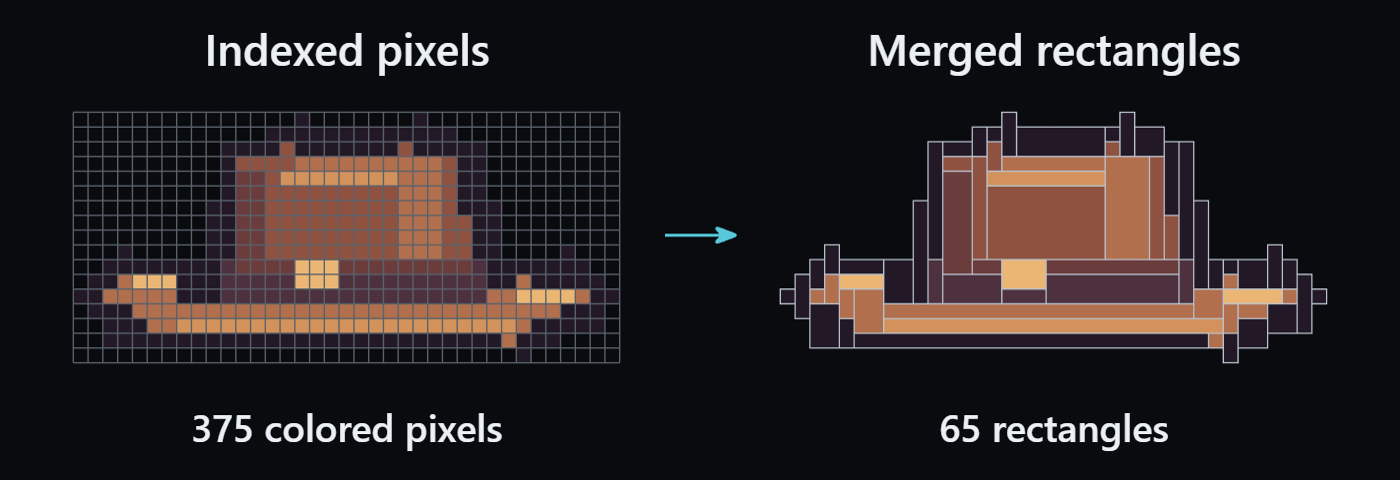
The hat's 375 colored pixels become 65 rectangles: about 83% fewer faces to transform and draw than using one rectangle per colored pixel. Each rectangle is defined by four corners and a palette index; transparent pixels need no geometry. The outlines mark the boundaries between the rectangles. The colors and silhouette remain unchanged.
To place a character, the renderer scales the vertices about a fixed origin and translates them to the character's position in the room. Increasing the scale makes the rival grow as he approaches:
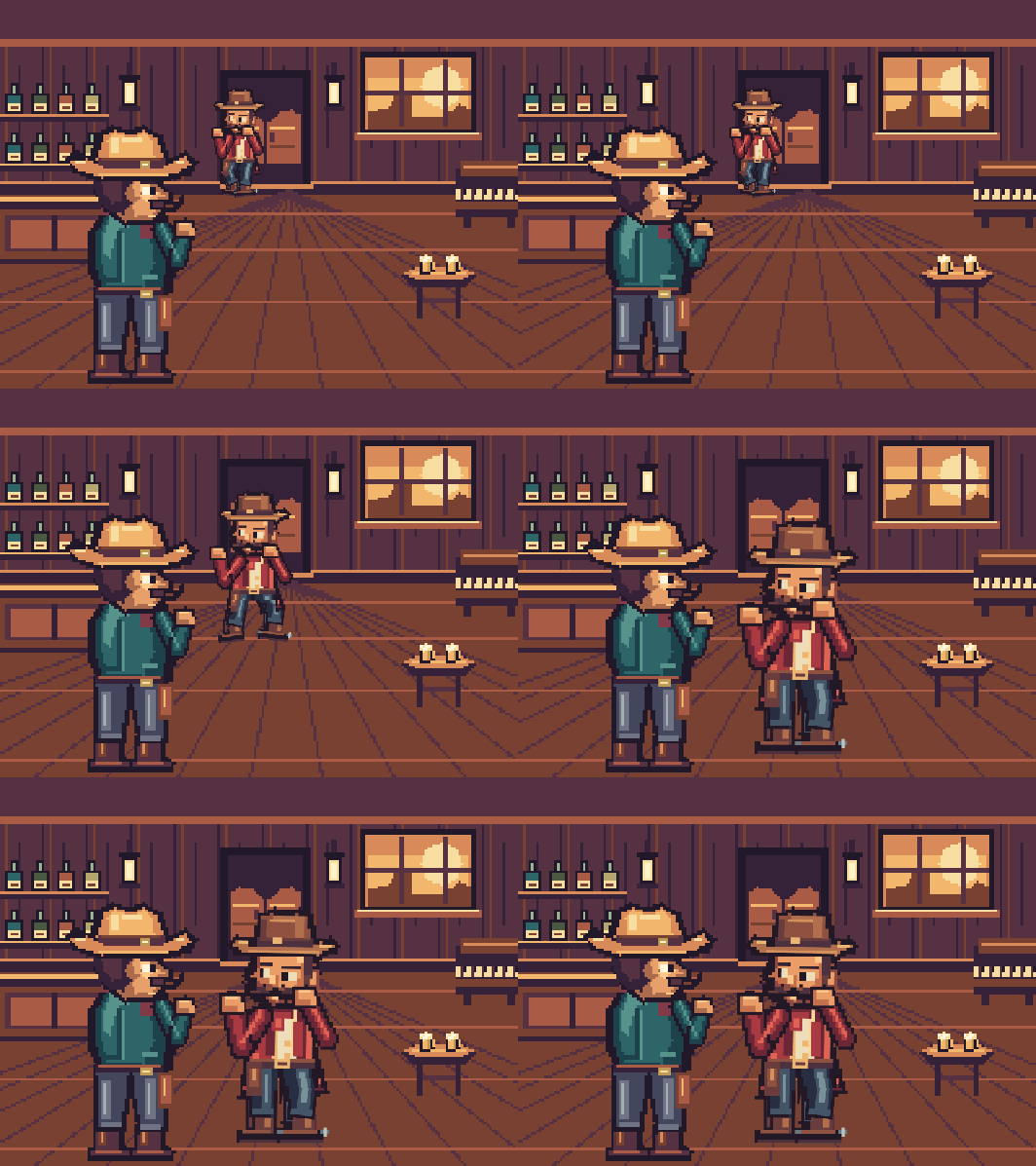
The sheriff leans back at the waist and lowers his torso to dodge the punch. After the counterpunch, the rival's fall combines rotation with changes in position and scale. The face, hat, and mustache rotate with the body:
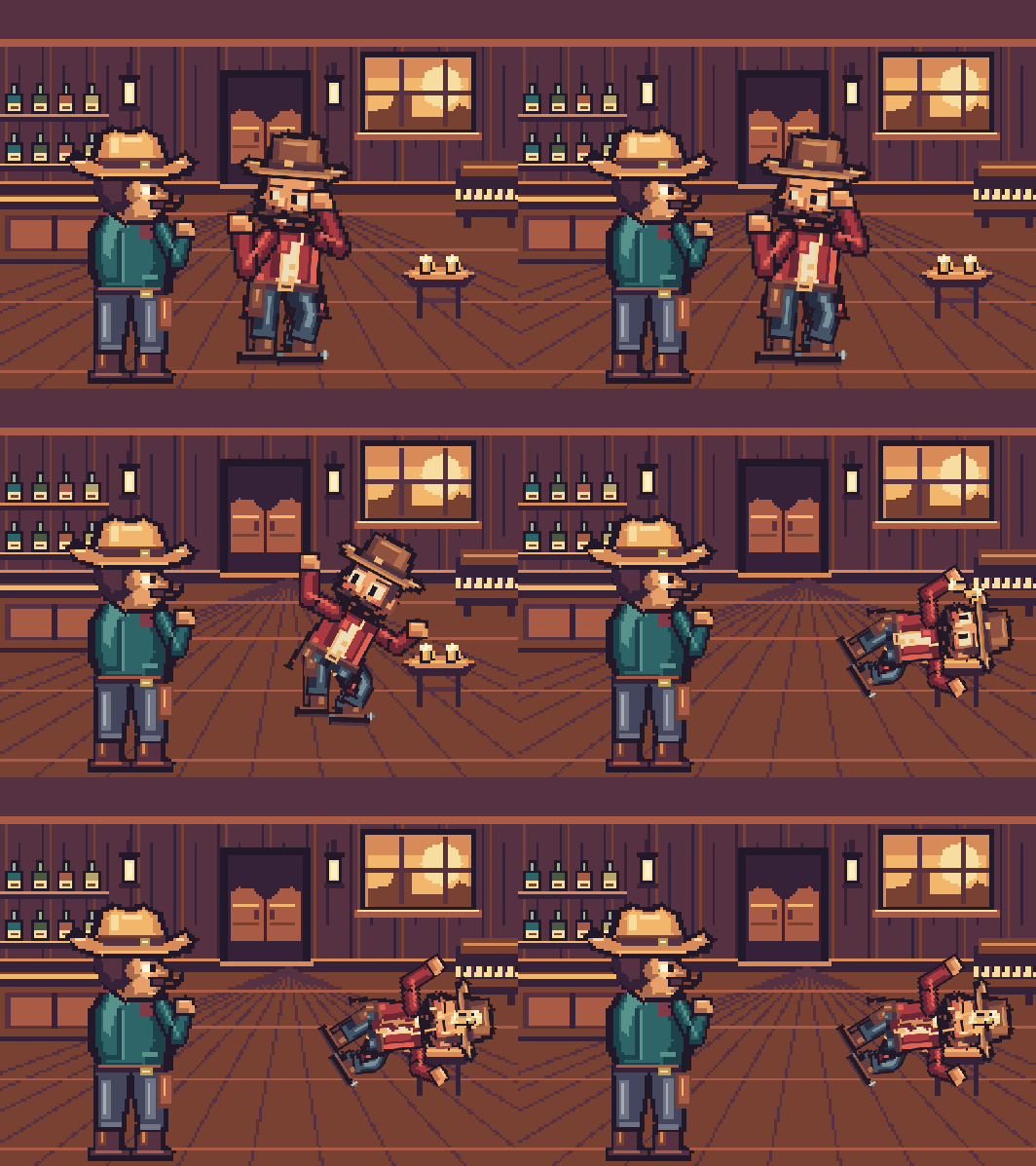
The renderer scales and rotates the rectangles directly, so that their corners are not restricted to the original pixel grid. The head, torso, and leg pieces are prepared during initialization and reused, while the pose calculations place the parts around the moving joints. Characters and moving props are drawn through one reusable patch object. The background remains a separate 150-by-200 indexed image, and the original palette supplies the colors for both.
Generating poses during initialization
We can also prepare a character's animation frames before play begins. Run & Gun generates its sprite images during initialization, building them from polygons, rectangles, disks, and connected limb segments. Changing the limb positions produces the running poses, while folding the body and rotating the assembled sprite produces the somersault:
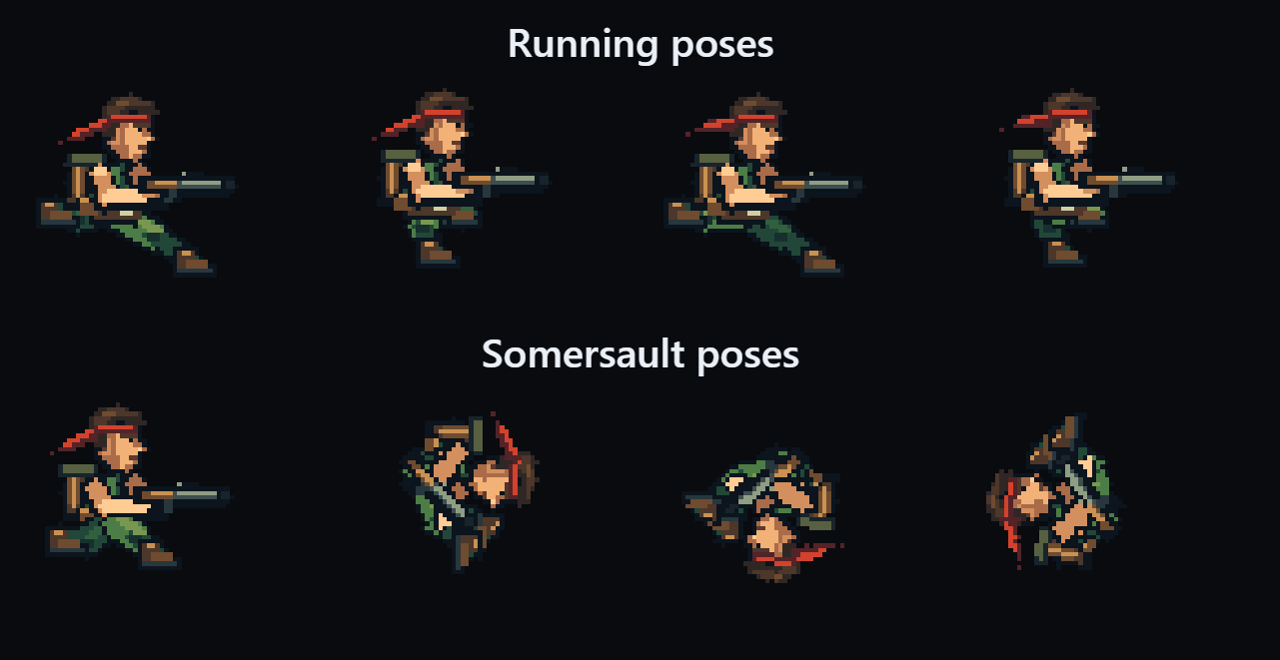
The rifle is drawn with the body before rotation, so both turn together. The player frames are prepared once and retained; during play, the renderer selects the frame for the current action.
Preparing artwork during initialization is useful for scenery as well. Tharikaa Ramesh Kumar describes this in their Slingshot Home article, where a grid and a lighting expression generate the planet textures. Run & Gun prepares separate sky, scenery, and road arrays, which its renderer reuses to scroll the scenery at different speeds.
Copying repeated patterns
When encoding sprite images, repeated details provide another opportunity to save space. Repeated wheels, windows, or patches of shading can contain identical sequences of palette indices. We can store a reference to an earlier occurrence of a repeated sequence and have the decoder copy its values.
In Paperboy: Back on the Block, seven 24-by-24 sprites are joined into one array. Their 4,032 pixels are represented by 407 tokens. Each token either contains a pixel value or specifies a distance back into the decoded data and the number of values to copy.
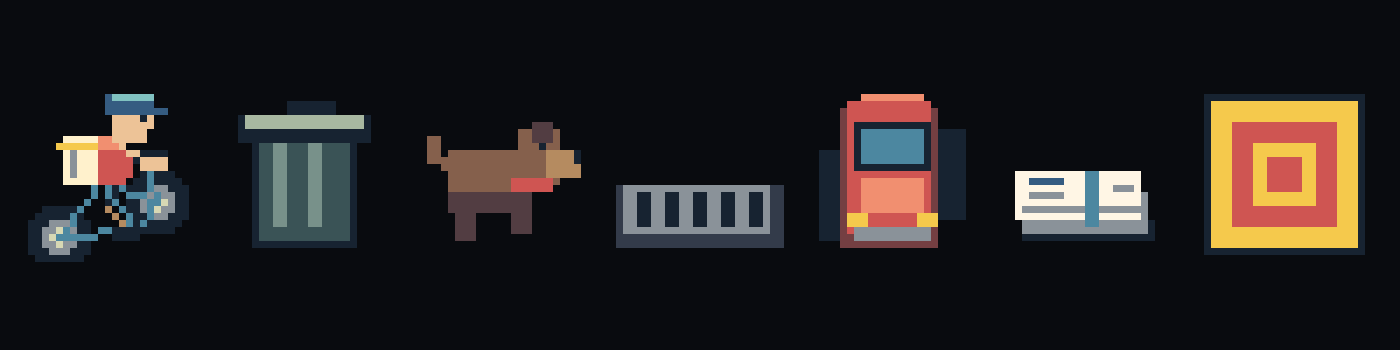
This format reserves token values below 33 for individual pixels. For a copy token, the integer quotient after division by 33 is the distance, and adding 2 to the remainder recovers the copy length. The decoder starts with an empty array and appends either a pixel or a copied sequence for each token:
distance = floor(token / 33);
if distance == 0
decoded(end+1) = token;
else
copyLength = mod(token, 33) + 2;
indices = numel(decoded) - distance + 1 ...
+ mod(0:copyLength-1, distance);
decoded = [decoded, decoded(indices)];
end
The modulo operation allows the copied pattern to repeat when the requested length exceeds the distance. For example, when decoded ends with [4 7], a copy with distance 2 and length 6 appends [4 7 4 7 4 7]. During preparation, the encoder searches the preceding pixels for these matches and chooses between writing a pixel value and a copy token. The decoder follows the recorded choices; it doesn't need to repeat the search. Once all tokens have been expanded, reshape restores the original sprite array.
Generating character variations
colorbar generates its customers from a shared set of 34 shapes. Varying their proportions, colors, hairstyles, and accessories produces over 400 distinct appearances. The generator and its decoder use under 2,000 characters, including the encoded geometry and palette.

Ellipses form the faces, ears, eyes, and hands, while polygons form the clothing and other details. Each ellipse is stored as four values: its center coordinates and two radii. For example, the shared face ellipse can be encoded and reconstructed as follows:
parameters = [0, -82, 18, 23];
packed = char(19968 + 2*parameters);
parameters = (double(packed) - 19968)/2;
angles = (0:15)' * pi/8;
vertices = [parameters(1) + parameters(3)*cos(angles), ...
parameters(2) + parameters(4)*sin(angles)];
Multiplying by 2 allows half-unit values to be packed as integers. The decoder expands each four-character ellipse record into 16 vertices. For polygons, each pair of integer coordinates is combined into a single character, using the same remainder-and-quotient approach as the earlier color and run-length tokens. The shared palette supplies the base colors, and a short list of roles assigns skin, hair, clothing, or detail colors to each shape.
A customer's number selects the skin tone, hair and jacket colors, body width, and head proportions through modular arithmetic. For example, mod(identity,6) cycles through six hairstyles, while mod(identity,5) selects one of five skin tones. The number also determines which optional parts appear, including glasses, facial hair, ties, and earrings. These choices are linked by the same number, producing a repeating sequence of appearances. The game retains the resulting geometry until the customer's identity changes; blinking, service reactions, and movement are applied to those vertices during play.
The attached colorbarCharacterDemo.m expands those compact functions for readability and adds a gallery for browsing all 14 sheets of 30 customers. The numbers match the identities used by the game. Run colorbarCharacterDemo() to open it, or return the complete collection without opening a window:
customers = colorbarCharacterDemo(false);
Calling colorbarCharacterDemo(ExportFolder="customers") also saves the 14 numbered sheets as PNG images. The example includes the shared data and helpers, so it can be used independently of the game.
Encoding glass geometry
Shatterglass uses five flat profiles and eight glass volumes. The renderer assigns their face and outline colors from the game's palette:
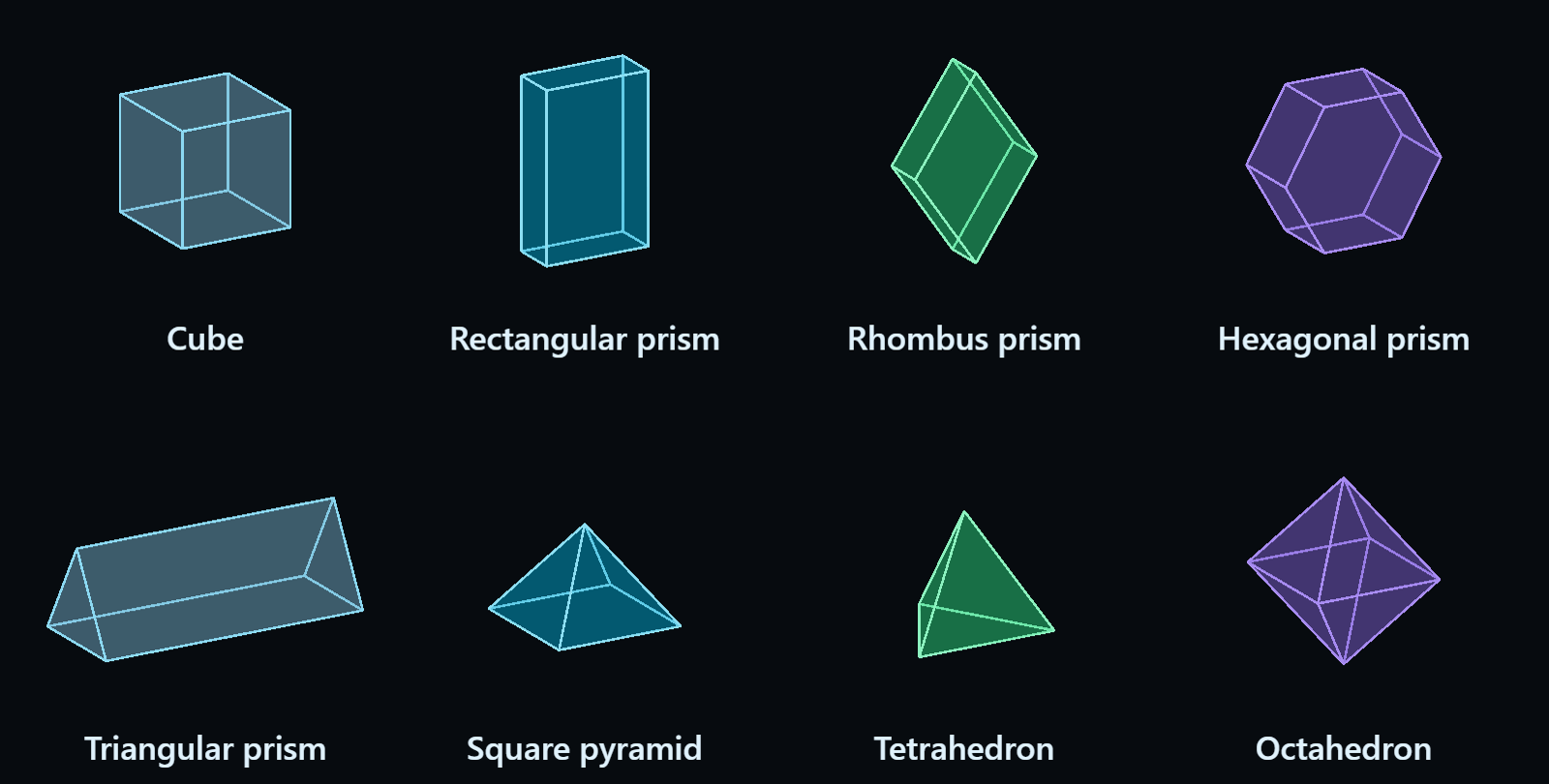
The vertex coordinates are multiplied by 1000 and rounded to integers. Adding an offset of 20000 shifts these integers into a range of character codes, similarly to the mug's run tokens. The indices used to draw the exterior edges are packed into characters as well. These short vectors describe the original shapes; the game calculates their changing positions and orientations in real time.
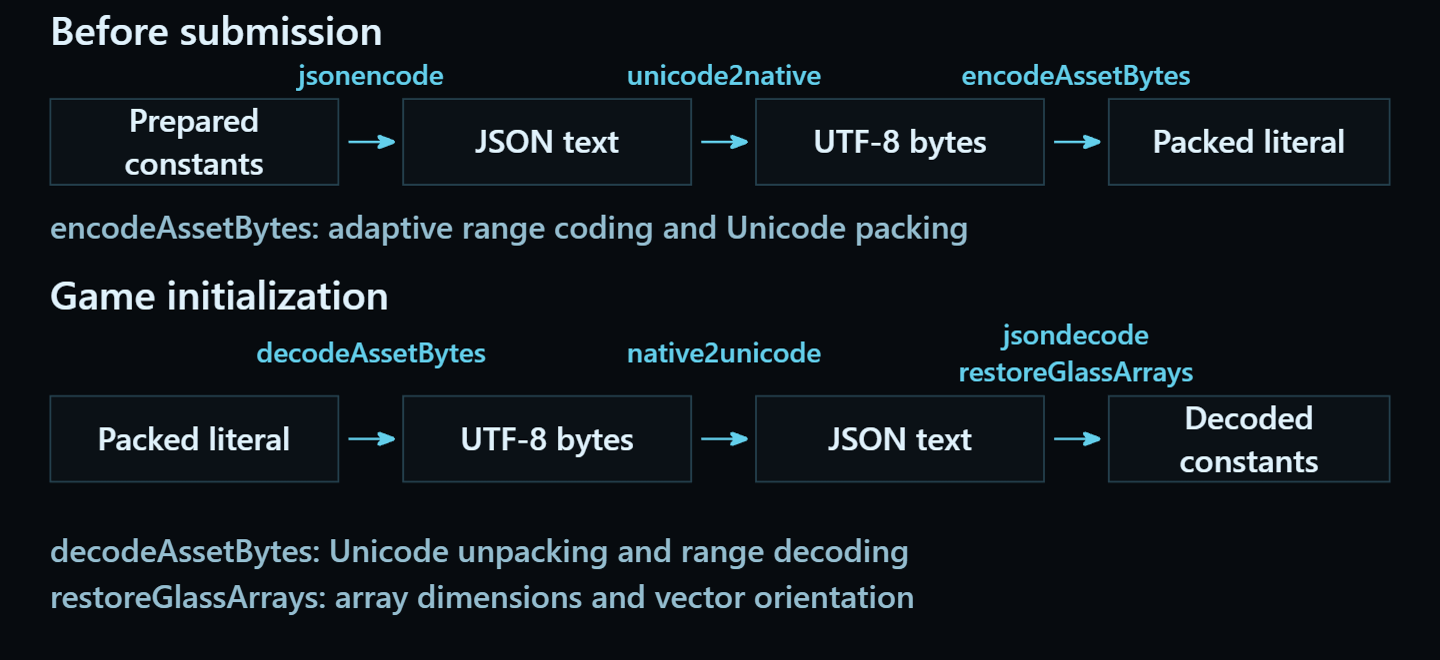
There’s more to store than just the geometry. The palette, fracture weights, graphics settings, and other fixed game data are grouped into a collection of constants. To compress that collection together, we first need to turn its differently sized arrays and text values into a single sequence. MATLAB's jsonencode writes them as structured JSON text. The compressor works with byte values from 0 to 255, so unicode2native converts the text to bytes using the UTF-8 encoding. The diagram below illustrates the encoding and decoding process:
The attached glassEncodingDemo.m includes the original packed data and all the functions needed to decode it and draw the volumes. It also reproduces the encoding, using the following preparation code:
prepared = prepareGlassArrays(constants);
json = jsonencode(prepared, ConvertInfAndNaN=false);
bytes = unicode2native(json, 'UTF-8');
packed = encodeAssetBytes(bytes);
byteCount = numel(bytes);
prepareGlassArrays preserves array information that JSON would otherwise lose. For example, the game's empty 0-by-9 and 0-by-17 arrays would both become []; recording their dimensions lets the decoder distinguish and rebuild them. ConvertInfAndNaN=false also retains the nonfinite values used by the game in MATLAB's JSON representation. The original byte count is saved with the packed data so the decoder knows how many bytes to recover.
The custom encodeAssetBytes helper compresses those bytes using adaptive range coding. It estimates probabilities for the next byte from counts of values previously seen after contexts of up to four bytes. Those estimates divide a numeric interval among the possible next values, allocating larger portions to more probable values. Each input byte selects its portion and narrows the interval. The decoder follows the same divisions to recover the bytes, updating its counts in the same order as the encoder. Both build the model as they go, so its frequency table can be omitted from the stored data.
We still need to include the compressed output in the MATLAB source. The compressor produces 20-bit integers, which are larger than the mug's 10-bit tokens. MATLAB stores a char array as 16-bit elements using UTF-16; some Unicode characters are represented by a pair of these elements. The helper splits each compressed integer into two 10-bit parts and places them in such a UTF-16 surrogate pair. The 3,413 input bytes become 633 packed integers, occupying 1,266 elements of the character vector written into game.m.
At initialization, the following sequence reverses the process:
bytes = decodeAssetBytes(packed, byteCount);
json = native2unicode(bytes, 'UTF-8');
constants = restoreGlassArrays(jsondecode(json));
decodeAssetBytes unpacks the characters and recovers the byte sequence. native2unicode interprets those bytes as UTF-8 to recover the text, and jsondecode turns it back into MATLAB values. restoreGlassArrays reconstructs arrays from their recorded dimensions and converts the remaining column vectors to rows.
The constants are decoded once, during initialization. Running glassEncodingDemo() displays the reconstructed volumes, and glassEncodingDemo(false) returns the decoded data without opening the figure.
The recovered constants include the packed coordinate and edge-index vectors for each volume. We can now turn these back into the points, triangular faces, and outline used to draw the shape:
vertices = reshape(double(packedCoordinates) - 20000, 3, [])' / 1000;
faces = convhull(vertices);
edgeIndices = double(packedEdges) - 20000;
outlineVertices = [vertices; NaN(1,3)];
edges = outlineVertices(edgeIndices, :);
Subtracting 20000 recovers the stored integers; dividing by 1000 restores their coordinate scale. Each row of vertices contains one point's x, y, and z coordinates. convhull returns triangles covering the boundary of the convex solid, which can be passed to patch. For the octahedron, this produces its eight outer triangular faces, with no surface between the upper and lower halves.
The exterior edge path is stored separately because the triangulation also contains diagonals across flat faces. Drawing only the selected edges keeps those diagonals out of the glass outline. The appended NaN row provides breaks between the separate segments when the outline is drawn with line.
Deriving the shards and reflections
The triangular faces also provide the geometry for the shattering effect. A common set of weights selects each face's corners, edge midpoints, and an interior point. Matrix multiplication combines these weights with the coordinates of the face's three vertices to divide it into six smaller triangles. The same subdivision works for every volume. The animation below uses the game's collision and rendering functions to demonstrate the shattering effect and reflections:
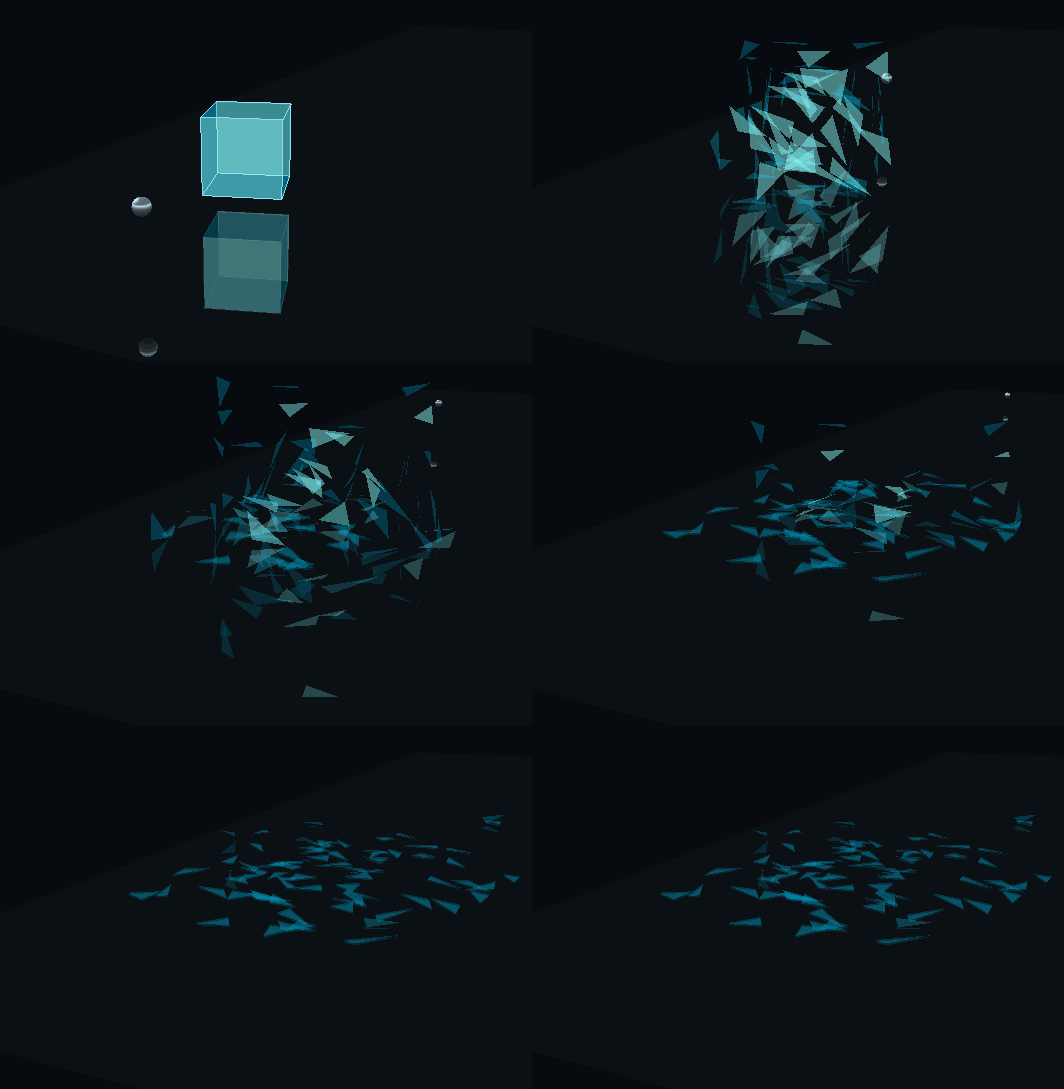
The cube has 12 surface triangles and produces 72 shards. Each shard is assigned an initial velocity; its position and rotation are calculated from the time since impact. The shards fall under gravity, then bounce and slow down as they settle flat on the floor.
The reflection uses a second copy of the displayed geometry with its vertical coordinate reversed. For a floor at z = 0, the operation is:
reflectedVertices = vertices .* [1, 1, -1];
The wall reflections reverse the x coordinates about each wall's position, while the ceiling reflection reverses the z coordinates about its height. Intact glass, moving shards, and balls are mirrored from their current geometry. The renderer reduces the opacity of the reflected glass and darkens the ball reflections. The orientations of the glass faces also determine their shading and transparency as the fragments turn. Shatterglass creates its graphics objects once and reuses them, changing their vertices, colors, and transparency as the objects move or break.
Validating the game
The encoder can remain in the development files, but the submitted game needs to include everything required to reconstruct its graphics. That includes the palettes, dimensions, lookup tables, and decoder. A small font or a few rectangles may need only a short unpacking expression. A larger collection can share a more elaborate decoder across many assets, and may also benefit from retaining drawing routines for repeated shapes or poses.
For Shatterglass, an equivalent version using direct MATLAB routines and ordinary numeric arrays uses 16,399 counted characters. Encoding the game brings this down to 10,000:
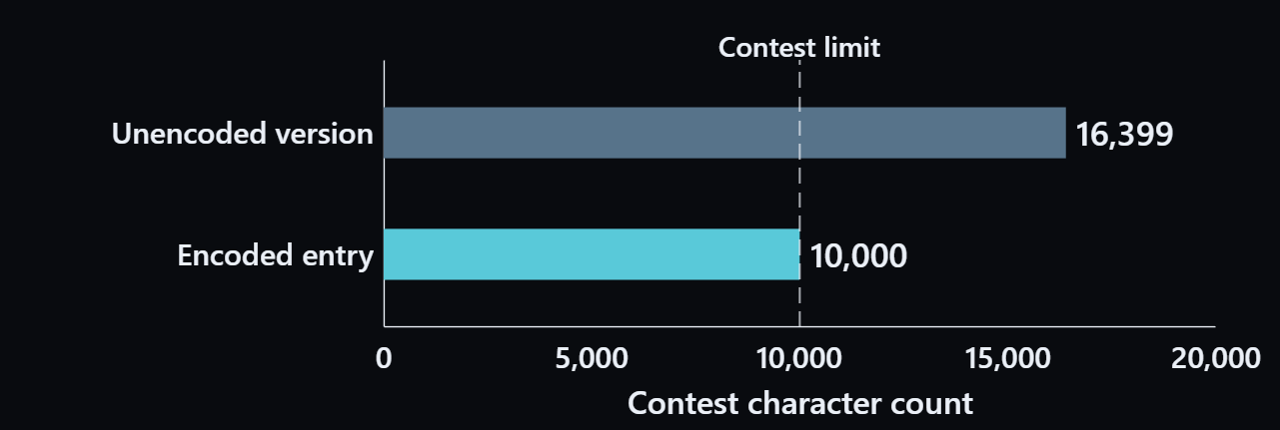
The counts cover the complete game, including the code needed to decode and use the stored values. Both versions retain the same gameplay, graphics, shattering, and reflections.
The preparation code checks each representation by decoding its output and comparing it with the source arrays. For example, isequal checks that every palette index in the reconstructed mug matches the original. For the glass, the comparison uses the rounded coordinates. The mug and glass demos include these reconstruction checks. All three attachments contain their own data and helpers, so they can run independently of the games.
When validating the character count, use the contest tools on the game.m file. The validator also parses and reformats the code before counting it, excluding comments. Mohammad Aryayi discusses this in their account of reducing Stack OverDad, which also describes packing the coordinates of rectangles, ellipses, and polygons into character codes. Save the file as UTF-8 in order to preserve the packed character literals, then run minihackContest.validate before submitting the game.
I hope these examples give you a few useful ways to make room for more of your own graphics. If you try a different representation or find a particularly effective way to pack your artwork, I would be interested to see it! I look forward to seeing many more amazing games from everyone taking part in the Mini Hack!
1 Comment
Time Descending
An exceptionally thoughtful contribution to the MATLAB community @Vasilis Bellos, this article demonstrates how computational ingenuity can transform seemingly restrictive programming constraints into opportunities for methodological innovation. Particularly impressive is your treatment of the character limit as an information encoding challenge, employing adaptive range coding, shared graphical templates, and geometric reconstruction to achieve substantial compression without compromising visual fidelity. The implementation detail, and emphasis on reconstruction validation lend considerable technical credibility to the discussion. Having followed and voted for several of your game submissions, I find it especially rewarding to gain insight into the sophisticated engineering principles underlying your work. A truly commendable contribution.
Happy Holidays! 🍁
Sign in to participate
Tags


